How to Use Claude Cowork (Desktop, macOS/Windows) for Blogging, Coding, and Research Workflows
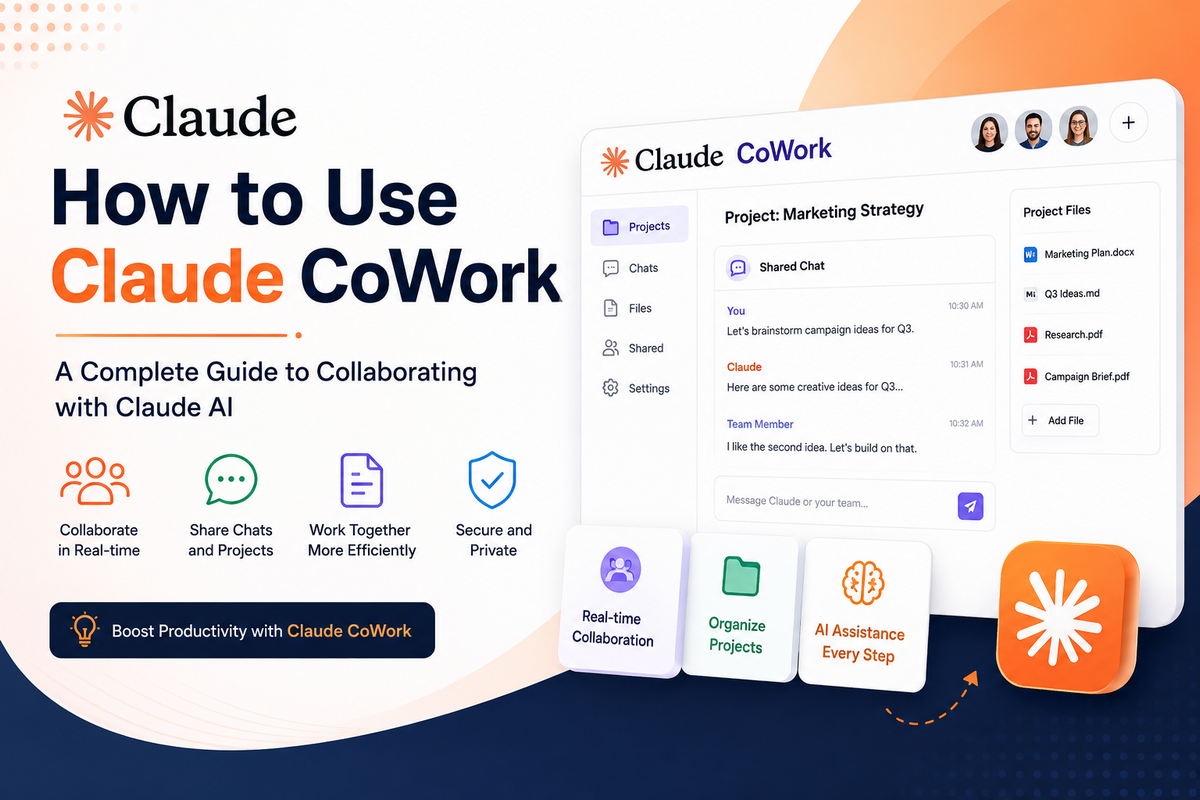
How to use Claude Cowork is an important question for bloggers, developers, and researchers who want to automate repetitive work on a desktop.
If you’ve been using Claude for chatting and drafting, you’re only scratching the surface. Claude Cowork is Anthropic’s most powerful desktop product yet — an autonomous AI agent that doesn’t just answer questions but actually does the work.
Whether you’re a blogger, developer, or researcher, Cowork can run multi-step workflows while you focus on higher-value tasks.
If you’re new to Anthropic’s models, first check my detailed guide on Claude AI and models.
In this guide, you’ll learn how to use Claude Cowork on macOS and Windows for blogging, coding, and research workflows.
What Is Claude Cowork?
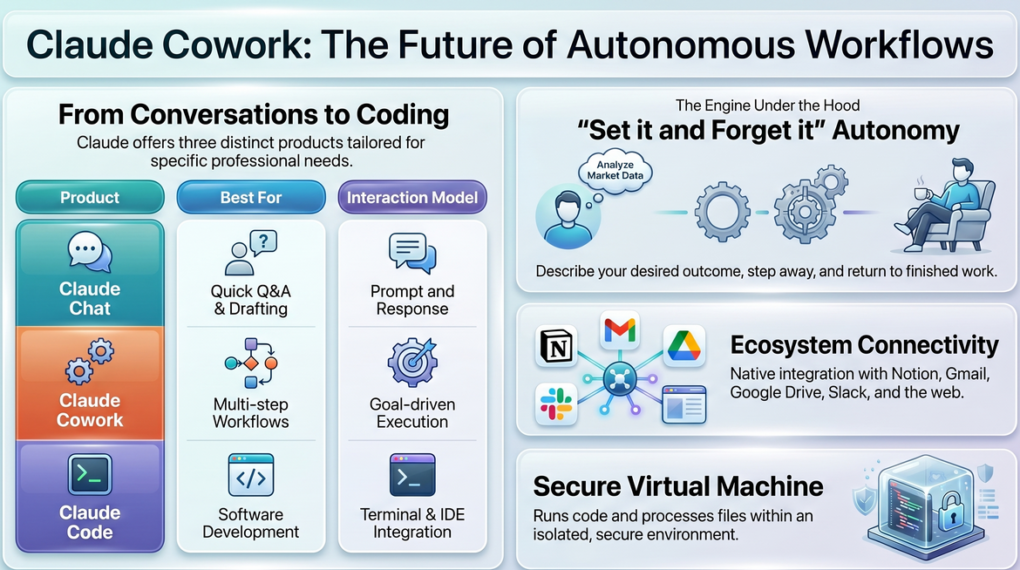
Claude Cowork is Anthropic’s agentic AI desktop application—think of it as “Claude Code for the rest of your work.” Unlike the browser-based Claude Chat, which is conversational, Cowork is a workflow engine: you describe your desired outcome, step away, and return to finished work.
In 2026, Cowork expanded beyond desktop and is rolling out to the web and mobile apps, so you can trigger and monitor workflows from anywhere, not just your Mac or Windows PC.
Here’s how the three Claude products differ:
| Product | Best For | How It Works |
|---|---|---|
| Claude Chat | Quick Q&A, drafting, brainstorming | You prompt, it responds |
| Claude Cowork | Autonomous multi-step workflows | You set a goal; it executes end-to-end |
| Claude Code | Software development, coding tasks | Works in your terminal/IDE |
Cowork runs code inside an isolated virtual machine, reads and writes your files, browses the web, and connects to apps like Notion, Gmail, Google Drive, and Slack. It’s designed for knowledge workers—content creators, marketers, developers, and researchers—who need AI that doesn’t just advise but acts.
System Requirements & Availability
Before diving in, here’s what you need to know about platform support and pricing:
- macOS: Available since early 2026; reached general availability on April 9, 2026.
- Windows: Full-featured support launched with the February 2026 enterprise update and is now at parity with macOS.
- Web & Mobile: Cowork is rolling out to the web interface and Claude’s iOS/Android apps, starting with Max users and then other paid tiers.
- Plans required: Requires a paid Claude plan (Pro, Max, Team, or Enterprise). Free users do not see the Cowork tab.
- Computer Use (screen control): Started on macOS for Pro and Max; now available on supported Windows devices as the rollout continues.
- Minimum specs: Anthropic recommends running the built-in Cowork Readiness Check before installing to confirm your device meets CPU, RAM, and OS requirements.
How to Set Up Claude Cowork (Step-by-Step)
Before you start, make sure you have a paid Claude plan and the desktop app installed on your computer. The setup process is quick, but a few permissions and connector choices will shape how well Claude Cowork works for your blogging, coding, and research tasks.
Step 1: Download Claude Desktop
Go to claude.com/download and install the Claude desktop app for your operating system (macOS or Windows). The installer is straightforward—run it like any standard app installation.
Step 2: Enable Computer Use
Once installed, open Claude Desktop and navigate to Settings → General. Toggle on Computer Use. This is the feature that lets Cowork actually control your screen, click buttons, open applications, and interact with your desktop.
Step 3: Grant Permissions
On macOS, you’ll need to grant two key permissions:
– Accessibility Access (allows Claude to interact with UI elements)
– Screen Recording (allows Claude to see your screen and capture visual context).
On Windows, similar permissions are requested during first-time setup. Always review what you’re granting and restrict it to the Claude app only.
Step 4: Connect Your Apps via Connectors
Navigate to Settings → Connectors and link your tools:
– Notion — for a knowledge base and publishing
– Gmail / Google Drive — for email drafts and document access
– Slack — for team communication automation
– HubSpot or WordPress — for direct blog publishing
Step 5: Set Up the Dispatch Tab (Mobile Trigger)
Install the Claude mobile app and use the Dispatch tab to remotely trigger your desktop tasks. This means you can initiate a 3-hour research workflow from your phone while commuting and return to a completed report on your desktop.
On desktop, Cowork lives in the Claude Desktop app alongside the Chat and Code tabs, and you can open it by clicking the Cowork tab once you’re signed in with a paid account.
How to Use Claude Cowork for Blogging
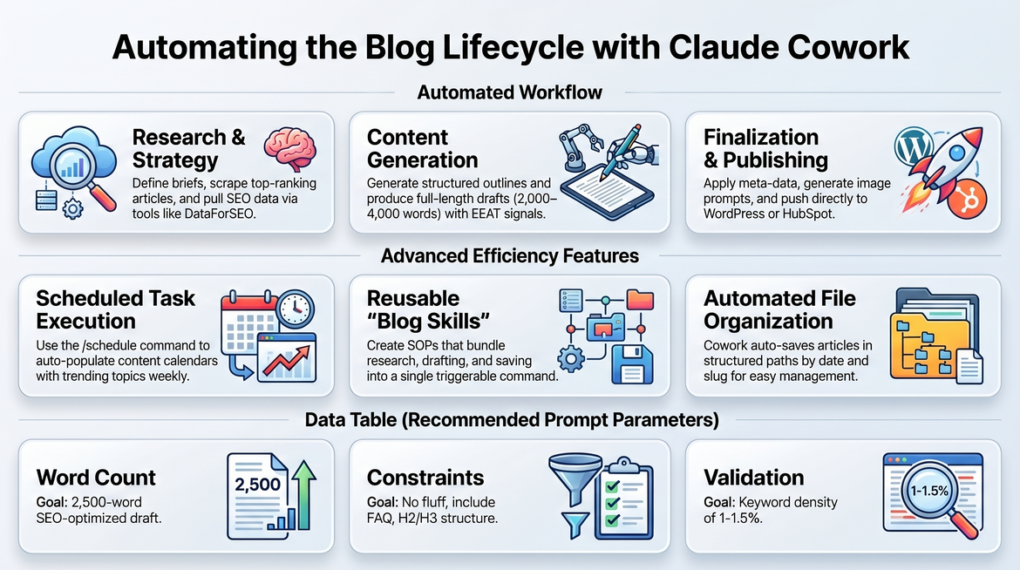
This is where Claude Cowork becomes a game-changer for content creators and bloggers. Instead of manually going through keyword research → outline → draft → edit → publish. Cowork can handle the entire pipeline for you while you focus on strategy, monetization, and promotion.
The 9-Step Blogging Workflow
Here is a proven end-to-end blogging workflow you can implement immediately:
- Brief Creation—Define your topic, target audience, tone, and goal
- SEO Keyword Research — Use MCP tools like DataForSEO or Exa.AI to pull keyword data
- Content Research — Scrape top-ranking articles using Firecrawl or Perplexity MCP
- Content Outline — Generate a structured H2/H3 outline with semantic keywords
- Draft Writing — Produce a full-length article (2,000–4,000 words) based on the brief
- Editing Pass — Check readability, E-E-A-T signals, and factual accuracy
- Image Suggestions — Generate alt-text-optimized image prompts
- Formatting — Apply heading structure, meta title, meta description, and schema
- Publish — Push directly to HubSpot, WordPress, or your CMS via Claude in Chrome
Blogging Prompt Template (Copy & Paste)
Objective: Write a 2,500-word SEO-optimized blog post
Topic: [Your Topic]
Primary Keyword: [Keyword]
Secondary Keywords: [List 3-5 LSI keywords]
Target Audience: [Who will read this]
Tone: [Professional / Conversational / Expert]
Constraints: No fluff, include H2/H3 structure, add a FAQ section
Deliverables: Full draft + meta title + meta description + slug suggestion
Validation: Check keyword density is 1-1.5%, no keyword stuffing
Scheduling Recurring Blog Tasks
One of Cowork’s most powerful features for bloggers is the /schedule command. You can tell Cowork:
“Every Monday at 8AM, pull the top 5 trending topics in [your niche] from Google Trends, create content briefs for each, and save them to /workspace/briefs/”
This keeps your content calendar filled automatically every week.
Auto-Save to Organized Folders
Cowork automatically saves your articles in structured paths like/workspace/articles/[date]/[slug].md, making it easy to manage your content library, track publication history, and revisit older posts for updates.
Building Reusable Blog Skills
Claude Cowork lets you create Skills — reusable SOPs for recurring tasks. For example, build a “Weekly Blog Post” Skill that:
- Pulls your latest keyword gaps from DataForSEO
- Research competitors using Firecrawl
- Drafts, formats, and stages the post for review
- Saves it to your Notion content calendar
Once the Skill is ready, you can trigger it with a single command anytime.
SEO Content Machine: Cowork + Apify Integration
For power bloggers running content at scale, combine Claude Cowork + Apify for a fully automated SEO content machine:
- Apify scrapes SERPs and competitor content
- Cowork analyzes keyword gaps and creates briefs
- Claude writes and formats the articles
- Posts auto-save to
/workspace/articles/[date]/
How to Use Claude Cowork for Coding
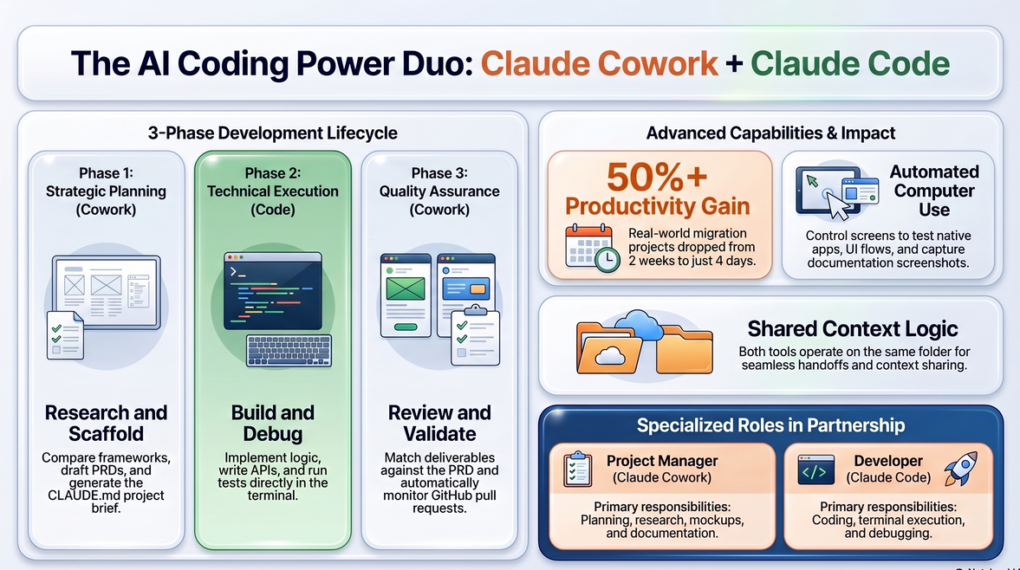
Claude Cowork is not just for non-technical users. When paired with Claude Code, it becomes a complete development partner covering both planning and execution.
The Cowork + Claude Code Power Combo
Think of this as two specialists on the same project:
- Claude Cowork = Project Manager (planning, research, mockups, documentation)
- Claude Code = Developer (actual coding, terminal execution, debugging)
Both tools operate on the same project folder, so they share full context and work seamlessly together.
Phase 1: Planning with Claude Cowork
Before writing a single line of code, use Cowork to:
- Research and compare frameworks (e.g., Astro vs. Next.js)
- Create low-fidelity UI mockups and page wireframes
- Write a Product Requirements Document (PRD)
- Generate a
CLAUDE.mdfile — a project brief that Claude Code reads to understand the codebase context
Phase 2: Execution with Claude Code
Hand off the CLAUDE.md and PRD to Claude Code, which:
- Implements the planned architecture
- Writes components, APIs, and logic
- Runs tests and fixes bugs in the terminal
Phase 3: Review with Claude Cowork
Cowork then reviews the implementation:
- Checks if the deliverables match the original PRD
- Monitors GitHub pull requests automatically
- Suggests improvements or flags inconsistencies
Real-World Result
One developer used this Cowork + Claude Code workflow to migrate a website from Webflow to Astro. The project that would have taken 2 weeks was completed in just 4 days — a 50%+ productivity gain.
Computer Use for App Testing
If you’re developing desktop or mobile apps, Cowork’s Computer Use feature is invaluable. Claude can literally control your screen to:
- Launch and interact with native apps
- Test mobile simulators
- Click through UI flows and report bugs
- Capture screenshots as documentation
This removes the need for repetitive manual QA for straightforward test cases.
Coding Workflow Prompt Template
Objective: Plan and scaffold a [project type]
Phase 1 (Cowork): Research [framework options], compare pros/cons, create PRD,
generate CLAUDE.md with project structure
Phase 2 (Claude Code): Implement based on PRD
Phase 3 (Cowork): Review deliverables against PRD, flag any gaps
Constraints: Use [language/framework], no external dependencies beyond [list]
Deliverables: Working codebase + documentation + test coverage report
How to Use Claude Cowork for Research
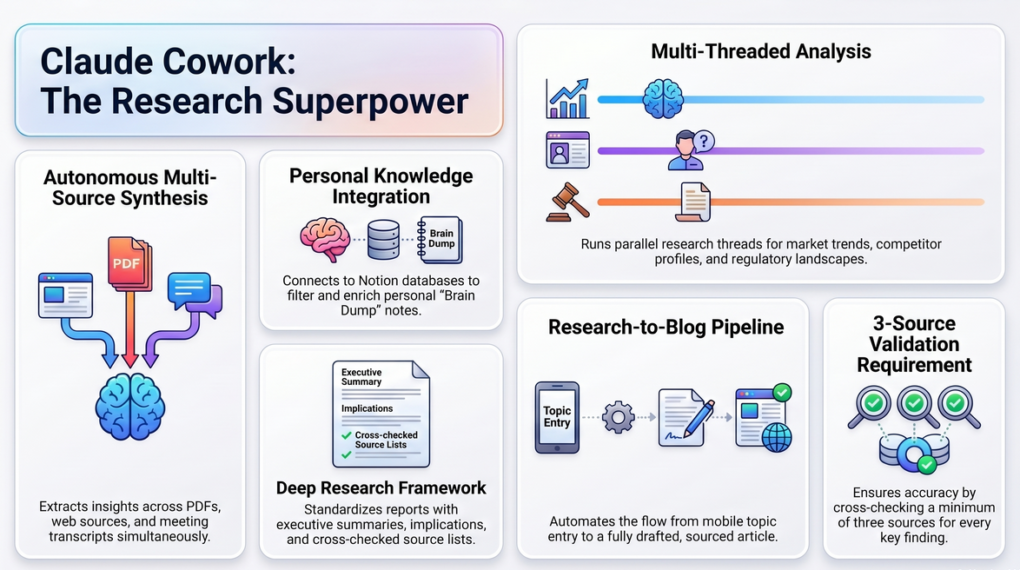
Researchers and analysts have perhaps the most to gain from Cowork. The ability to synthesize large volumes of information autonomously — across documents, web sources, and personal notes — makes it a research superpower.
What Cowork Can Do for Researchers
- Web research synthesis — Pull information from multiple sources, compare findings, and summarize
- Document analysis — Upload PDFs, reports, or whitepapers; Cowork extracts themes and insights
- Interview/transcript analysis — Extract key themes, quotes, and action points from meeting notes
- Personal knowledge synthesis — Connect to your Notion “Brain Dump” database and find patterns in your own notes
- Competitive intelligence — Monitor industry news, competitor announcements, and market shifts
Deep Research Prompt Template
Use this structured prompt to get comprehensive research reports:
Objective: Conduct deep research on [topic]
Scope: Focus on [specific angle or subtopic]
Sources: Web + [any uploaded files]
Constraints: Only use sources from [year range], focus on [region if relevant]
Deliverables:
  1. Executive Summary (200 words)
  2. Background & Context
  3. Key Findings (numbered)
  4. Implications & Takeaways
  5. Source List with URLs
Validation: Cross-check at least 3 sources per key finding
Building a Personal Research Database
Connect Cowork to your Notion workspace and automate this research pipeline:
- Add raw ideas, links, or notes to a “Brain Dump” page in Notion
- Cowork monitors the page on a schedule
- It filters, categorizes, and enriches each entry with research
- Saves polished notes to your organized Notion knowledge base database
Multi-Thread Research
Cowork can run parallel research threads simultaneously for large projects. For example, if you’re writing an industry report, Cowork can simultaneously:
- Research the regulatory landscape
- Analyze market size and trends
- Profile top 5 competitors
- Summarize recent academic studies
…and deliver a unified, structured report combining all threads.
Research → Blog Post Pipeline
For bloggers who do topic research before writing, this workflow is gold:
- Trigger: Enter a topic into Cowork via Dispatch (from mobile)
- Research: Cowork pulls the top 10 Google results, 3 academic papers, and 2 forum discussions
- Synthesis: Creates a structured research brief with key stats, quotes, and source links
- Brief → Draft: Passes the brief to Claude’s writing workflow and generates a full post
- Output: Article + research sources saved to
/workspace/articles/[topic]/
Advanced Tips for Power Users
1. Structuring Prompts for Complex Tasks
For multi-step Cowork tasks, structure your prompts using this framework:
Objective: [What you want achieved]
Scope: [Boundaries of the task]
Constraints: [What to avoid or limit]
Deliverables: [Exact output format/files]
Validation: [How Claude should verify it did the job correctly]
This structure reduces ambiguity and dramatically improves output quality on the first try.
2. Using /schedule for Workflow Automation
The /schedule Command is one of Cowork’s most underutilized features. Examples of what you can automate:
- Daily 7AM: Pull overnight news in your niche → summarize → save to Notion
- Every Monday 8AM: Generate weekly content briefs for your blog
- Every Friday 5PM: Pull this week’s analytics → create a performance summary report
- On-demand via Dispatch: Start a research task from your phone while away from your desktop
3. Creating and Sharing Skills
Skills are Cowork’s version of macros or SOPs. Once you’ve perfected a workflow — say a 15-step “Publish Blog Post” sequence — save it as a Skill. You can then:
- Trigger it with a one-line command
- Share it with your team (Team/Enterprise plans)
- Iterate and improve it over time
For bloggers running a content team or agency, shared Skills ensure consistency across all writers and editors.
4. Combining MCP Tools for Maximum Power
Claude Cowork supports Model Context Protocol (MCP) tools that dramatically expand its capabilities:
| MCP Tool | Use Case |
|---|---|
| DataForSEO | Keyword research, SERP data |
| Exa.AI | Semantic web search |
| Firecrawl | Web scraping and competitor analysis |
| Perplexity MCP | Real-time web research |
| Apify | Large-scale data scraping |
Stack these with Cowork’s native capabilities for a fully automated content or research production system.
As Cowork rolls out to the web and mobile apps, you can assign tasks from your browser or phone and let your desktop agent do the heavy lifting, then review results later from any device.
Claude Cowork Pricing: What Plan Do You Need?
| Plan | Cowork Access | Computer Use | Best For |
|---|---|---|---|
| Free | ❌ No | ❌ No | Basic chat only |
| Pro | ✅ Yes | ✅ Yes | Individual bloggers, creators |
| Max | ✅ Yes | ✅ Yes | Power users, heavy workflows |
| Team | ✅ Yes | ✅ Yes | Content teams, agencies |
| Enterprise | ✅ Yes | ✅ Yes | Large organizations |
Cowork does not carry a separate fee — it is bundled into every paid Claude tier, and the Pro plan (around 20 USD/month) includes Claude Chat, Cowork, Claude Code, and related features under a single subscription. Usage for chat, Code, and Cowork shares one pooled quota, so heavy Cowork tasks will consume more of your allotted compute than simple chats.
Common Mistakes to Avoid
- Being too vague in prompts: Always use the Objective → Scope → Constraints → Deliverables framework
- Skipping the Validation field: Without it, Cowork may complete a task technically, but not to your quality standard
- Not using Skills: If you’re running the same workflow more than 3 times, turn it into a Skill
- Ignoring Dispatch: The mobile trigger is one of Cowork’s most powerful features for async workflows
- Over-granting permissions: Only give Cowork access to the apps and folders it actually needs
Is Claude Cowork Worth It for Bloggers in India?
As a blogger or content creator based in India, the ROI of Claude Cowork is significant. Here’s a practical value assessment:
- A single 2,500-word SEO article typically takes 4–6 hours manually (research + writing + editing)
- With Cowork, the same article—with proper keyword data and structured prompts—takes 45–90 minutes of active involvement, with Cowork handling the rest autonomously
- If you publish 4 articles/month, you save 12–20 hours monthly—time you can redirect to client work, affiliate campaigns, or new content verticals
- The Pro plan costs approximately 20 USD/month and includes Cowork, Code, and other advanced features in one subscription.
In my own workflow, Claude Cowork cut my blog post production time from 4 to 6 hours to about 20 minutes of active work.
Suggestions for you
- Claudi.AI Review: Best AI Content Creator and Assistant
- 5 Best AI Chatbots: Your Guide to Generative Chat Platforms
Frequently Asked Questions
Is Claude Cowork available in India?
Yes. Claude Cowork is available globally, including India, wherever Claude paid plans are accessible. Simply subscribe to a Pro, Max, Team, or Enterprise plan on claude.ai and download the desktop app for macOS or Windows. There are no region-specific restrictions for Indian users. As Cowork expands to web and mobile, Indian users on paid plans can trigger and monitor workflows from their browser or smartphone in addition to the desktop app.
Can I use Claude Cowork without the Computer Use feature?
Yes. Most of Cowork’s core capabilities — including file management, web research, writing, document analysis, and app integrations via Connectors — work without enabling Computer Use. That feature is only required for tasks where Claude needs to physically control your screen or interact with native desktop applications.
Is Claude Cowork safe to use for sensitive content?
Yes, with proper precautions. Cowork runs all code inside an isolated virtual machine, meaning it cannot access files or applications outside what you explicitly grant. Always review permissions during setup, limit folder access to relevant directories only, and avoid connecting sensitive accounts unless necessary for your workflow.
How is Claude Cowork different from Claude Projects?
Claude Projects is a persistent memory feature within the Claude Chat interface — it remembers context across conversations. Claude Cowork is a fully separate, autonomous agent that takes real-world actions: running code, writing files, controlling apps, and executing multi-step workflows from start to finish without constant manual input.
Can I use Claude Cowork for affiliate marketing workflows?
Absolutely. Claude Cowork is highly effective for affiliate marketing. You can automate competitor research, generate product comparison articles, run SEO keyword gap analysis, build content briefs, and update link-management spreadsheets — all autonomously. Save these as reusable Skills to run your entire affiliate content pipeline on autopilot.
What is the difference between Claude Cowork and Claude Code?
Claude Code is a terminal-based tool built specifically for software developers to write, debug, and execute code. Claude Cowork is designed for knowledge workers — bloggers, marketers, researchers — who need autonomous multi-step workflows. Both can be combined: Cowork handles planning and documentation, while Claude Code handles actual development execution.
How much does Claude Cowork cost per month?
Claude Cowork is included with Claude’s paid plans starting from the Pro plan (around 20 USD/month). The Max plan offers higher usage limits and more headroom for long-running Cowork tasks, while Team and Enterprise tiers add collaboration and admin controls for organizations. The Free plan does not include Cowork or Computer Use.
Can Claude Cowork publish blog posts directly to WordPress?
Yes. Claude Cowork can publish content directly to WordPress and HubSpot using the Claude in Chrome integration combined with Connectors. Once your blog post is drafted and formatted, Cowork can log into your CMS, paste the content, add the meta details, and stage or publish the post — all autonomously.
How to use Claude Cowork for research workflows?
Use Claude Cowork to collect sources, compare findings, summarize key points, and organize insights into a structured report. It works especially well when you give it a clear objective, scope, and deliverables before starting the task.
Final Thoughts
Claude Cowork represents a genuine step-change in AI productivity tools for bloggers, developers, and researchers. It’s not just a smarter chatbot — it’s an autonomous agent that completes real work from start to finish.
For bloggers, it compresses a 6-hour content workflow into under 90 minutes. For developers, it cuts project timelines in half. For researchers, it synthesizes information from dozens of sources into structured, actionable reports.
The key to getting value from Cowork is structured prompting, reusable Skills, and smart scheduling. Start with one workflow — your weekly blog post pipeline—perfect it into a Skill, and then expand from there.
Within a month, you’ll have an autonomous AI system doing the heavy lifting across your entire content operation.