Xiaomi HyperOS is the software platform behind Xiaomi smartphones, Redmi phones, POCO devices, tablets, and a growing ecosystem of connected products.
It combines Android-based smartphone software with Xiaomi’s own interface, customisation options, AI-powered features, and cross-device connectivity.
If you use a Xiaomi phone, you may be wondering what is new in HyperOS 3, whether HyperOS 4 is available, which devices qualify for an update, and how HyperOS compares with the older MIUI interface.
This guide explains the latest Xiaomi HyperOS developments as of October 12, 2026, including the distinction between stable software releases and beta testing.
It also covers the main features, device compatibility, update instructions, advantages, disadvantages, and common questions.
Xiaomi HyperOS at a Glance
Platform: Xiaomi’s software ecosystem, with Android-based smartphone and tablet releases
Previous interface: MIUI
Stable-generation focus: HyperOS 3
Latest beta development covered here: HyperOS 4 global beta announcement
Main benefits: Interface customization, multitasking, AI features on supported devices, and connectivity across compatible Xiaomi products
What Is Xiaomi HyperOS?
Xiaomi HyperOS is Xiaomi’s operating system and software platform designed to connect its smartphones, tablets, smart-home products, wearables, and other compatible devices.
On smartphones, HyperOS is built on Android, while Xiaomi adds its own interface, system applications, device-management features, and ecosystem services.
HyperOS succeeded MIUI as Xiaomi’s main software branding. The transition was intended to create a more integrated experience across personal devices and connected products, rather than focusing exclusively on the smartphone interface.
HyperOS includes several layers of functionality:
- User interface: Home screens, widgets, notifications, lock-screen customisation, and system settings.
- Performance management: Resource scheduling, memory management, and system-level optimisations.
- AI capabilities: Writing assistance, image-related tools, and other AI functions on supported devices.
- Device connectivity: Features for sharing content and interacting with compatible Xiaomi products.
- Security and privacy: Android security mechanisms combined with Xiaomi’s software and ecosystem protections.
The exact capabilities depend on the device, hardware, software version, and region. Two Xiaomi phones running different HyperOS versions may not offer identical features.
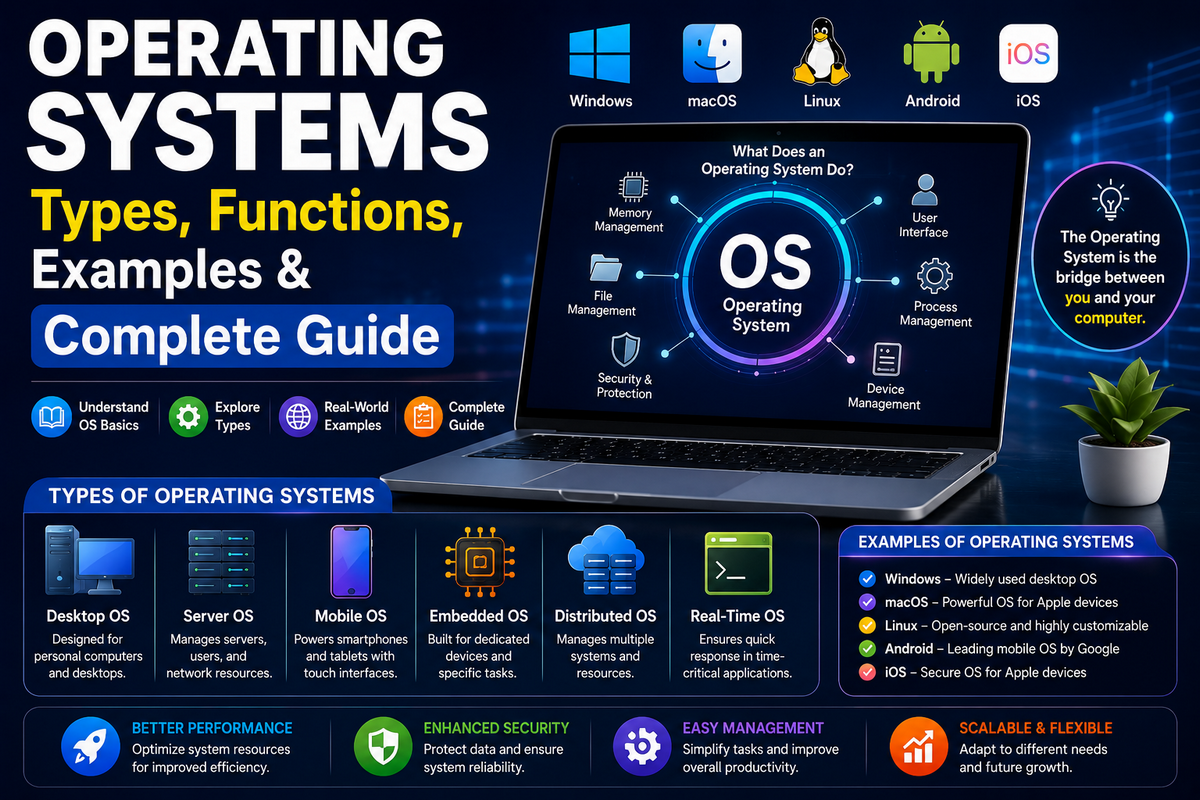
For additional background, see TechyDen’s guide to operating systems and their functions.
Latest Xiaomi HyperOS Version in 2026
As of October 12, 2026, HyperOS 3 is an established release, while Xiaomi’s HyperOS 4 global beta programme is testing the next generation on selected devices.
Xiaomi’s official HyperOS 3 page documents the stable-generation features, and its Xiaomi Community announcements describe the HyperOS 4 beta program and eligible models.
HyperOS 2 vs HyperOS 3 vs HyperOS 4
| Feature or status | HyperOS 2 | HyperOS 3 | HyperOS 4 |
|---|---|---|---|
| Software status | Previous generation | Stable-generation release | Global beta testing as of the cutoff |
| Interface | Earlier HyperOS design | Refined animations and updated home screen | New Soft Light Glass visual direction in beta |
| Customization | Features depend on device | Updated lock-screen and wallpaper options on supported devices | Additional lock-screen and home-screen customization in beta |
| AI features | Vary by device | HyperAI features on selected devices | Further AI-related changes being tested |
| Performance | Depends on device and build | System and graphics optimizations | New system-level optimizations under evaluation |
| General recommendation | Keep installed if supported and working well | Recommended for eligible users seeking the supported stable release | Best reserved for users comfortable testing beta software |
HyperOS 4 is not simply another name for HyperOS 3. It is a separate software generation, and beta functionality should not be presented as part of the stable HyperOS 3 experience.
Is HyperOS 4 officially released?
Xiaomi announced its HyperOS 4 global beta programme in September 2026. The company described three development priorities: effortless performance, effortless aesthetics, and effortless interaction. The programme allows eligible users to test early software and provide feedback before the official stable release.
For this guide’s October 12, 2026 cutoff, HyperOS 4 should be described as being in global beta testing, not as a generally available stable update for all users.
A beta announcement, a beta download, and a stable public rollout are three different things. A device may qualify for testing without having a stable HyperOS 4 update available.
Check the official Xiaomi Community HyperOS announcements for subsequent announcements before publishing any later update.
What is new in HyperOS 4 beta?
Xiaomi’s beta announcements describe several areas of development:
- Soft Light Glass Design: A refreshed interface with translucent materials and lighting effects.
- More lock-screen controls: Additional options for adjusting the clock’s appearance and position.
- Resizable home-screen folders: A more flexible way to organise apps.
- System app improvements: Updated layouts and refinements to navigation and animations.
- AI-assisted notes and summaries: Beta features described for summarising recordings and organising information.
- Performance optimisations: Changes to resource scheduling, app responsiveness, and system efficiency.
- Connected-device controls: Further development of the Xiaomi Smart Hub and its connected-device experience.
These are beta capabilities, not a guarantee that every feature is enabled on every eligible phone. Some functions may arrive in later beta builds, be restricted by region, or change before stable release.
Top Features of Xiaomi HyperOS
HyperOS 3 introduces a number of user-facing improvements beyond a simple change in branding. The following features are documented on Xiaomi’s official HyperOS 3 page. Availability varies by device and region.
1. Improved Performance and System Animations
Xiaomi describes HyperOS 3 as including kernel-level and graphics optimizations, along with more than 100 refined system animations.
The aim is to make common actions—opening applications, moving between screens, switching windows, and navigating the interface—feel smoother.
Actual performance depends on the phone’s processor, memory, storage, software build, and background workload. An older or entry-level device should not be assumed to perform like a flagship model simply because both run HyperOS 3.
2. Xiaomi HyperIsland
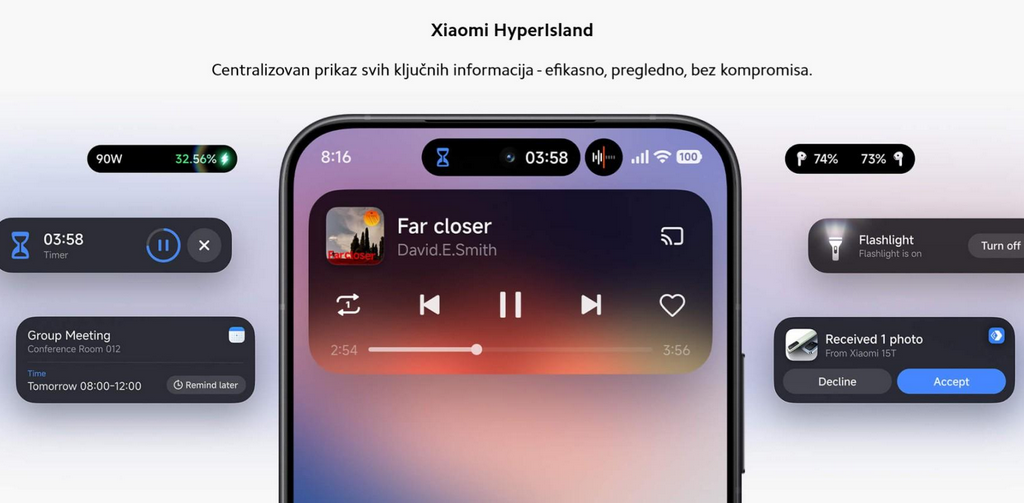
Xiaomi HyperIsland provides a compact area for selected live activities and notifications, helping users access relevant information without repeatedly opening full applications.
Depending on the supported phone and app, it can help users switch between content or access floating-window interactions.
However, HyperIsland is not universally available. Xiaomi states that availability depends on the device and supported applications, and some floating-window functions require integration by third-party app developers.
3. AI Cinematic Lock Screen and Dynamic Wallpapers
HyperOS 3 adds AI-assisted visual customization on selected devices. Supported features include cinematic lock-screen effects and dynamic wallpapers created from personal photos.
These options provide more ways to personalize the phone beyond choosing a static image.
Some functions require updated system or Themes applications, an internet connection, or compatible hardware. Do not assume that every Xiaomi or Redmi device can use all the advertised effects.
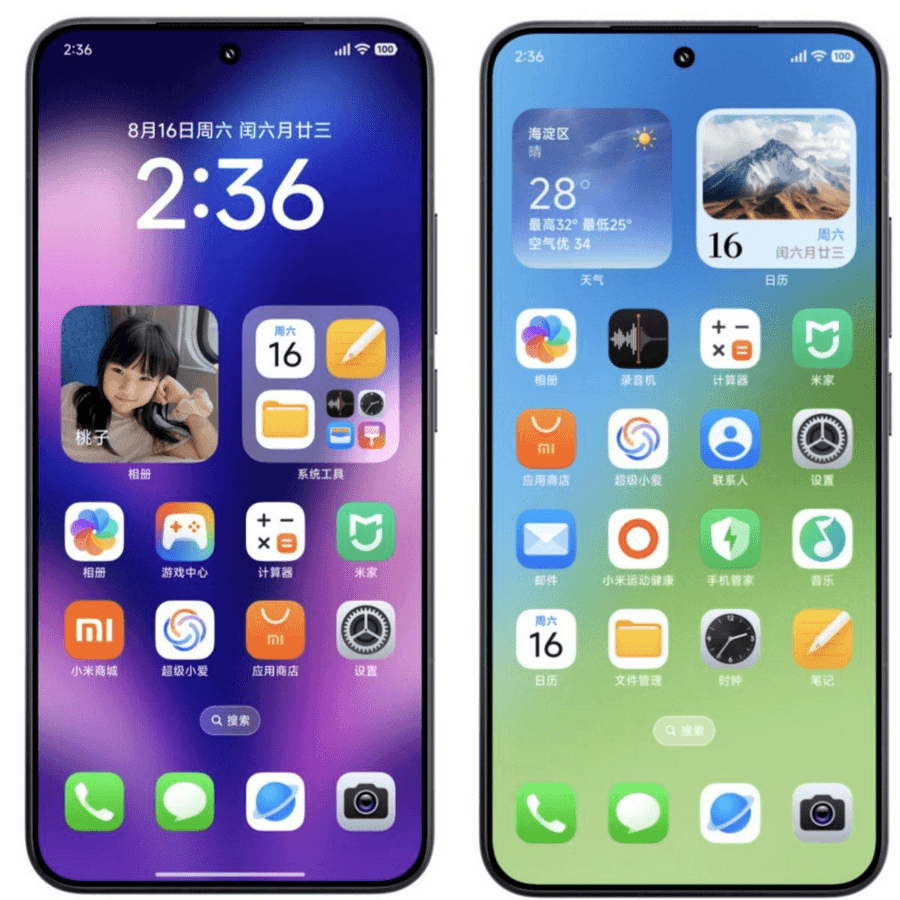
4. Redesigned Home Screen and Widgets
HyperOS 3 introduces refreshed icons, updated visual styling, and more versatile widget options.
The redesigned home screen is intended to make frequently used applications and information easier to access. Users can personalize the arrangement to suit their preferences, although the exact layout options vary by device and software version.
If your phone already runs HyperOS, check the Home screen settings and Themes application for the customization features available to your model.
5. Improved Gallery and Search
The HyperOS 3 Gallery experience includes a customizable layout and improved search capabilities.
Xiaomi describes search improvements for common categories, including food and landscapes, alongside smart recommendations. This can make it easier to find images in a large photo collection without scrolling through every album.
Gallery features and search accuracy may vary according to the phone model, app version, language, and region.
6. Xiaomi HyperAI
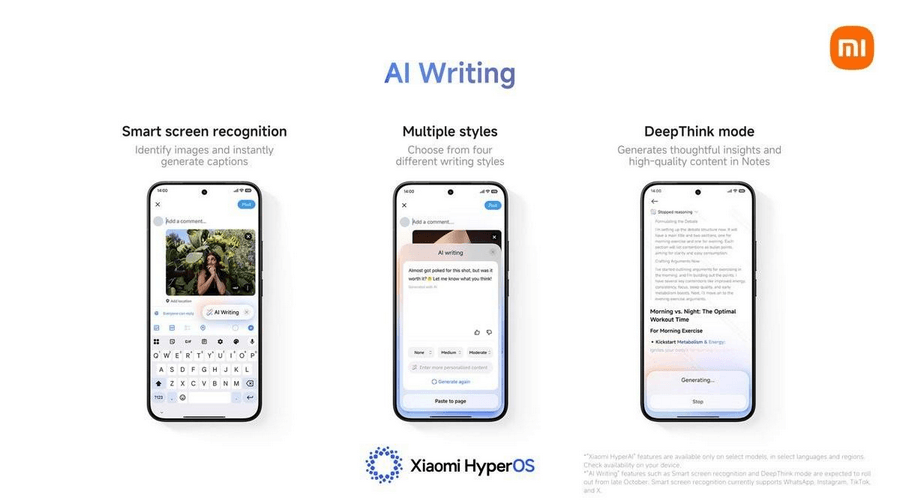
Xiaomi HyperAI is the company’s umbrella branding for selected AI-powered experiences in its software ecosystem.
Depending on the compatible device and region, features can include:
- AI-assisted writing and text refinement.
- Smart screen recognition and image-related assistance.
- AI search and summarization functions.
- Additional language and productivity tools.
These features should not be confused with a universal AI assistant available on every Xiaomi phone. Xiaomi identifies device, language, and regional restrictions for its HyperAI functions, and some capabilities require an internet connection. Users should also verify AI-generated information before relying on it.
7. Multitasking and Floating Windows
Supported HyperOS devices offer multitasking tools such as floating windows and split-screen layouts.
These functions are useful when you want to reference a webpage while messaging someone, review information while taking notes, or work across compatible applications.
The exact controls differ between phones and tablets. Xiaomi’s HyperOS 3 documentation also describes tablet-specific improvements, including vertical split-screen support and more flexible window management on supported models.
8. Xiaomi HyperConnect and Cross-Device Sharing
HyperOS supports Xiaomi’s broader connected-device experience, which aims to make compatible products work together more conveniently.
Depending on the hardware and software combination, supported features may include content sharing, device discovery, hotspot connectivity, and interactions between phones, tablets, wearables, and other ecosystem products.
Some cross-device functions also depend on companion apps, account configuration, and the other device’s operating system. Check compatibility before purchasing a product specifically for a particular HyperOS feature.
9. Privacy and Security Enhancements
Xiaomi describes security measures for HyperOS 3 that include protections for data transmission, on-device privacy, cloud-related processing, and connected-device interactions.
These measures complement Android’s underlying security architecture. They do not eliminate every privacy or security risk.
For better protection, install official system updates, download apps from trusted sources, review application permissions, and use a strong screen lock. AI and cloud features should be evaluated according to the data they process and the permissions they require.
10. Tablet and Wearable Improvements
HyperOS is not limited to smartphones. Xiaomi also documents features for supported tablets and wearables, including improved stylus interactions, split-screen multitasking, and the display of certain fitness statistics in compatible camera workflows.
These features are hardware- and application-dependent. A tablet, watch, and phone running software from the same generation may still have different capabilities.
For a deeper breakdown of individual functions, read Features of Xiaomi HyperOS.
Xiaomi HyperOS Supported Devices
There is no single universal list of phones that receive every HyperOS update. Eligibility depends on the exact model, regional software variant, update policy, and the rollout stage.
1. Xiaomi phones and tablets
Xiaomi’s official HyperOS 3 page lists devices from the Xiaomi 15 and Xiaomi 14 families, selected Xiaomi T-series phones, the Xiaomi MIX Flip, and supported tablets among its rollout devices. This is a generation-specific rollout list, not a guarantee that every model will receive HyperOS 4.
2. Redmi devices
Selected Redmi models are included in Xiaomi’s HyperOS 3 rollout. The official list includes devices such as the REDMI Note 14 series and other eligible models.
Do not assume that all Redmi phones qualify. Two phones with similar names can have different update schedules, and a regional variant may receive an update later than another variant.
3. POCO devices
Xiaomi’s published HyperOS 3 rollout includes selected POCO models, such as the POCO F7 series and POCO X7 series.
POCO eligibility should be checked independently from Xiaomi-branded phones. The availability of HyperOS 3 on a POCO device does not automatically confirm eligibility for the HyperOS 4 beta.
Which phones support HyperOS 4 beta?
Xiaomi’s September 2026 global beta announcements initially named the Xiaomi 17 Ultra, Leica Leitzphone powered by Xiaomi, and Xiaomi 17. A subsequent announcement expanded recruitment and testing to include the Xiaomi 17T Pro, Xiaomi 17T, Xiaomi 15 Ultra, and Xiaomi 15.
The official announcements establish these models as part of the announced global beta program, subject to the program’s regional and eligibility requirements. They should not be treated as a complete list of all future beta devices or stable-release devices.
For the most accurate answer, check the official Xiaomi Community announcements and your phone’s update screen.
How to check whether your phone is eligible
Follow these steps:
- Open Settings on your Xiaomi, Redmi, or POCO phone.
- Tap About phone.
- Select the Xiaomi HyperOS version area.
- Tap Check for updates.
- Review the available version and release information.
Xiaomi documents this update-checking process in its official system-update support guide.
If no update appears, it does not necessarily mean that your phone is permanently unsupported. The update may not have reached your region or model yet, or your device may have reached the end of its planned update cycle.
How to Update Xiaomi HyperOS
Installing an official stable update is generally the best choice for users who want new features and security fixes without the additional risks of beta software.
Step 1: Back up your data
Back up important photos, documents, contacts, and other personal information before installing a major operating system update.
A backup is particularly important before installing beta software, changing firmware, or attempting a manual installation.
Step 2: Connect to a reliable network
Use a stable Wi-Fi connection where possible. Make sure your phone has sufficient free storage and battery power. Xiaomi recommends having at least 50% battery available for its documented manual-update procedure.
Step 3: Check for the latest update
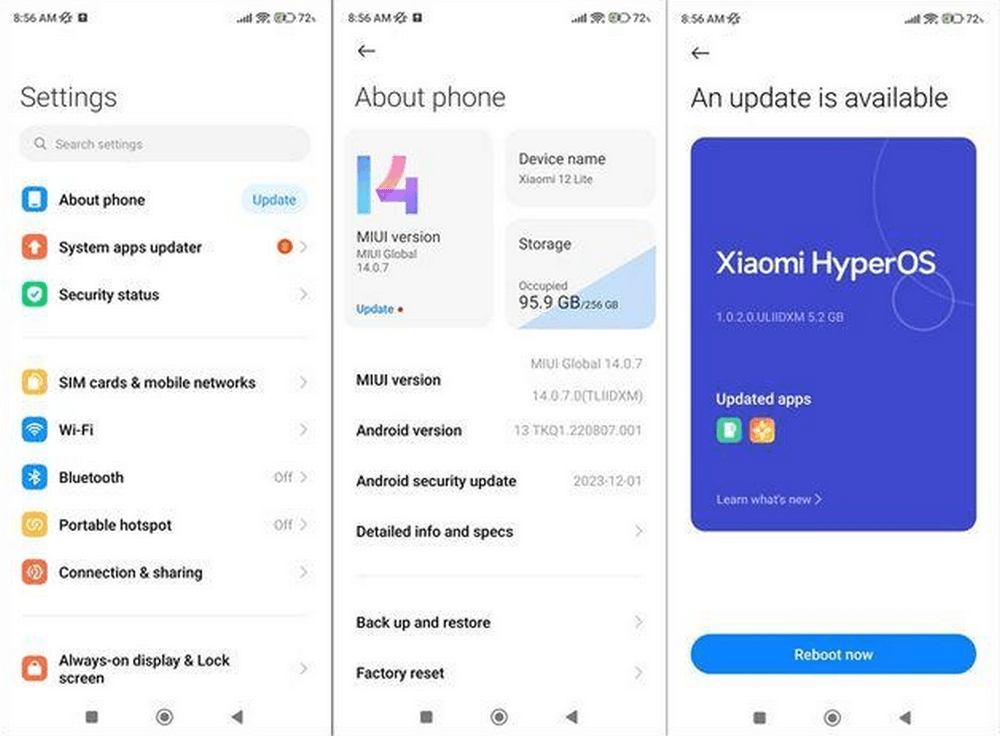
- Open Settings.
- Select About phone.
- Tap the Xiaomi HyperOS icon or version area.
- Select Check for updates.
- Follow the instructions if a compatible update is offered.
The precise wording and placement of the controls may vary by software build.
Step 4: Install the update
If an update is available, read the release notes and install it using the on-screen instructions. Avoid interrupting the process while the phone is installing the software.
After installation, allow the device time to complete any background optimization. Check your apps, connectivity, and battery usage before concluding that the update has caused a problem.
Step 5: Review the update log
You can review the update’s changes through the HyperOS version area. Xiaomi’s support documentation describes accessing the update information through the version screen and its What’s new option.
This is useful for checking whether a particular feature or fix is included in your installed build.
Can you install HyperOS manually?
Xiaomi provides update procedures for compatible devices, but the appropriate firmware depends on the exact model and region.
Do not install an arbitrary ROM simply because its version number appears newer. Incorrect firmware can cause installation failures, data loss, or device problems.
For most users, the built-in updater is the safer choice. Advanced users should follow official device-specific instructions and understand the risks before attempting a manual firmware installation.
Should You Install the HyperOS 4 Beta?
The HyperOS 4 global beta is intended for testing, feedback, and software development. It is not equivalent to a stable release.
Xiaomi’s beta guidance explains that eligible users must register through Xiaomi Community and meet the relevant model and regional requirements. Its published guidance also warns that downgrading from HyperOS 4 beta to HyperOS 3 requires flashing the device.
Consider these factors before enrolling.
Potential benefits
- Early access to upcoming interface changes.
- An opportunity to test new system features.
- The ability to report problems and contribute feedback.
Potential disadvantages
- Bugs, crashes, or application compatibility issues.
- Unexpected battery drain or inconsistent performance.
- Features that are incomplete or changed before stable release.
- A more complicated downgrade process.
If you depend on your phone for work, banking, communication, or daily business activities, waiting for a stable release is generally the more sensible choice.
Xiaomi HyperOS vs MIUI: What Has Changed?
MIUI was Xiaomi’s previous main smartphone interface. HyperOS continues Xiaomi’s software development with a broader emphasis on connected devices, system optimization, and integration across its product ecosystem.
| Category | MIUI | Xiaomi HyperOS |
|---|---|---|
| Software branding | Previous Xiaomi interface | Current Xiaomi software platform |
| User interface | Varies by MIUI generation | Updated interface and customization across supported versions |
| Performance | Depends on device and release | Includes newer system optimizations in later releases |
| AI features | Depends on version and device | HyperAI and other selected AI features on compatible devices |
| Device ecosystem | Xiaomi ecosystem features | Continued emphasis on connectivity across compatible products |
| Update eligibility | Depends on device support | Depends on the model’s HyperOS update policy |
| Feature availability | Varies by generation and region | Also varies by generation, device, and region |
Is HyperOS better than MIUI?
HyperOS offers a newer software experience, with updated features and Xiaomi’s continued investment in system optimization and connected-device functionality.
However, it is not possible to say that HyperOS is universally faster, more battery-efficient, or better for every user. Results depend on the phone’s hardware, the software version, background applications, and individual usage.
If your device is eligible for an official stable HyperOS update, installing it can provide access to newer features and security improvements. If you are comparing two phones, evaluate their hardware, update commitments, and actual software behavior rather than relying on the operating system name alone.
For a broader comparison, see TechyDen’s guide to the best operating systems for mobile phones.
Advantages and Disadvantages of Xiaomi HyperOS
Advantages
- Modern interface: Updated visual design, animations, and customization options on supported devices.
- AI capabilities: Selected productivity and image-related tools on compatible phones.
- Multitasking: Floating windows and split-screen functions on supported hardware.
- Connected-device features: Better integration across compatible Xiaomi products.
- Ongoing development: New features and improvements arrive through eligible software updates.
Disadvantages
- Uneven availability: Features and rollout schedules differ by model and region.
- Preinstalled apps: The experience may include applications and services users do not need.
- Update delays: Not every eligible device receives an update at the same time.
- Hardware limitations: Older and entry-level phones may not support every advanced feature.
- Beta risks: Experimental releases may introduce bugs and require additional troubleshooting.
Overall, HyperOS provides a useful combination of customization, Android-based smartphone functionality, and Xiaomi ecosystem integration. The experience is strongest when your device supports the features you actually use.
Frequently Asked Questions About Xiaomi HyperOS
What is Xiaomi HyperOS used for?
Xiaomi HyperOS powers compatible Xiaomi smartphones, Redmi phones, POCO devices, tablets, and other connected products. It provides the user interface, system functions, customization options, and selected AI and cross-device features.
Is Xiaomi HyperOS based on Android?
Yes. Xiaomi’s smartphone and tablet HyperOS releases are Android-based. The underlying Android version and available features depend on the particular device and software build.
What is the latest Xiaomi HyperOS version in October 2026?
HyperOS 3 is an established stable-generation release, while Xiaomi HyperOS 4 is undergoing global beta testing as of October 12, 2026. Check Xiaomi’s official announcements for any subsequent stable-release announcement.
Is HyperOS 4 stable or still in beta?
The global HyperOS 4 program was announced as a beta program in September 2026. Beta software is intended for testing and may contain bugs or incomplete features. Do not assume that a stable version is available for your device without checking the official release information.
Which phones support HyperOS 4?
Xiaomi’s September 2026 global beta announcements included selected Xiaomi 17-series, Xiaomi 17T-series, and Xiaomi 15-series models. The complete eligibility criteria depend on the specific announcement, regional software variant, and registration requirements. This is not a universal stable-release compatibility list.
How do I update Xiaomi HyperOS?
Open Settings, go to About phone, select the Xiaomi HyperOS version area, and tap Check for updates. If an update is available for your device and region, follow the installation instructions.
Is Xiaomi HyperOS better than MIUI?
HyperOS introduces newer interface features, system optimizations, and ecosystem capabilities. Whether it is better for you depends on your device, software version, preferred features, and real-world performance.
Why has my Xiaomi phone not received the HyperOS update?
Possible reasons include a staged rollout, regional differences, model eligibility, insufficient storage, or the end of the device’s planned software-support period. Check the official update page for your exact model before trying other installation methods.
Can I go back to HyperOS 3 after installing HyperOS 4 beta?
Xiaomi’s beta guidance states that downgrading from HyperOS 4 beta to HyperOS 3 requires flashing the device. This is not the same as installing a normal OTA update. Flashing may erase data and carries risks, so back up your information and follow the official device-specific guidance.
Does Xiaomi HyperOS include AI features?
Yes, selected releases include Xiaomi HyperAI and other AI-powered capabilities. Availability depends on the device, region, language, application version, and internet connectivity. Not every Xiaomi phone supports every AI feature.
Conclusion: Is Xiaomi HyperOS Worth Using?
Xiaomi HyperOS has evolved beyond a simple replacement for MIUI, offering a modern interface, customization options, multitasking tools, AI-powered features on supported devices, and closer integration with Xiaomi’s connected-device ecosystem.
HyperOS 3 provides the established feature set discussed in this guide, while HyperOS 4 brings a new direction for system performance, visual design, and interaction through its global beta program.
For most users, the best approach is to install the latest official stable update available for their exact device rather than rushing to install beta software. Before updating, confirm compatibility, back up important data, and review Xiaomi’s official release notes.
As Xiaomi expands the HyperOS ecosystem, device-specific compatibility and regional availability remain just as important as the version number. Checking the official rollout information is the most reliable way to know which features you can actually use.