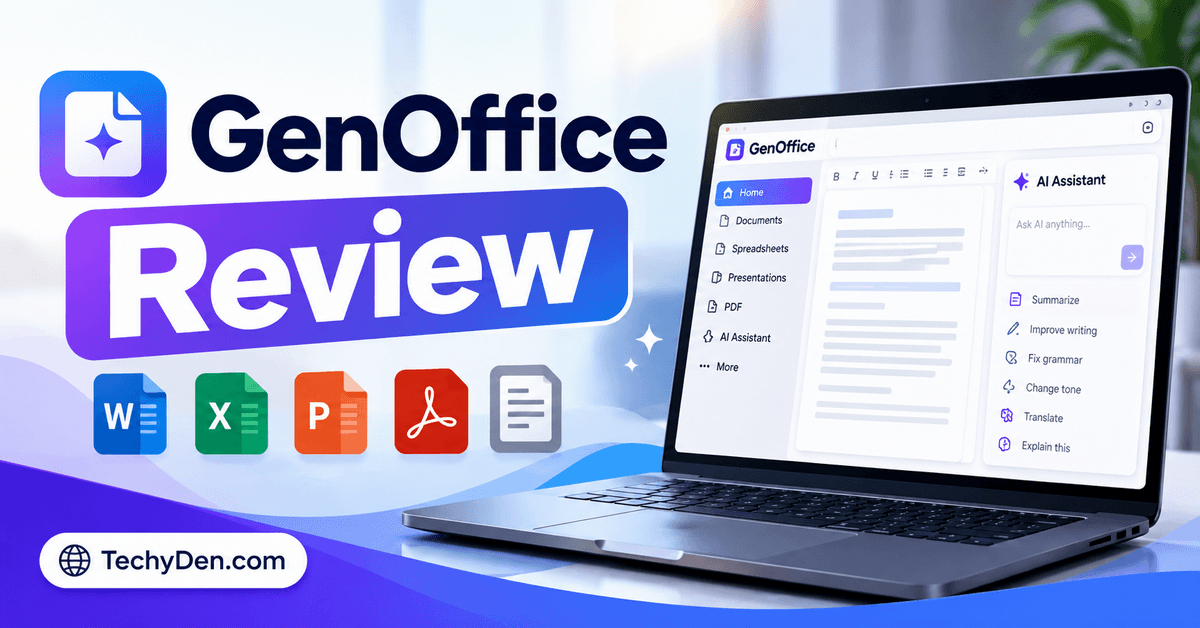
Are you looking for a free office suite that combines document editing, spreadsheets, presentations, and AI assistance in one desktop application? GenOffice is an emerging productivity tool designed to help users create and edit office files with the support of AI models and built-in editing tools.
In this GenOffice review, we explore its features, pricing, file compatibility, AI capabilities, privacy considerations, advantages, disadvantages, and alternatives.
We’ll also compare GenOffice with Microsoft Office and LibreOffice to help you decide whether it is suitable for your daily productivity needs.
Unlike a conventional office suite, GenOffice integrates an AI agent directly into document-editing workflows. It supports common Microsoft Office formats and provides additional tools for working with PDFs, Markdown, and HTML. Discover more AI tools to improve your productivity.
Quick verdict: GenOffice is worth considering if you want a free, open-source desktop office suite with integrated AI assistance. However, users who depend on highly polished document formatting, advanced collaboration, or predictable AI costs should evaluate it carefully before making it their primary office application.
GenOffice Review: Quick Summary
| Product Details | Information |
|---|---|
| Product Name | GenOffice |
| Category | AI office suite and productivity software |
| Developer | Genspark / Mainfunc |
| Latest Version Found | v0.11.564 |
| Supported Operating Systems | Windows, macOS, and Linux |
| License | Apache 2.0 for the main project; the ee/ directory has a separate license |
| Desktop Application Price | Free |
| AI Usage | Depends on the selected provider, credits, or API configuration |
| Official Website | GenOffice.ai |
| Source Code | GenOffice on GitHub |
GenOffice supports editing Word, Excel, and PowerPoint files, alongside PDF, Markdown, and HTML workflows. It also provides AI assistance, command-line tools, and integrations for supported AI coding agents.
The project is actively evolving, so supported features and compatibility may change between releases.
GenOffice Review
AI-powered office suite for Windows, macOS and Linux
Free desktop application, open-source core, support for multiple office formats, integrated AI tools, cross-platform availability and command-line integrations.
AI usage may cost extra, advanced file compatibility requires testing, privacy depends partly on AI provider configuration, and some workflows may require technical knowledge.
Important: The stars above are decorative and do not represent a numerical score. The empty rating bars intentionally avoid inventing feature scores. Update them after testing.
What Is GenOffice?
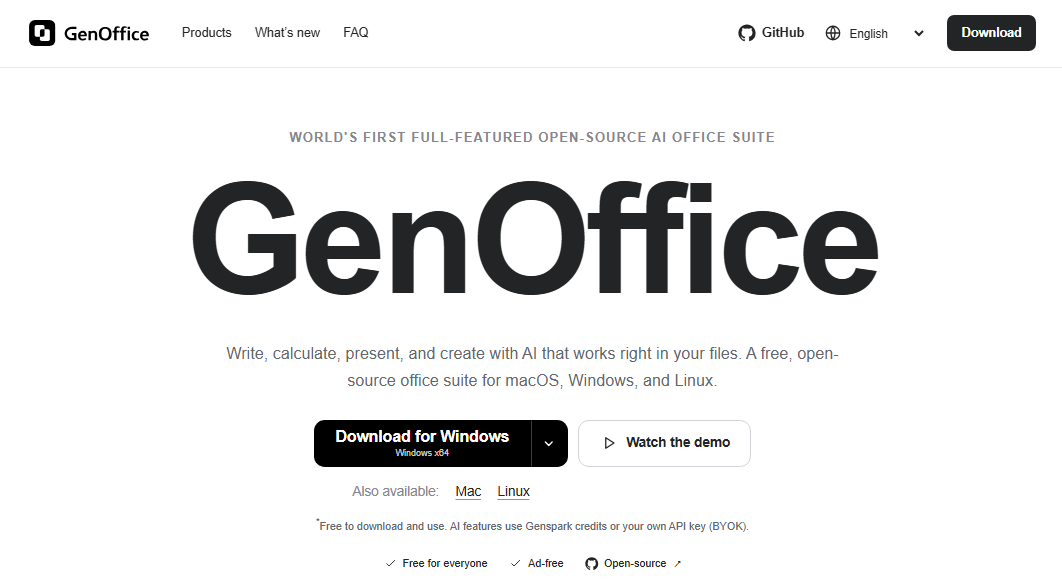
GenOffice is a desktop office productivity suite that combines traditional document-editing capabilities with an integrated AI agent. It is developed under the Genspark / Mainfunc project and is positioned as a free, open-source alternative to conventional office software.
The application is designed to work with familiar office files, including DOCX documents, XLSX spreadsheets, and PPTX presentations. It also includes tools for PDFs, Markdown documents, and HTML files.
What makes GenOffice different is its approach to AI assistance. Instead of requiring users to copy content into a separate chatbot for every task, the application brings AI assistance into the document workflow.
For example, a user may ask an AI assistant to revise a document, analyze spreadsheet data, or help create presentation content. The exact capabilities depend on the editor, selected AI provider, and application version.
You can explore the product and source code through the official GenOffice GitHub repository.
Who Developed GenOffice?
GenOffice is associated with Genspark and MainFunc. The project is maintained as an open-source desktop application, with releases and source code published through GitHub.
Its development focuses on making office documents usable by both people and AI agents. This includes traditional graphical editors as well as command-line tools that supported coding agents can use to create, inspect, convert, and edit office files.
Is GenOffice Open-Source?
Yes, the main GenOffice project is licensed under Apache License 2.0, subject to the project’s stated exception for the ee/ directory, which uses a separate enterprise license.
This distinction matters. Open-source licensing does not automatically mean that every component, trademark, third-party service, or enterprise module has identical permissions.
Before redistributing a modified version or incorporating GenOffice into a commercial product, review the applicable licenses and notices in the official repository.
For ordinary users, the main attraction is the ability to inspect the core project’s source code and use the desktop application without paying a conventional office-suite subscription.
GenOffice Features Reviewed
GenOffice combines several types of productivity tools in one application. Here are the most important features to understand before downloading it.
Bloggers who need additional writing assistance can explore our AI writing tools guide.
1. AI-Powered Document Editing
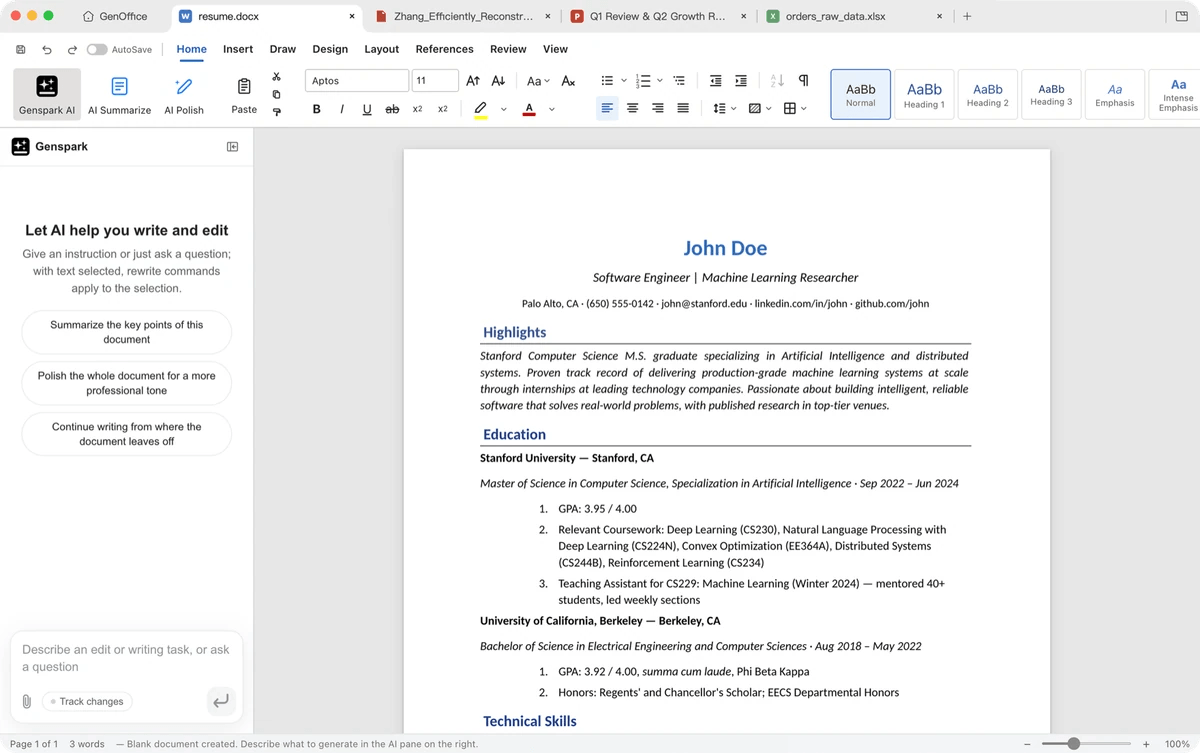
The document editor is designed for working with Word-compatible files and making changes with AI assistance.
Potential workflows include:
- Drafting and revising text.
- Rewriting paragraphs for clarity.
- Improving document structure.
- Editing existing documents with AI assistance.
- Working with headings, tables, and formatting.
- Reviewing and refining longer documents.
The key advantage is the integration of AI into the editing process. Instead of repeatedly switching between an office application and a chatbot, users can work within the same general workflow.
For bloggers and content creators, this could be useful for preparing outlines, editing drafts, organizing research, and improving document readability.
However, AI-generated text still requires human review. Do not assume that an AI-edited document is factually accurate, original, or ready for publication without checking it.
2. AI Spreadsheet Creation and Analysis
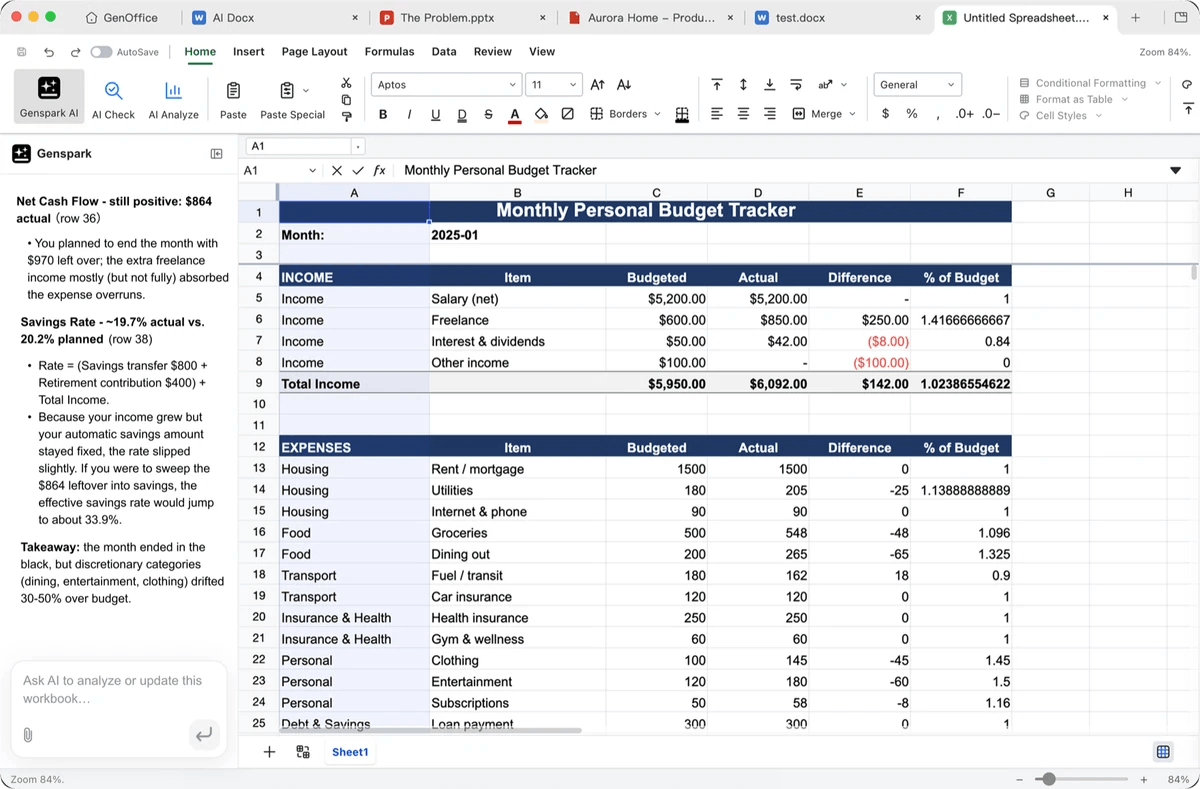
GenOffice includes a spreadsheet editor intended for working with Excel-compatible workbooks.
Spreadsheet-related workflows can involve:
- Organizing structured data.
- Editing spreadsheet cells and tables.
- Working with formulas and calculations.
- Filtering and reviewing datasets.
- Preparing reports and tables.
- Using AI assistance for spreadsheet-related tasks.
The project has continued to improve its spreadsheet functionality. For example, the v0.11.564 release notes mention improvements to filtering large streamed workbooks and spreadsheet navigation. These are documented release changes, not independent performance-test results.
If you use spreadsheets for budgeting, SEO reporting, website analytics, or content planning, test your actual files before moving your workflow to GenOffice.
Pay particular attention to complex formulas, charts, pivot tables, macros, external data connections, and workbook formatting. Compatibility with XLSX files does not guarantee perfect support for every Excel feature.
3. AI Presentation Creation
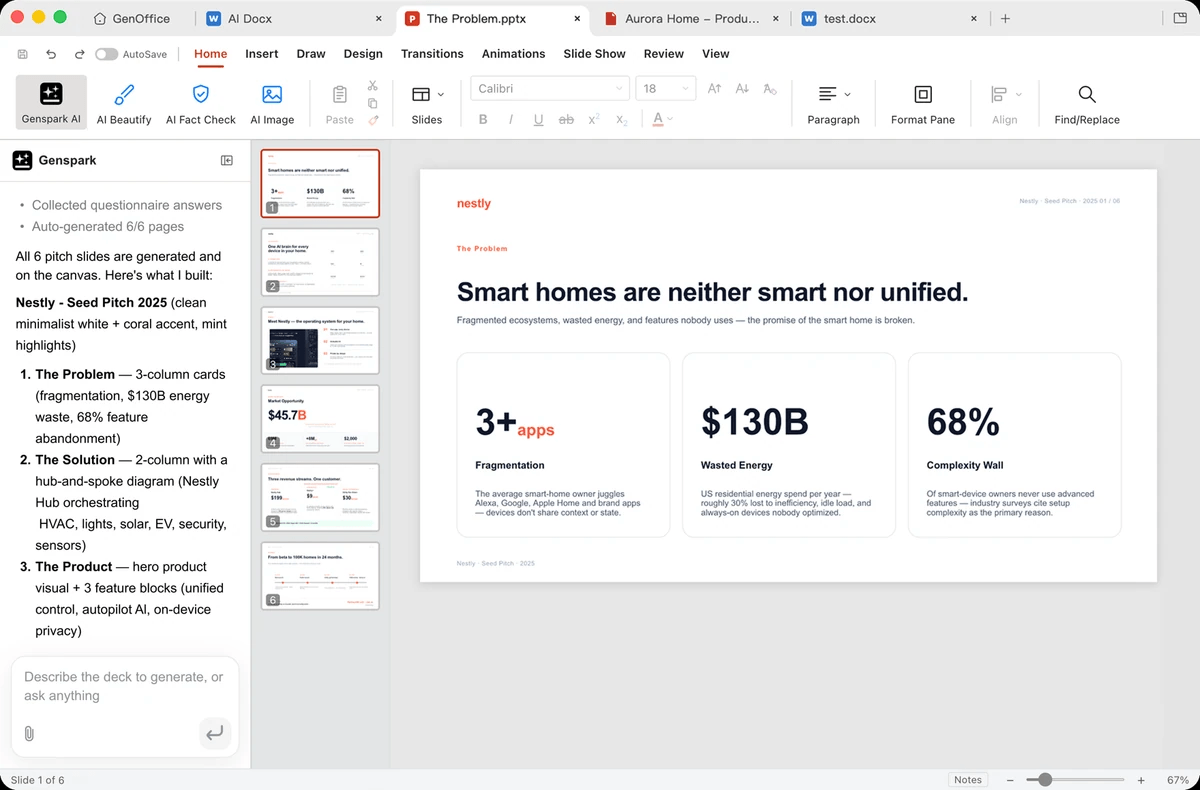
GenOffice includes a presentation editor for working with PowerPoint-compatible files.
Presentation workflows may involve organizing slides, editing text and visual elements, arranging objects, and using AI assistance to help develop content.
For example, a blogger preparing a product review presentation might organize the main features, pricing information, strengths, weaknesses, and final recommendations into slides.
A student might use a presentation editor to structure lecture notes or prepare a classroom presentation.
Nevertheless, AI-generated slide content should be checked for factual accuracy, repetition, readability, and design quality. Imported PPTX files should also be checked for layout changes, animations, fonts, embedded media, and other presentation-specific features.
If you regularly create client presentations, test a copy of an existing presentation before relying on GenOffice for important work.
4. PDF Editing and Conversion
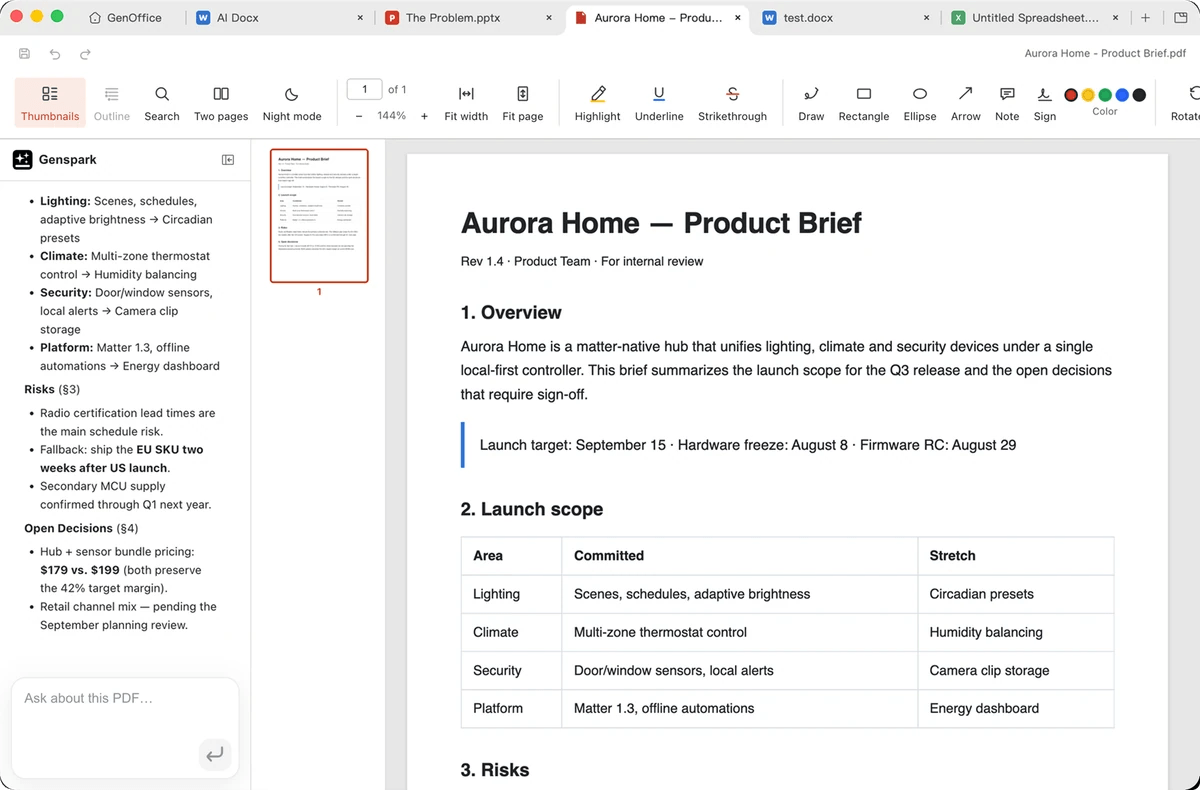
PDF functionality is another important part of the GenOffice feature set.
The project includes PDF tools for document-related workflows. The v0.11.564 release notes specifically mention digital certificate signatures, verification of existing signatures, and improvements to fillable PDF forms.
These features could be useful for users who regularly work with forms, reports, agreements, and other document files.
However, different PDF tasks have different requirements. Editing text in an existing PDF, converting a document to PDF, filling a form, and applying a legally appropriate digital signature are not interchangeable operations.
Before using GenOffice for official documents, verify the resulting file and ensure that the signature method meets your organization’s or jurisdiction’s requirements.
5. HTML and Markdown Editors
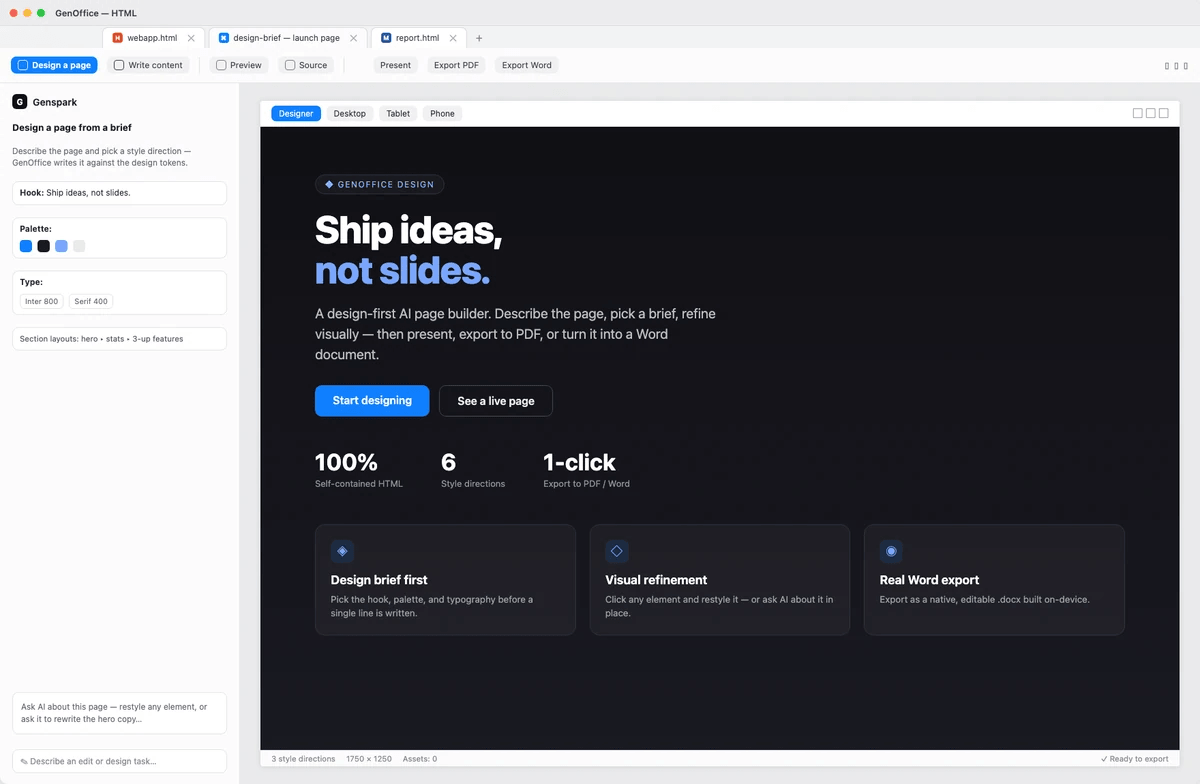
GenOffice also supports HTML and Markdown workflows.
This is particularly relevant to bloggers, developers, technical writers, and content creators who work with structured text.
Markdown can be useful for writing documentation, notes, outlines, and other text-first content. HTML editing can help developers work directly with web markup.
For a WordPress blogger, these capabilities may be useful for preparing article drafts or editing HTML snippets. However, GenOffice should not be confused with a complete WordPress content-management workflow.
You should still check HTML output, links, formatting, and any code before publishing it on a live website.
6. AI Model Support and Bring Your Own Key (BYOK)
One of GenOffice’s important features is its support for AI-assisted workflows through configurable providers.
Depending on the supported configuration, users may be able to use Genspark credits, a compatible third-party AI provider, or their own API key.
This is commonly called the Bring Your Own Key (BYOK) model.
The main benefit is flexibility. Instead of being limited to one AI assistant or subscription arrangement, users can select supported AI configurations according to their needs.
However, BYOK is not automatically free. An API provider may charge for input tokens, output tokens, requests, or other usage. You may also need to configure endpoints, credentials, or model settings correctly.
For another perspective on AI assistants, read our Claude AI review.
Before using a third-party provider, verify its current pricing, data-handling policies, supported models, and compatibility with GenOffice.
7. Command-Line Tools and AI Agent Integrations
GenOffice extends beyond its graphical desktop interface.
The official project describes a genoffice command-line interface and integrations that enable supported AI coding agents to work with office files. The repository also documents Model Context Protocol (MCP) functionality for compatible agent workflows.
This may be especially useful for developers who want to automate repetitive document tasks.
Examples include:
- Creating documents from structured information.
- Converting files between supported formats.
- Extracting or inspecting document content.
- Generating reports from data.
- Integrating document operations into an AI-assisted workflow.
The command-line tools can make GenOffice more interesting than a conventional office editor for technically confident users.
However, automation introduces additional considerations. Test scripts on copies of important files, validate output, and control which files an AI agent can access or modify.
GenOffice Pricing: Is It Really Free?
One of the most appealing aspects of GenOffice is that its desktop application is offered for free.
However, free desktop software does not necessarily mean unlimited free AI usage.
There are two separate costs to understand: the application itself and the AI services you choose to use with it.
GenOffice Desktop Application Pricing
The official project describes GenOffice as a free desktop office suite.
| Item | Cost or pricing consideration |
|---|---|
| Desktop application | Free |
| Main open-source code | Available under Apache 2.0, subject to stated exceptions |
| Standard document editing | Available in the desktop application |
| Built-in AI assistance | Depends on provider and configuration |
| Genspark credits | Subject to applicable credit terms |
| Third-party AI API | May incur usage-based charges |
| Enterprise modules | Check the applicable license and agreement |
For the latest installation files, visit the official GenOffice website or its GitHub releases page.
Genspark Credits vs. Your Own API Key
If you use a credit-based AI service, your available usage depends on that service’s current terms and limits.
If you configure your own API key, your AI expenses depend on the provider, selected model, and volume of usage.
For example, using an AI model to rewrite a short paragraph may consume fewer resources than analyzing a large workbook or processing a long document.
The actual cost varies by provider and task. Therefore, it would be misleading to promise unlimited AI usage or quote a fixed monthly price without checking the relevant service.
Is GenOffice Worth It on a Budget?
GenOffice may be attractive if you want a desktop office application without paying a traditional office-suite subscription.
It is especially worth considering if you are comfortable managing AI configurations and do not need every feature offered by an established commercial suite.
However, users who require advanced collaboration, enterprise administration, or predictable bundled AI usage should compare the complete cost and feature set against Microsoft 365 and other alternatives.
GenOffice Compatibility and System Requirements
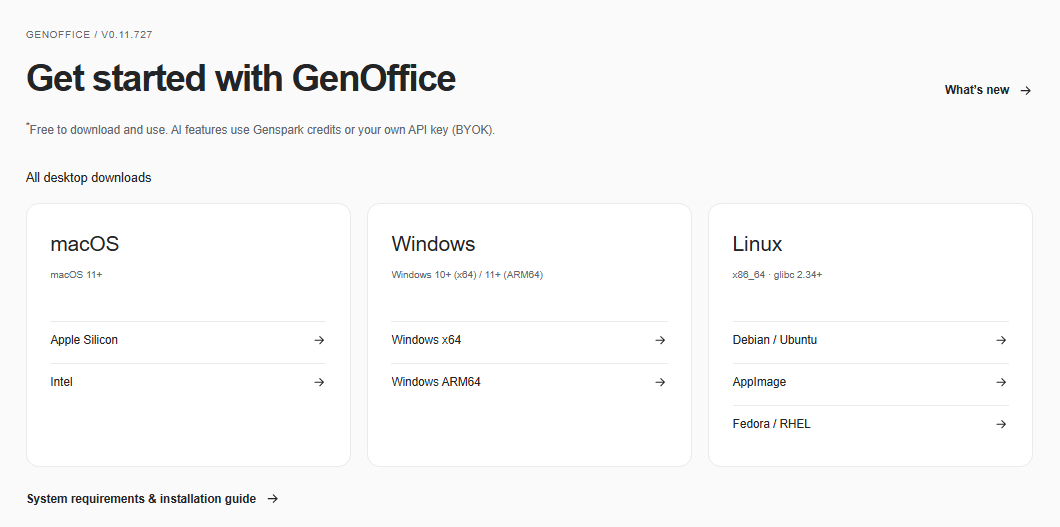
GenOffice is available for Windows, macOS, and Linux. The official releases page provides installers for supported desktop architectures.
For example, the v0.11.564 release includes Windows x64 and Windows ARM64 installers, macOS builds for Apple Silicon and Intel, and Linux packages in AppImage, Debian/Ubuntu, and Fedora/RHEL formats.
The correct installer depends on your operating system and processor architecture.
Supported Operating Systems
| Operating system | Available distribution formats |
|---|---|
| Windows | Installer for x64 and ARM64 systems |
| macOS | Apple Silicon and Intel installers |
| Linux | AppImage, Debian/Ubuntu package, and Fedora/RHEL package |
Download the version appropriate for your device from the official release page.
Before installing, check the release notes for any minimum operating-system or hardware requirements. Do not assume that every version supports every older computer.
Does GenOffice Support Word, Excel, and PowerPoint Files?
GenOffice supports the common DOCX, XLSX, and PPTX formats.
That makes it relevant to people who exchange documents with Microsoft Office users.
Nevertheless, format support and full compatibility are different things. Documents can contain advanced layouts, embedded objects, specialized fonts, macros, charts, formulas, animations, and other features that may behave differently across office suites.
Before using GenOffice as your default office application, open copies of representative files and compare the results after saving and reopening them.
Installation Requirements
For a Windows installation:
- Visit the official GenOffice website or GitHub releases page.
- Select the Windows installer appropriate for your processor architecture.
- Download the installer from the official source.
- Review the publisher information and follow the installation prompts.
- Launch GenOffice and open a sample document.
- Configure AI providers only if you intend to use AI features.
If you are unsure whether your Windows computer uses an x64 or ARM64 processor, check Settings → System → About → System type.
Start with a non-sensitive test document before opening important business files.
Is GenOffice Safe and Private?
Safety and privacy deserve particular attention because GenOffice combines local desktop software with optional AI services.
The fact that an application is open-source does not automatically establish that every workflow is private, secure, or appropriate for confidential data.
Local File Processing vs. Cloud AI Requests
Some document operations can run locally. The GenOffice project also documents local command-line workflows for supported file operations.
However, when you use an external AI model, the data required for that AI request may be sent to the configured provider.
The exact behavior depends on the feature, configuration, and provider. Do not assume that every AI-assisted operation is performed entirely offline.
Before processing confidential material, identify which operations are local and which require network access. Review the provider’s retention policy, privacy terms, and data-use practices.
AI Provider and API Key Security
If you configure your own API key, treat it as a credential.
Use the following precautions:
- Obtain API keys directly from the provider.
- Never paste API keys into public documents or source code.
- Avoid sharing screenshots that expose credentials.
- Review how the application stores configuration and secrets.
- Revoke and replace a key if you suspect it has been exposed.
- Monitor API usage and spending limits.
Also check whether the AI provider uses submitted data for model training or retains requests. Policies differ among providers and account types.
Usage Analytics and Privacy Settings
Before using GenOffice with sensitive data, review its official privacy documentation and application settings.
Pay attention to diagnostics, usage analytics, crash reporting, account connections, update checks, and any other network activity described by the project.
For confidential business documents, educational records, or client information, test the complete workflow using non-sensitive sample files first.
Privacy verdict: GenOffice offers the potential benefits of local desktop editing and configurable AI workflows, but privacy should be evaluated per feature and provider. Do not treat the product’s open-source status as a guarantee of end-to-end privacy.
GenOffice Pros and Cons
Every productivity tool involves trade-offs. GenOffice’s main appeal is its combination of open-source desktop editing and integrated AI assistance.
GenOffice Pros
- Free desktop application: GenOffice is available without the traditional upfront cost of a paid office suite.
- Open-source core: The main project uses the Apache 2.0 license, subject to the documented enterprise-directory exception and other applicable third-party licenses.
- Multiple office formats: Support for DOCX, XLSX, and PPTX makes it relevant to people who work with common Microsoft Office files.
- Integrated AI assistance: The application brings AI into document workflows rather than requiring every task to begin in a separate chatbot.
- Additional document tools: PDF, Markdown, and HTML support broadens its usefulness beyond conventional word processing.
- Command-line and agent capabilities: Supported automation workflows may appeal to developers and users who want to connect office tasks with AI coding agents.
- Cross-platform availability: Users can choose compatible Windows, macOS, or Linux releases.
GenOffice Cons
- Compatibility needs verification: Support for common formats does not guarantee perfect preservation of every advanced Office feature.
- AI usage can cost extra: Free desktop software may still rely on paid AI credits or metered API usage.
- Privacy depends on configuration: External AI requests may involve sending relevant document content to a provider.
- The product is evolving quickly: Frequent releases can introduce improvements, but users should also keep track of changes, fixes, and compatibility issues.
- Not every workflow is suitable for beginners: Configuring AI providers, API keys, or automation tools may require additional technical knowledge.
- Independent testing remains important: Users who depend on complex spreadsheets, professional presentations, or confidential documents should validate their workflows before switching.
GenOffice vs. Microsoft Office vs. LibreOffice
How does GenOffice compare with established office suites?
The most important difference is its focus on integrated AI assistance combined with an open-source desktop application.
| Feature | GenOffice | Microsoft 365 | LibreOffice |
|---|---|---|---|
| Desktop application | Free | Desktop apps generally require an eligible paid license or subscription | Free |
| Open-source core | Yes, subject to license exceptions | No | Yes |
| Word-compatible documents | DOCX support | DOCX support | DOCX support |
| Excel-compatible spreadsheets | XLSX support | XLSX support | XLSX support |
| PowerPoint-compatible presentations | PPTX support | PPTX support | PPTX support |
| Built-in AI | Integrated AI workflows, depending on configuration | Copilot features depend on the eligible plan and setup | No equivalent built-in AI experience by default |
| PDF workflows | Yes | PDF-related workflows vary by app and service | PDF export and related workflows |
| Command-line AI agent workflows | Supported tools and integrations | Different automation ecosystem | Different automation ecosystem |
| Collaboration | Verify current capabilities | Strong cloud collaboration ecosystem | Collaboration depends on deployment and tools |
| Best suited for | Users interested in AI-assisted office editing | Users needing established Office workflows and collaboration | Users seeking a mature free office suite |
Comparison note: Features, pricing, and licensing depend on the edition, plan, version, and deployment. This table compares general product positioning rather than claiming that every feature is equivalent.
GenOffice vs. Microsoft Office
- Microsoft 365 is a strong choice for people who depend on familiar Office workflows, advanced compatibility, enterprise administration, and cloud collaboration.
- GenOffice may appeal more to users who want a free desktop application and prefer to experiment with configurable AI assistance.
However, do not assume GenOffice is a complete Microsoft 365 replacement. Organizations should test macros, complex spreadsheets, presentation layouts, collaboration requirements, and document exchange before migrating.
GenOffice vs. LibreOffice
- LibreOffice is an established open-source office suite with word processing, spreadsheets, and presentation tools.
- GenOffice’s main differentiator is its focus on AI-assisted document workflows and integrations with supported AI agents.
Choose LibreOffice if you prioritize a mature traditional office suite. Consider GenOffice if integrated AI and automation are central to your workflow.
For users who need both, testing each with the same sample documents is a practical way to compare compatibility and usability.
Best GenOffice Alternatives
GenOffice is not the only option for people looking for an office suite. Consider these alternatives according to your budget and workflow.
1. Microsoft 365
Microsoft 365 is worth considering if you rely on Word, Excel, PowerPoint, OneDrive, and collaboration features.
It is particularly suitable for businesses and professionals who exchange complex documents with clients or colleagues.
Some AI capabilities depend on the specific plan, account, and licensing arrangement. Check the current plan details before purchasing.
Official website: Microsoft 365
2. LibreOffice
LibreOffice is a free, open-source office suite with applications for documents, spreadsheets, and presentations.
It is a good option if you want traditional office tools without a subscription and do not need GenOffice’s specific AI integrations.
Its mature desktop workflow may be preferable for users who value established features over experimentation with AI-enabled editing.
Official website: LibreOffice
3. ONLYOFFICE
ONLYOFFICE provides office editors for documents, spreadsheets, and presentations, with desktop and online deployment options.
It may suit individuals or teams who need office-file compatibility and document collaboration capabilities.
Review the licensing and features of the specific edition before selecting it for personal or commercial use.
Official website: ONLYOFFICE
4. Google Docs, Sheets, and Slides
Google’s productivity tools are suitable for users who prefer browser-based editing and cloud collaboration.
They can be convenient for teams working together on shared documents, spreadsheets, and presentations.
However, their workflow differs from GenOffice’s desktop-first approach, and access to particular AI features depends on the account and plan.
Official website: Google Workspace
Who Should Use GenOffice?
GenOffice may be a good fit for users who want to explore AI-assisted office productivity without purchasing a conventional desktop office subscription.
1. Students and Educators
Students can explore AI-assisted document editing, presentation preparation, and spreadsheet workflows. Educators may find it useful for preparing teaching materials and organizing information.
Always review AI-generated content for accuracy and follow institutional policies for AI use.
2. Bloggers and Content Creators
Bloggers may use GenOffice to organize article drafts, edit documents, prepare editorial plans, and work with structured text.
For example, you could maintain an editorial calendar in a spreadsheet, draft a product review in a document, and prepare a presentation for a content strategy meeting.
If you publish through WordPress, remember that your final workflow still needs fact-checking, SEO optimization, formatting, and publication in the WordPress editor.
3. Freelancers and Small Businesses
Freelancers may benefit from a free office application for proposals, reports, spreadsheets, and client documentation.
Small businesses should assess document compatibility, access control, privacy, and AI costs before adopting GenOffice for business-critical workflows.
4. Developers and AI Automation Enthusiasts
Developers may find the command-line tools and supported AI agent integrations especially interesting.
These capabilities can help connect office-file operations with automation scripts and compatible AI coding tools.
If automation is your main reason for considering GenOffice, evaluate the CLI documentation and supported integration methods before installing it.
For bloggers and content creators, explore our AI tools for bloggers guide for more productivity solutions.
Frequently Asked Questions About GenOffice
Is GenOffice completely free?
The desktop application is offered for free. However, AI usage may require Genspark credits or a third-party API key, and external AI providers may charge usage fees. Review the current terms for your chosen configuration.
Does GenOffice require an internet connection?
Basic local file workflows may work without cloud AI services, but AI features that depend on an online provider require network access. Confirm the offline behavior of the specific feature and configuration you intend to use.
Can GenOffice replace Microsoft Office?
GenOffice may replace some everyday document, spreadsheet, and presentation tasks. Whether it can replace Microsoft Office entirely depends on your compatibility, collaboration, advanced formatting, macro, and enterprise requirements.
Does GenOffice support Windows 11?
The project publishes Windows installers. Check the current release notes and system requirements for compatibility with your particular Windows 11 version and processor architecture.
Can GenOffice edit DOCX, XLSX, and PPTX files?
Yes, these are among the common office formats supported by GenOffice. However, complex files should be tested to ensure that formatting, formulas, embedded objects, and other features remain intact after editing and saving.
Does GenOffice send documents to the cloud?
Not every document operation necessarily requires cloud processing. However, AI requests sent to external providers may transmit relevant content. Review the privacy documentation and provider policies before processing confidential documents.
Can I use my own AI API key?
GenOffice documents support for configurable AI providers and a bring-your-own-key approach. Confirm that your preferred provider, model, and endpoint are supported by your installed version.
Is GenOffice safe to download?
Download it from the official GenOffice website or the project’s GitHub releases page. Verify the source and publisher information, keep the application updated, and use appropriate security precautions when configuring AI providers or automation tools.
Is GenOffice better than LibreOffice?
Neither is universally better. LibreOffice is a strong choice for a traditional, established open-source office suite, while GenOffice may be more attractive to users who specifically want integrated AI assistance and agent-oriented workflows.
Where can I download GenOffice?
Visit the official GenOffice website or the GitHub releases page to find the latest available installers for supported operating systems.
Final Verdict: Is GenOffice Worth It?
GenOffice is an interesting development in desktop productivity software because it combines traditional office-file editing with integrated AI assistance.
Its free desktop application, open-source core, support for common office formats, PDF and Markdown tools, and command-line integrations make it worth exploring.
For bloggers, students, developers, and productivity enthusiasts, it may offer a useful alternative to conventional office workflows. Its AI features could be particularly appealing to people who want to automate repetitive editing and document tasks.
However, there are important limitations to consider. AI services may incur additional costs, file compatibility should be tested, and privacy depends on the operation and provider being used. Users who rely on advanced Microsoft Office features or extensive cloud collaboration should evaluate their requirements before switching.
Our recommendation: Try GenOffice with non-sensitive sample documents and representative spreadsheets and presentations. Test the AI workflows you actually need, compare saved files with the originals, and review the privacy and pricing terms of your chosen AI provider.
GenOffice is worth watching as it develops, but it should be treated as an option to evaluate rather than an automatic replacement for every established office suite.
Ready to explore GenOffice? Visit the official website to review the latest version, documentation, and available downloads.
Visit the official GenOffice website | Explore GenOffice on GitHub