
Artificial intelligence has become an essential part of modern content creation. From generating blog post ideas and researching topics to writing articles, editing drafts, optimizing content, and creating social media posts, AI tools are helping bloggers and digital creators work faster and more efficiently.
Among the growing number of AI assistants, Claude AI has established itself as a powerful option for writing, reasoning, research, coding, and working with documents. Developed by Anthropic, Claude is designed to help users handle both everyday tasks and more advanced professional workflows.
For bloggers and content creators, Claude can support almost every stage of the content creation process. You can use it to brainstorm ideas, create article outlines, analyze source material, draft and edit content, summarize documents, develop SEO content briefs, and repurpose existing articles for other platforms.
If you are looking for more AI tools to improve your blogging workflow, check out our guide to the best AI tools for bloggers.
However, having a long list of AI features does not necessarily make a tool the right choice for every blogger.
Does Claude AI actually produce high-quality content? How does it compare with ChatGPT and Gemini? Which Claude model is best for bloggers? And is a paid Claude subscription worth the cost in 2026?
In this Claude AI Review 2026, we take a closer look at Claude’s features, current models, pricing, strengths, limitations, and real-world usefulness for bloggers and content creators.
We also examine Claude through a practical content-creation and SEO workflow, including article outlining, long-form writing, content editing, research, document analysis, SEO content planning, and content repurposing.
| Category | TechyDen verdict |
|---|---|
| Writing | Excellent |
| Editing | Excellent |
| Research | Excellent |
| SEO | Good with dedicated SEO tools |
| Coding | Excellent |
| Long documents | Excellent |
| Images | Depends on current capabilities |
| Ease of use | Excellent |
| Free plan | Good |
| Paid plans | Worth it for regular users |
| Best for | Bloggers, creators, professionals |
Rather than simply listing Claude’s features, this review focuses on how useful Claude actually is in a real blogging workflow and whether it deserves a place in your AI content toolkit.
Disclosure: This article may contain affiliate links. If you purchase through our links, TechyDen may earn a commission at no additional cost to you. Our recommendations are based on our testing and editorial evaluation.
- Last updated: October 8, 2026
- Last tested: October 8, 2026
- Testing environment: Claude web app / Windows 11 / Chrome
- Reviewer: Satish Ithamsetty
Quick verdict
- Best for: Long-form writing, editing, research, and complex content workflows.
- Best model for most bloggers: Claude Sonnet 5.5.
- Best for demanding tasks: Claude Opus 5.5.
- Best for high-volume/low-cost tasks: Claude Haiku 5.5.
- My rating: 4.9/5
What You Will Learn in This Claude AI Review
This review is written for bloggers, freelance writers, SEO professionals, digital marketers, and anyone interested in using AI for content creation.
We will cover:
- What Claude AI is and how it works.
- The key Claude AI features are available to users.
- How Claude can help with blog writing, editing, and SEO content planning.
- Claude AI pricing and available subscription options.
- The advantages and limitations of using Claude for content creation.
- How Claude compares with ChatGPT and Google Gemini.
- Whether Claude AI is worth using for bloggers and content creators in 2026.
Our review approach: Rather than focusing only on feature descriptions, this article emphasizes practical content-creation workflows.
We will examine how Claude can be used for real blogging tasks and discuss the areas where human review, fact-checking, and SEO expertise remain important.
Whether you are a beginner blogger looking for an AI writing assistant or an experienced content creator exploring alternatives to ChatGPT, this Claude AI review will help you understand what the tool offers and how it may fit into your content strategy.
What Is Claude AI?
Claude AI is an artificial intelligence assistant developed by Anthropic, an AI company focused on building useful and reliable AI systems.
It is designed to help users with tasks such as writing, analyzing information, answering questions, coding, and working with documents.
You can access Claude through its web application, supported apps, and developer tools.
Depending on the available plan and features, users can use Claude for everyday questions, professional work, content creation, and more advanced workflows.
How Does Claude AI Work?
Claude uses large language models to understand user instructions and generate responses.
You can interact with it through natural language prompts, just as you would with other AI assistants.
For example, a blogger can ask Claude to:
- Generate blog post ideas for a specific niche.
- Create an SEO-friendly article outline.
- Rewrite an introduction to improve readability.
- Summarize a long research document.
- Suggest FAQs for a blog post.
- Repurpose an article into social media content.
- Review a draft for clarity, grammar, and structure.
Claude processes the instructions and available context to produce a response.
The quality of the output depends on the prompt, the information provided, the model being used, and the complexity of the task.
Who Developed Claude AI?
Claude AI was developed by Anthropic. The company focuses on AI research and the development of AI assistants designed to be helpful, reliable, and safer to use.
Claude is part of Anthropic’s broader AI product ecosystem, which includes the Claude assistant and developer-focused tools.
For content creators, the important point is that Claude is not limited to simple chatbot conversations. It can also support writing, document-based work, research, and other productivity tasks.
What Can You Use Claude AI For?
Claude can be useful in several areas:
- Content writing: Create drafts, introductions, conclusions, product descriptions, and other written content.
- Content editing: Improve grammar, sentence structure, readability, and tone while preserving the original meaning.
- Research assistance: Organize information, summarize documents, and help develop content ideas. Important facts should still be verified against reliable sources.
- SEO content planning: Generate topic ideas, content briefs, headings, FAQs, and keyword-related suggestions. Claude should support SEO decisions rather than replace keyword research and search performance data.
- Productivity: Help with brainstorming, organizing information, drafting emails, and working with documents.
- Coding and technical tasks: Assist with programming, debugging, and technical explanations, depending on the tools and capabilities available in your Claude environment.
Is Claude AI Only for Writers?
No. Although Claude is particularly relevant to bloggers and content creators, it can also be used by students, developers, researchers, professionals, and businesses.
For TechyDen readers, Claude is especially interesting because it can fit into multiple stages of a blogging workflow.
Instead of using AI only to generate an article, you can explore how it helps with planning, drafting, editing, and content repurposing.
In the next section, we will look at the key Claude AI features that content creators should know about in 2026.
Claude AI Features
Claude AI has evolved from a conversational AI assistant into a broader productivity tool for writing, research, coding, and working with documents.
For bloggers and content creators, its most useful capabilities include drafting articles, improving existing content, organizing project information, and supporting research workflows.
In this section of our Claude AI review 2026, we will explore the major Claude AI features and how they can help with blogging, SEO content creation, and everyday productivity.
1. Current Claude AI Model Options
One of the first things to understand when using Claude AI is that Anthropic offers different models for different types of work. The model lineup changes regularly, so older information about Claude 2, Claude 3, or earlier Claude 4 models may no longer represent the current Claude experience.
As of October 2026, Anthropic’s current Claude model lineup includes Claude Opus 5.5, Claude Sonnet 5.5, Claude Haiku 5.5, Claude Fable 5.1, and Claude Mythos 5.1. Anthropic launched Haiku 5.5 on October 7, 2026, making it the newest addition to the Claude 5.5 family.
These models target different workloads. Opus 5.5 is designed for demanding professional and reasoning-heavy work, Sonnet 5.5 provides a balance of capability, speed, and cost, Haiku 5.5 focuses on fast and high-volume tasks, while Fable 5.1 and Mythos 5.1 are designed for more specialized advanced coding, knowledge-work, cybersecurity, and life-sciences use cases.
For bloggers and content creators, the model you choose can affect writing quality, reasoning capability, response speed, and API costs.
a. Claude Opus 5.5
Claude Opus 5.5 is Anthropic’s leading Claude model and was introduced in September 2026. It is designed for complex reasoning, coding, research, professional knowledge work, and demanding multi-step workflows. Anthropic says Opus 5.5 performs at the level of Fable 5.1 on most work while costing 40% less to run than the previous Opus 5.
Useful for bloggers and content creators:
- Complex content research
- Detailed analysis
- Long-form content development
- Advanced technical writing
- Complex coding tasks
- Large document analysis
- Multi-step workflows
- Research-heavy projects
- Advanced content strategy
Opus 5.5 is generally available through supported Claude products and developer platforms.
For bloggers, Opus 5.5 is most useful when a project requires deeper reasoning, extensive research, complex analysis, or a long sequence of tasks rather than simple content generation.
b. Claude Sonnet 5.5
Claude Sonnet 5.5 is designed as a faster, lower-cost complement to Opus 5.5. Anthropic introduced it in September 2026 and says it runs about 30% faster than Sonnet 5 while costing up to 30% less for most work.
For bloggers, Sonnet 5.5 is useful for:
- Writing blog posts
- Creating article outlines
- Editing and rewriting content
- Creating SEO content briefs
- Brainstorming article ideas
- Creating FAQs and supporting content
- Working with documents
- Content research
- Everyday coding and technical tasks
- Creating polished documents
Sonnet 5.5 is a strong choice for everyday professional content workflows because it balances quality, speed, and cost.
For most bloggers and content creators, Sonnet 5.5 is likely to be the best all-around Claude model for regular content work, while Opus 5.5 becomes more useful for complex research and demanding projects.
c. Claude Haiku 5.5
Claude Haiku 5.5 is Anthropic’s newest small Claude model and was announced on October 7, 2026. Anthropic describes it as its fastest, cheapest, and most capable small model to date. It is designed specifically for high-volume, cost-sensitive, and speed-sensitive workloads.
Haiku 5.5 is now available across Claude’s supported platforms, including the Claude Platform and major cloud platforms.
Best for:
- High-volume tasks
- Speed-sensitive workflows
- Lower-cost AI workflows
- Simple transformations
- Routine content tasks
- Summaries and information extraction
- Classification
- Content cleanup and rewriting
- Repetitive editorial workflows
- Browser and automation tasks
For bloggers, Haiku 5.5 can be particularly useful for repetitive tasks such as:
- Creating short summaries
- Rewriting paragraphs
- Generating meta descriptions
- Extracting keywords and entities
- Creating short social media content
- Cleaning and formatting content
- Classifying large numbers of articles
- Processing large amounts of text
- Performing routine content transformations
Anthropic says Haiku 5.5 costs around 75% less to run on average than Haiku 4.5, making it particularly attractive for high-volume workloads. Its API pricing starts at $0.10 per million input tokens and $0.50 per million output tokens for prompts up to 100,000 tokens.
Haiku 5.5 is therefore a better choice than Haiku 4.5 for new workflows that prioritize speed and cost efficiency.
For complex research, advanced reasoning, and demanding long-form projects, however, Sonnet 5.5 or Opus 5.5 remains the better choice.
d. Claude Fable 5.1
Claude Fable 5.1 is a specialized model designed for advanced coding, knowledge work, and long-running professional workflows. Anthropic introduced Fable 5.1 in September 2026 as a generally available model, while Mythos 5.1 uses the same underlying model with different safeguards.
Fable 5.1 is designed for workflows involving:
- Advanced coding
- Complex knowledge work
- Deep research
- Long-running tasks
- Technical projects
- Large document analysis
- Multi-stage workflows
- Autonomous agentic work
Anthropic describes Fable 5.1 as its most capable generally available model for ambitious, long-running work. It is available to Pro, Max, Team, and Enterprise users and through supported developer platforms.
Its API pricing is $10 per million input tokens and $50 per million output tokens, with cache reads priced at $0.25 per million tokens.
For most bloggers, Fable 5.1 is less important than Sonnet 5.5 or Opus 5.5 because its strongest advantages are in advanced coding, agentic workflows, and demanding knowledge work.
e. Claude Mythos 5.1
Claude Mythos 5.1 is a specialized version of the Fable 5.1 model with different safeguards and access controls. It is designed primarily for advanced cybersecurity and life-sciences research.
Mythos 5.1 is not generally available to all Claude users. Access is limited to vetted organizations and specialized trusted-access programs, including Anthropic’s cybersecurity and life-sciences verification programs.
Mythos 5.1 is mainly relevant to:
- Cybersecurity researchers
- Life-sciences researchers
- Scientific organizations
- Specialized professional teams
- Security teams with approved access
It is generally not necessary for bloggers, freelance writers, or everyday content creators.
For bloggers who primarily need help with writing and editing, our guide to the best AI writing tools for bloggers compares several useful options.
Claude Opus 5.5 vs Sonnet 5.5 vs Haiku 5.5 vs Fable 5.1 vs Mythos 5.1
| Model | Main Focus | Availability | Best For |
|---|---|---|---|
| Claude Opus 5.5 | Complex reasoning and professional work | Generally available | Advanced research, coding and complex content workflows |
| Claude Sonnet 5.5 | Everyday professional work | Generally available | Writing, editing, documents and everyday work |
| Claude Haiku 5.5 | Speed and cost efficiency | Generally available | High-volume, quick and routine tasks |
| Claude Fable 5.1 | Advanced coding and knowledge work | Generally available | Long-running technical and knowledge workflows |
| Claude Mythos 5.1 | Cybersecurity and life-sciences research | Restricted access | Specialized scientific and cybersecurity research |
Which Claude Model Should Bloggers Use?
For most bloggers and content creators, Claude Sonnet 5.5 is the best all-around starting point. It provides a strong balance of writing quality, research, editing, document handling, speed, and cost.
- Choose Claude Opus 5.5 when your workflow involves complex research, advanced reasoning, technical analysis, coding, or demanding multi-step projects.
- Choose Claude Haiku 5.5 when speed and cost efficiency are more important than maximum reasoning capability. It is particularly well suited to repetitive and high-volume blogging tasks such as summaries, rewriting, content cleanup, classification, and information extraction.
- Choose Claude Fable 5.1 for advanced coding, long-running agentic workflows, and complex knowledge-work projects.
- Claude Mythos 5.1 is primarily intended for approved cybersecurity and life-sciences research and is not necessary for normal blogging workflows.
Anthropic’s model lineup continues to evolve, so model names, availability, pricing, capabilities, and access requirements can change.
| Model | Best for | Blogger relevance |
|---|---|---|
| Opus 5.5 | Advanced reasoning | High |
| Sonnet 5.5 | Everyday work | Very high |
| Haiku 5.5 | Speed/high volume | High |
| Fable 5.1 | Coding/knowledge work | Medium |
| Mythos 5.1 | Cyber/bio research | Low |
Always check Anthropic’s official documentation and current Claude model information before making a purchasing or API decision.
Claude Opus 5.5 vs Sonnet 5.5 vs Haiku 5.5
Claude Opus 5.5, Sonnet 5.5, and Haiku 5.5 are all part of Anthropic’s current Claude 5.5 family, but they are designed for different workloads.
| Feature | Claude Opus 5.5 | Claude Sonnet 5.5 | Claude Haiku 5.5 |
|---|---|---|---|
| Main focus | Complex professional work | Everyday professional work | Speed and high-volume work |
| Writing | Excellent | Excellent | Good for routine tasks |
| Research | Advanced | Strong | Best for simple research tasks |
| Coding | Advanced | Strong | Suitable for simpler coding tasks |
| Speed | Optimized for complex work | Fast | Fastest Claude model |
| Cost | Higher | Mid-range | Lowest |
| Best for | Complex reasoning and demanding projects | Blogging, documents and everyday work | Repetitive and high-volume workflows |
For bloggers, Sonnet 5.5 is particularly useful for regular article writing, editing, content planning, SEO workflows, and document creation.
Haiku 5.5 is the better option for repetitive, high-volume tasks where response speed and cost matter, while Opus 5.5 is more appropriate for complex research, advanced analysis, coding, and demanding multi-step projects. Anthropic itself positions Haiku 5.5 for high-volume and cost-sensitive work, while Sonnet 5.5 and Opus 5.5 remain stronger choices for complex professional tasks.
The choice therefore depends on the complexity of your workflow rather than simply choosing the newest or most expensive Claude model.
2. Writing and Editing
Writing and editing are among the most relevant Claude AI features for bloggers and content creators. Claude can help create drafts, improve existing content, and refine the tone and structure of written material. Anthropic describes Claude as a tool for drafting, editing, and polishing writing while helping users maintain their voice.
For a blogger, this means Claude can support several stages of the content creation process.
Blog post writing
You can use Claude to generate a first draft from a detailed prompt. For example, you can provide a topic, target audience, article length, tone, and required headings.
Example prompt:
Write a 1500-word blog post about the best AI tools for bloggers. Use a helpful, beginner-friendly tone. Include an introduction, H2 headings, practical examples, pros and cons, and a conclusion.
Claude can generate a draft based on these instructions. However, the output should be reviewed for factual accuracy, originality, and alignment with search intent before publication.
If your main goal is improving organic search performance, explore our list of the best AI SEO tools for bloggers.
Content editing
Claude can also help improve an existing article without completely changing its meaning.
You can ask it to:
- Correct grammar and spelling.
- Improve sentence clarity.
- Make paragraphs easier to read.
- Remove unnecessary repetition.
- Improve headings and transitions.
- Adapt the tone for a specific audience.
- Rewrite an introduction or conclusion.
For example, if you have written a technical paragraph about artificial intelligence, you can ask Claude to explain it in simpler language for beginners.
SEO content assistance
Claude can support SEO content planning by helping generate:
- Blog post outlines.
- Keyword-related topic ideas.
- Search-intent questions.
- FAQ suggestions.
- Meta title and meta description drafts.
- Content briefs.
However, Claude AI is not a replacement for keyword research tools or Google Search Console. Use tools such as Semrush, Ahrefs, and Google Search Console to validate search demand, competition, and actual search performance.
For TechyDen, a useful workflow is to use Claude for content planning and editing, then combine its output with your own SEO research and editorial expertise.
3. Web Search and Research
Another important Claude AI feature is web search. Anthropic’s official Claude product page lists web search as a capability for accessing current information beyond the model’s existing knowledge.
This is particularly useful for bloggers who need to research changing topics such as AI tools, software updates, WordPress plugins, hosting plans, and technology news.
How Claude web search can help content creators
You can use web search to assist with:
- Finding recent information about a product.
- Researching software updates.
- Exploring current technology topics.
- Gathering information for a blog post.
- Checking details from online sources.
- Creating research-based summaries.
For example, if you are writing a review of an AI writing tool, you can ask Claude to research its latest features, pricing, and official documentation.
Example prompt:
Research the latest features of Claude AI for content creators. Use official Anthropic sources where possible. Organize the findings into features, benefits, limitations, and information that needs verification.
Is Claude AI web search accurate?
Web search can help Claude access more current information, but it does not guarantee that every answer is correct. Search results can be incomplete, and AI-generated summaries may contain errors or misunderstandings.
For important information, always verify:
- Product prices.
- Model names.
- Technical specifications.
- Company announcements.
- Statistics and research findings.
- Claims about product capabilities.
For your TechyDen reviews, link to official product pages and include the date on which you checked pricing or features.
4. Projects and Memory
Projects are useful for organizing related conversations, files, and instructions around a particular topic. Anthropic introduced Projects to help users bring together relevant knowledge and chat activity in one place.
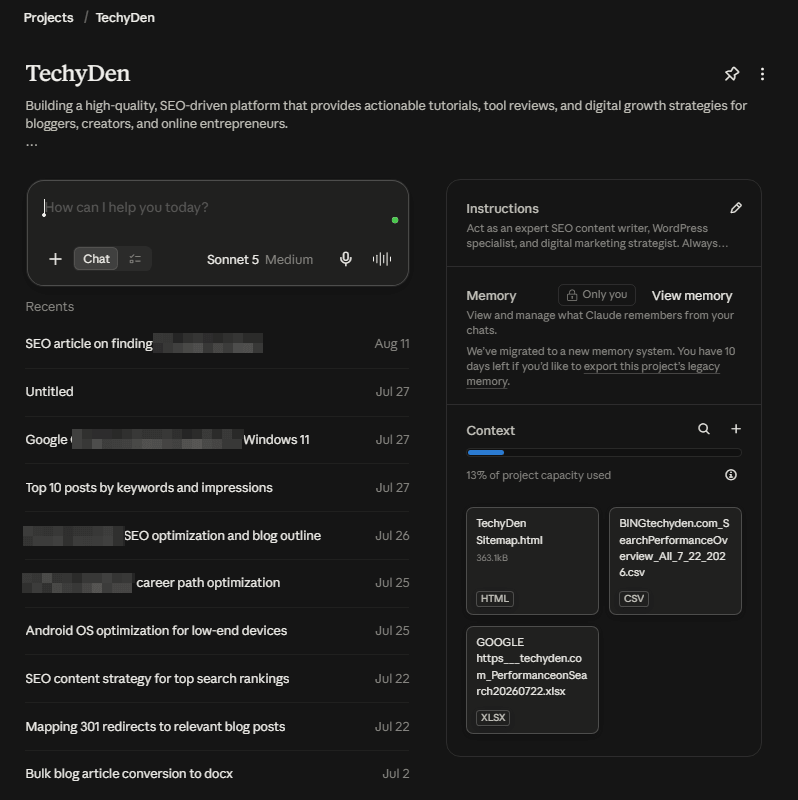
For content creators, projects can be useful when working on a long-term blog, website, or content campaign.
How Claude Projects can help bloggers
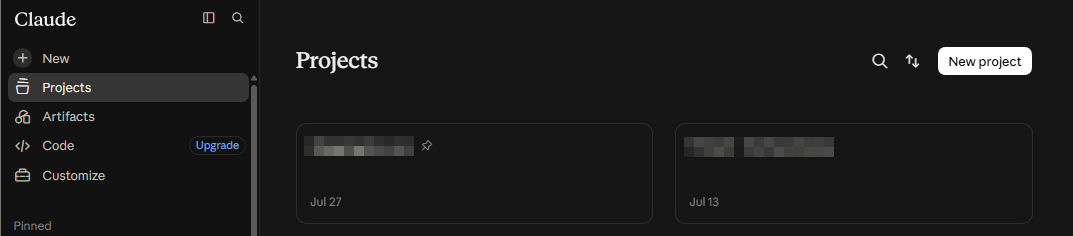
You could create a Claude Project for your TechyDen content workflow and use it for tasks such as:
- Planning a series of AI tool reviews.
- Storing brand voice guidelines.
- Organizing content briefs.
- Working with previous drafts.
- Maintaining consistent writing instructions.
- Developing a content cluster around AI tools.
For example, you could provide Claude with your preferred article structure, writing style, and content guidelines. This can help make future writing tasks more consistent.
Claude AI memory
Claude also offers memory-related capabilities. Anthropic’s product information describes Projects as a way to organize conversations and maintain context, while its product updates have introduced additional memory and workflow features.
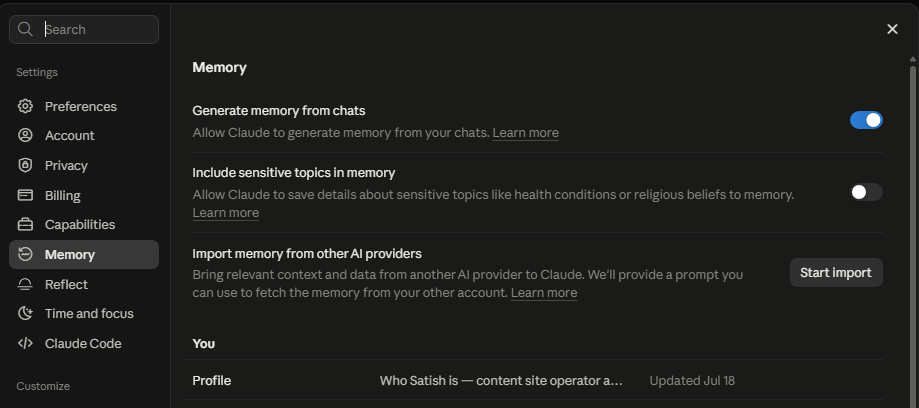
The exact memory functionality and availability may depend on the current plan and product settings.
For bloggers: Use project instructions and relevant source documents to help Claude understand your content workflow.
Do not assume that every past conversation or every detail about your website is automatically available in every new chat.
5. File and PDF Analysis
Claude can analyze uploaded documents and images, making it useful for content creators who work with research papers, reports, PDFs, spreadsheets, and existing articles.
Anthropic lists document and image analysis among Claude’s capabilities.
What can Claude do with uploaded files?
Depending on the supported file type and available features, Claude can help you:
- Summarize long documents.
- Extract important points.
- Explain technical information.
- Review an existing article.
- Analyze tables and data.
- Compare information across documents.
- Generate content ideas from research material.
Example: Using Claude for a research-based blog post
Suppose you are writing an article about AI agents. You can upload a relevant research paper or report and ask Claude to:
Summarize this PDF in simple language. Extract the key concepts, important statistics, and practical examples. Create a blog post outline based on the information, and identify any claims that need further verification.
This can save time when you are working with lengthy source material.
Important limitations
AI-generated summaries should not be treated as a substitute for reading important source documents.
Always check whether Claude has correctly interpreted the information, especially when working with scientific papers, technical documentation, or statistics.
For biochemistry and educational content, this is especially important because small errors in scientific terminology or explanations can change the meaning of a concept.
6. Artifacts
Claude AI Artifacts is a feature that allows Claude to create substantial, standalone content in a dedicated workspace alongside the conversation.
Anthropic’s official documentation describes Artifacts as useful for creating and editing documents, code, websites, diagrams, visualizations, and interactive content.
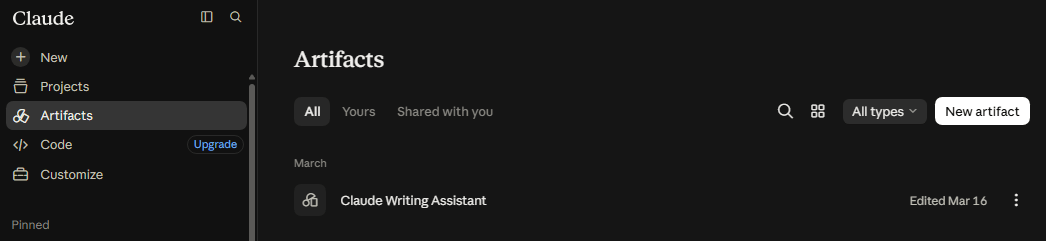
This is one of the more interesting features for bloggers and tech creators because it goes beyond generating plain text in a chat window.
What can you create with Claude Artifacts?
Examples include:
- Documents and Markdown content.
- Code snippets.
- Simple websites.
- SVG graphics.
- Diagrams and flowcharts.
- Interactive visualizations.
- Other shareable creations.
How bloggers can use Artifacts
You can ask Claude to create a simple content-related tool or visual.
For example:
Create an interactive SEO checklist for beginner bloggers. Include keyword research, content structure, on-page SEO, internal linking, and content promotion.
Claude can generate an artifact that you can inspect and refine.
Depending on the type of artifact, you may be able to edit it, view the underlying code, and export or share the result.
Why Artifacts matter for TechyDen
Artifacts may be useful for creating:
- SEO checklists.
- Blogging calculators.
- Simple HTML tools.
- Content planning templates.
- Interactive diagrams.
- Small educational resources.
However, you should not assume that every artifact is ready for production use. Test generated code, check accessibility, and review security before embedding tools on a public website.
7. Claude Code
Claude Code is Anthropic’s coding-focused tool for developers.
It is designed to assist with software engineering tasks such as writing code, debugging, and working with codebases.
Anthropic also describes Claude Code as part of its developer-focused AI tooling.
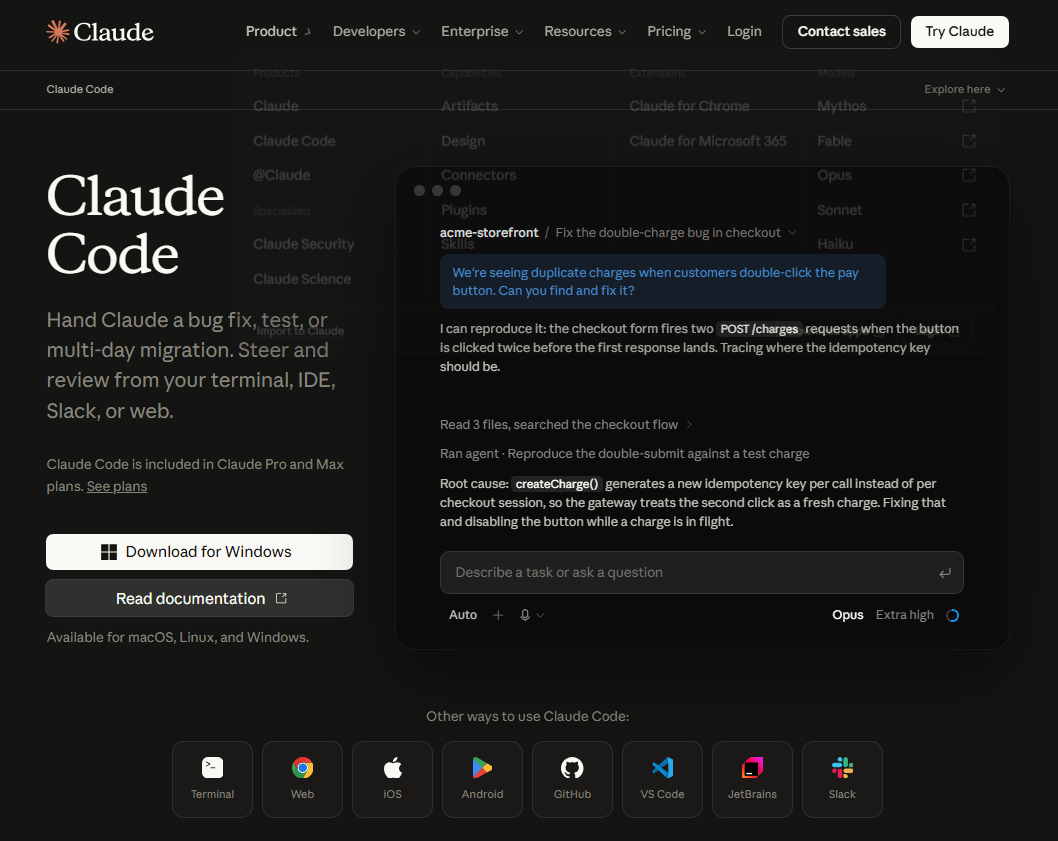
Although Claude Code is not primarily a blogging tool, it can be useful for bloggers who manage WordPress websites or create technical projects.
How Claude Code can help WordPress users
Potential use cases include:
- Understanding WordPress theme files.
- Reviewing PHP, HTML, CSS, and JavaScript.
- Debugging website code.
- Creating small scripts.
- Explaining technical errors.
- Assisting with plugin development.
- Working with website-related codebases.
For example, a developer could ask Claude Code to explain a PHP function or help investigate a bug in a WordPress plugin.
Claude Code for technical bloggers
If you publish tutorials about WordPress, coding, or AI tools, Claude Code can help you understand technical concepts and prepare examples.
However, generated code should always be reviewed and tested before using it on a live website. Make backups before making changes to important WordPress files.
8. Document and Presentation Tools
Claude has expanded beyond text chat into document and presentation workflows. Anthropic’s product announcements describe Claude’s ability to create files and work with documents, spreadsheets, and slides.
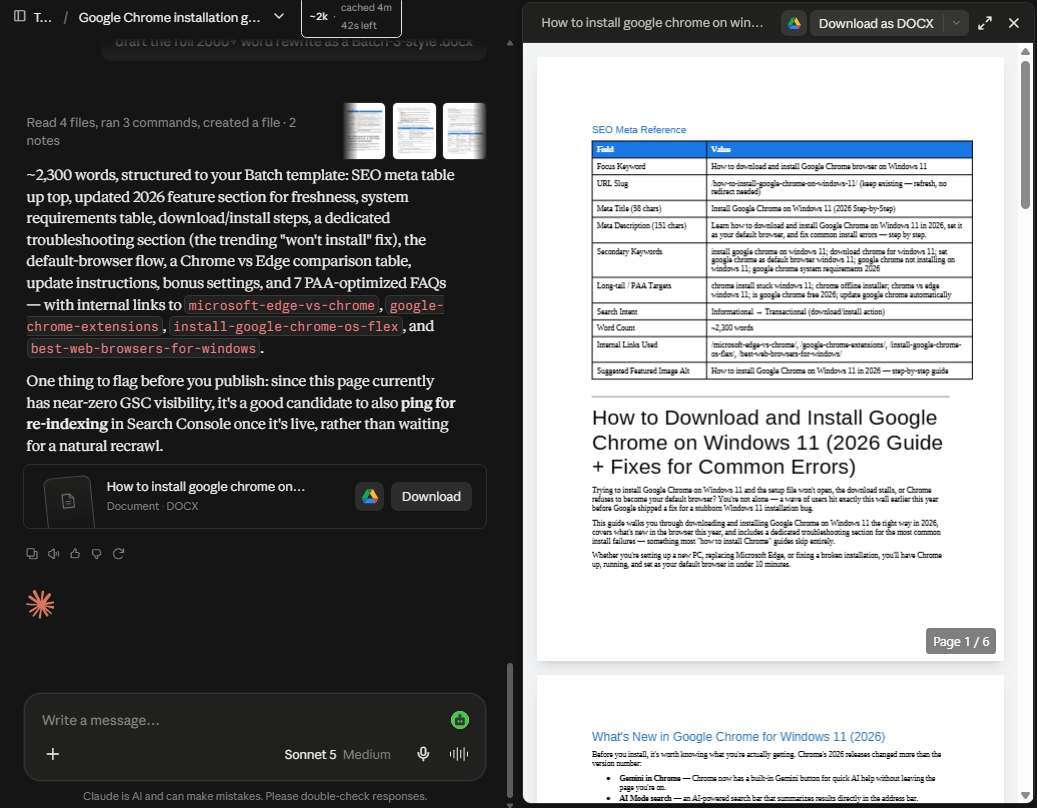
Anthropic also announced Claude Docs and Claude Slides in September 2026, introducing dedicated document and presentation creation and editing capabilities. Availability and supported plans should be checked before publishing because these features may change during rollout.
What can content creators do with these tools?
Potential uses include:
- Drafting articles in document format.
- Creating presentation outlines.
- Preparing slide content.
- Developing content briefs.
- Turning research into structured documents.
- Creating presentation material for tutorials or webinars.
For example, a blogger can ask Claude to transform an article about AI agents into a presentation outline containing:
- What are AI agents?
- How agentic AI works.
- Examples of AI agent tools.
- Benefits for bloggers.
- Limitations and future considerations.
Are Claude’s document and presentation tools useful?
They can be useful for creators who regularly prepare reports, presentations, and structured documents. The practical value depends on the quality of the generated content, available export formats, and whether the tools meet your workflow requirements.
For TechyDen, this feature area is worth testing because it can connect blog writing with presentation creation and content repurposing.
Quick Summary of Claude AI Features
| Feature | Use for content creators |
|---|---|
| Current model options | Choose models for different writing, reasoning, and coding tasks. |
| Writing and editing | Draft articles, improve readability, and refine content. |
| Web search and research | Research current information and gather source material. |
| Projects and memory | Organize content work and maintain relevant context. |
| File and PDF analysis | Summarize documents and extract useful information. |
| Artifacts | Create documents, tools, diagrams, and interactive content. |
| Claude Code | Assist with WordPress and other technical coding tasks. |
| Document and presentation tools | Create structured documents and presentation content. |
9. Claude in Chrome
Claude in Chrome brings Claude directly into the browser and allows it to assist with browser-based tasks.
For bloggers and content creators, this can be useful for:
- Competitor research.
- Website research.
- Content research.
- SEO research.
- Reviewing web pages.
- Collecting information from multiple websites.
- Working with browser-based tools.
Claude in Chrome is particularly useful when your workflow involves moving between websites and Claude. Instead of manually copying every piece of information into a chat, Claude can work with supported browser-based tasks.
Access to Claude in Chrome depends on the Claude plan and current availability.
For users interested in using Claude directly in their browser, see our guide to Claude in Chrome.
10. Claude Cowork
Claude Cowork introduced a way to hand longer, multi-step tasks to Claude rather than completing every step manually in a chat.
Anthropic’s current Claude experience increasingly incorporates these capabilities directly into Claude. Users can hand off tasks such as creating reports, spreadsheets, and presentations and allow Claude to continue working through multiple steps.
For content creators, this can be useful for larger workflows such as researching a topic, organizing information, preparing a document, and producing supporting content.
Claude also supports more advanced computer-based workflows through Cowork. Learn more in our guide to Claude Cowork.
The product naming and feature availability can change as Anthropic continues to integrate Cowork capabilities into Claude.
11. Claude Skills: Customize Your AI Workflow
Claude Skills allow users to give Claude reusable instructions, resources, and scripts for specific tasks.
Instead of explaining the same workflow every time, you can create a Skill that contains the rules and resources Claude should follow.
For example, a blogger could create a TechyDen Content Skill containing:
- Brand voice guidelines.
- Article structure.
- SEO requirements.
- Internal linking rules.
- Meta description guidelines.
- Affiliate disclosure requirements.
- Formatting preferences.
Claude can identify when a relevant Skill should be used and load the necessary information for the task.
Skills can also be used across Claude apps, Claude Code, and the API, making them useful for both individual creators and organizations.
For professional content creators, Skills can help make AI-assisted content more consistent across multiple articles and projects.
12. Claude Task Handoff and Scheduling
Claude can handle longer, multi-step tasks instead of requiring users to provide instructions for every individual step.
With task handoff and scheduling capabilities available on supported plans, users can delegate certain workflows to Claude and allow it to continue working in the background.
For bloggers, possible workflows include:
- Preparing a content research report.
- Organizing information into a document.
- Creating a presentation from research.
- Working with spreadsheets.
- Preparing content ideas for future publishing.
- Repeating certain workflows on a schedule.
This makes Claude more useful as a workflow assistant rather than simply a chatbot that answers one prompt at a time.
13. Claude Connectors
Claude Connectors allow users to connect Claude with supported external services and data sources.
Instead of manually uploading or copying information into every conversation, connected services can provide Claude with relevant context for supported tasks.
Depending on the account and available integrations, Claude can work with services such as Google Workspace, Microsoft 365, Slack, GitHub, and other supported tools.
For bloggers and content teams, connectors can simplify workflows involving research documents, emails, project information, files, and team communications.
Connector availability varies by plan and service, so check Claude’s current integration list before relying on a specific connector.
14. Claude Voice Mode
Claude also supports voice-based conversations on supported plans and platforms.
Instead of typing every prompt, users can speak with Claude to brainstorm ideas, discuss a project, ask questions, or work through a problem.
For bloggers, Voice Mode can be useful for:
- Brainstorming article ideas.
- Planning content calendars.
- Developing article outlines.
- Discussing writing ideas.
- Reviewing content concepts.
- Thinking through research questions.
Voice Mode is particularly useful when you want to capture ideas quickly without interrupting your workflow to type every instruction.
Latest Claude AI Features
Claude has evolved beyond a traditional AI chatbot. In 2026, Anthropic’s platform includes writing, research, coding, document creation, browser assistance, projects, memory, connectors, Skills, and other productivity features.
- Claude Code: Claude Code helps developers work with code directly from their development environment. It can assist with writing, modifying, debugging, explaining, and working through larger coding tasks.
- Claude in Chrome: Claude in Chrome brings Claude into the browser for supported users. It can assist with browser-based research and tasks, making it useful for workflows such as competitor research, website analysis, and online information gathering.
- Claude Research: Research helps users perform deeper research tasks instead of relying only on a single response. This can be useful when researching topics for articles, reports, and other long-form content.
- Claude Design, Docs and Slides: Claude can assist with creating and editing professional documents, presentations, and other files. These capabilities can be useful for bloggers who also create reports, presentations, lead magnets, and downloadable resources.
- Claude Science: Claude Science provides additional capabilities for scientific and research-oriented workflows. It is particularly relevant to researchers, students, academics, and professionals working with scientific information.
- Projects: Projects allow users to organize related conversations, files, and instructions around a specific subject or workflow. Bloggers can create separate projects for different websites, content categories, or long-term projects.
- Memory: Claude can use memory across conversations to provide more continuity between sessions. This can reduce the need to repeat information when working on ongoing projects.
- Connectors: Connectors allow Claude to work with supported external tools and data sources. This can make it easier to bring information from connected services into an AI workflow.
- Skills: Skills allow Claude to use reusable instructions, resources, and scripts for specialized workflows. They can help users create more consistent results for tasks such as document creation, spreadsheets, presentations, and organization-specific processes.
- Voice Mode: Claude also supports voice-based interaction on supported plans and platforms. This can be useful for brainstorming, discussing ideas, and working through tasks without typing every prompt.
Together, these features make Claude more useful as a complete productivity and content workflow rather than simply a text-generation tool.
Our Take on Claude AI Features
Claude AI offers more than basic text generation. Its writing, research, file analysis, Projects, Artifacts, and coding capabilities make it relevant to bloggers, SEO professionals, and technical content creators.
However, the best way to judge these features is through practical testing. In the next section, we will explore how to use Claude AI for blogging and content creation, including blog post writing, SEO content planning, editing, and content repurposing.
Claude AI for Bloggers and Content Creators: Keyword research assistance, outlines, blog writing, editing, SEO briefs, content repurposing, and social media content.
Claude AI for Bloggers and Content Creators
Creating high-quality content requires more than simply writing paragraphs. Bloggers need to research topics, understand search intent, plan article structures, write engaging content, optimize for SEO, and promote their work across different platforms.
This is where Claude AI for bloggers and content creators can become a useful writing and productivity assistant. Instead of using AI only to generate a complete article, you can use Claude throughout your content workflow—from brainstorming ideas to editing a finished blog post.
Whether you run a technology blog, SEO website, affiliate marketing blog, or educational website, Claude can help with several content creation tasks. However, it works best when you combine AI assistance with your own expertise, keyword research, and editorial judgment.
Let’s explore how to use Claude AI for blogging and content creation.
1. Keyword Research Assistance
Keyword research is one of the first steps in creating an SEO-friendly blog post. It helps you understand what people are searching for and what information they expect to find.
Claude AI can assist with keyword research by generating related topic ideas, identifying potential long-tail keywords, and organizing keyword lists based on search intent.
For example, if you want to write about AI writing tools, you can ask Claude to suggest related keywords and content angles.
Example Claude AI prompt for keyword research:
I want to write a blog post about AI writing tools for bloggers. Suggest relevant primary keywords, secondary keywords, long-tail keywords, and related questions. Group them according to informational, commercial, and comparison search intent. Do not invent search volume or keyword difficulty data.
Claude can help you build an initial keyword list. You can then validate those keywords using SEO tools such as Semrush, Ahrefs, or Google Keyword Planner.
How Claude helps with keyword research
- Generates related keyword ideas.
- Suggests long-tail keyword variations.
- Groups keywords by search intent.
- Identifies possible content gaps.
- Suggests questions readers may ask.
- Helps organize keywords into content clusters.
Important: Claude AI does not automatically provide reliable search volume, keyword difficulty, or ranking data for every keyword. Use dedicated SEO tools to check actual metrics before choosing your target keyword.
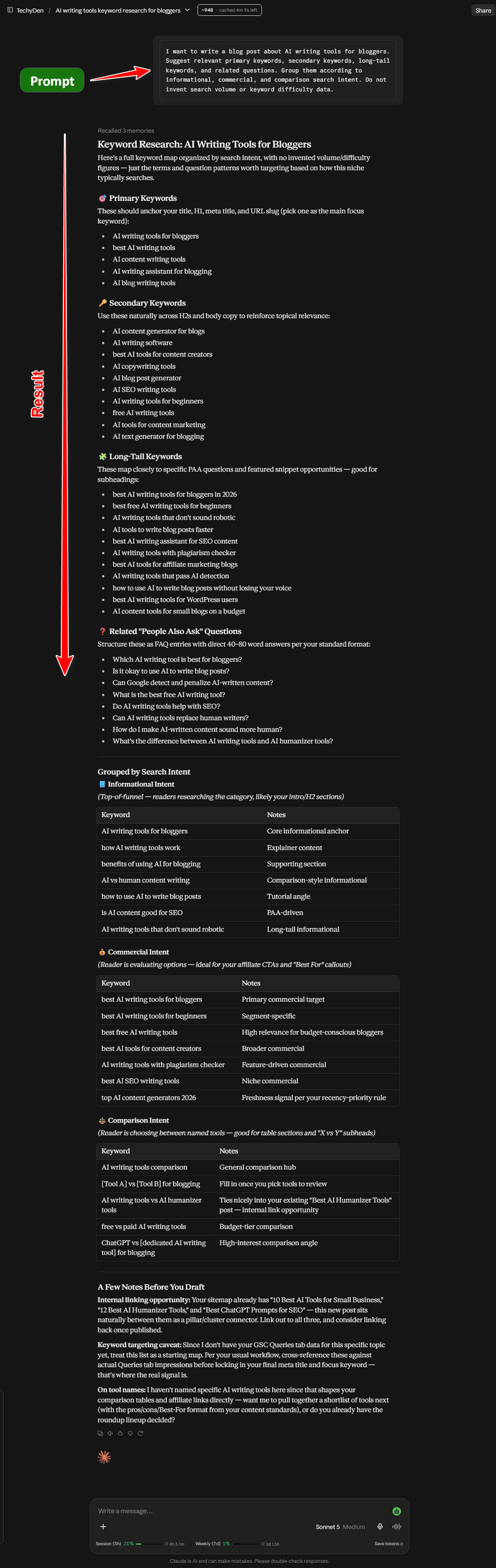
For example, when planning this Claude AI review, you could use the primary keyword “Claude AI review” and ask Claude to suggest supporting terms such as “Claude AI pricing,” “Claude AI features,” and “Claude AI for content creators.”
This makes Claude useful for brainstorming and organizing SEO research, but not a replacement for professional keyword research tools.
2. Creating Blog Post Outlines
A well-organized outline helps you write a comprehensive article without missing important topics. It also makes it easier to cover search intent and maintain a logical reading flow.
Claude AI can generate detailed blog post outlines based on your topic, audience, and SEO requirements.
For example, if you are writing an article about the best AI tools for bloggers, you can ask Claude to create an outline with an introduction, feature sections, comparisons, FAQs, and a conclusion.
Example Claude AI blog outline prompt:
Create a detailed SEO-friendly outline for a blog post titled "Best AI Tools for Bloggers." The target audience is beginner and experienced bloggers. Include H2 and H3 headings, search intent, practical examples, and FAQs. Avoid unnecessary sections and keep the structure easy to follow.
Claude can generate an outline that you can review and customize before writing the article.
Benefits of using Claude for blog outlines
- Saves time during content planning.
- Helps organize complex topics.
- Suggests useful H2 and H3 headings.
- Identifies missing subtopics.
- Makes long-form articles easier to structure.
- Helps maintain a consistent content format.
For TechyDen, Claude can be useful when creating pillar articles and supporting posts around topics such as AI agents, WordPress, blogging tools, and SEO.
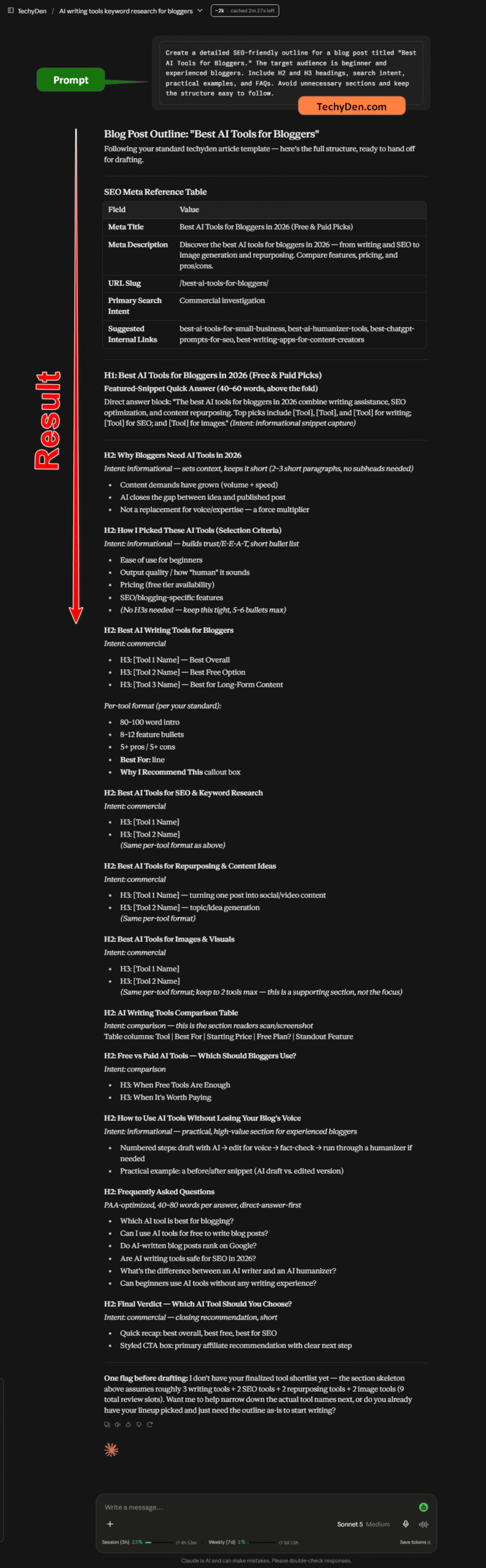
However, a good outline should not be accepted without review. Compare it with the search results, competing articles, and the questions your audience actually needs answered.
3. Blog Writing with Claude AI
One of the main reasons content creators explore Claude AI is its ability to generate written content. Claude can help draft blog introductions, individual sections, product descriptions, explanations, and conclusions.
It can also help transform rough notes into a more readable article.
For example, you can provide Claude with a topic, target audience, article structure, and writing instructions.
Example Claude AI blog writing prompt:
Write an informative section about how AI tools help bloggers with content creation. Use a clear, professional, beginner-friendly tone. Include practical examples and explain the limitations of AI-generated content. Avoid exaggerated claims and unsupported statistics.
Claude can generate a draft based on your instructions. You can then edit the output to match your writing style and the needs of your audience.
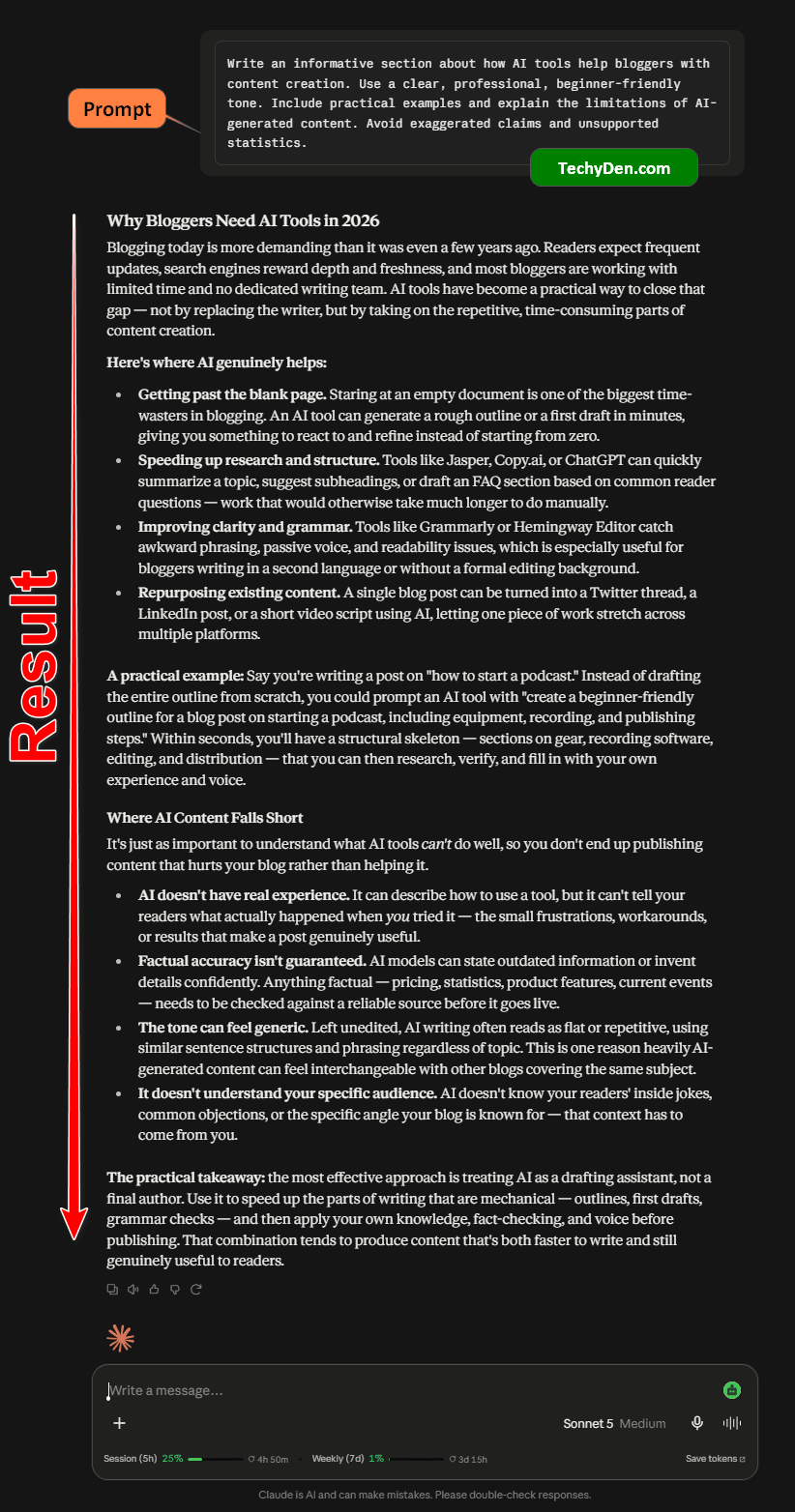
What Claude can help write
- Blog post introductions.
- Complete article drafts.
- Product review sections.
- How-to tutorials.
- Listicle content.
- FAQs.
- Meta descriptions.
- Social media captions.
- Email newsletter drafts.
- Content summaries.
Is Claude AI good for long-form content?
Claude can assist with long-form content, particularly when you provide a clear structure and relevant source material. However, generating a lengthy article in one prompt is not always the best workflow.
A better approach is to divide the article into sections.
For example:
- Create the article outline.
- Draft the introduction.
- Write each major section separately.
- Review the content for accuracy.
- Improve transitions and readability.
- Add original examples and practical insights.
- Edit the complete article before publishing.
This approach gives you more control over the final result.
My recommendation: Use Claude as a writing assistant rather than publishing its output without editing. Your own experience, examples, and expertise are what make a blog post more useful and trustworthy.
4. Content Editing and Rewriting
Content editing is another area where Claude AI can help bloggers. Even when you write an article yourself, you may need to improve its readability, remove repetition, or make the explanations easier to understand.
Claude can review existing content and suggest improvements based on your instructions.
For example, you can paste a paragraph from your blog and ask Claude to rewrite it in a clearer and more engaging style.
Example Claude AI editing prompt:
Edit the following blog post section for grammar, readability, and clarity. Preserve the original meaning and important technical details. Remove unnecessary repetition. Use short paragraphs and a professional, friendly tone. Do not add unsupported facts.
Claude can help with several editing tasks.
Common editing tasks
- Grammar and spelling: Identify grammatical errors, spelling mistakes, and awkward sentences.
- Readability improvement: Simplify complicated explanations and improve sentence flow.
- Tone adjustment: Rewrite content for beginners, professionals, or a specific audience.
- Content shortening: Remove unnecessary words and make lengthy paragraphs more concise.
- Content expansion: Add explanations and examples where a section needs more depth.
- Headline improvement: Suggest clearer and more engaging headings.
Example: Editing a technical blog
Suppose you have written an explanation of how AI agents work. The content may be technically accurate but difficult for beginners to understand.
You can ask Claude to rewrite it using simple language while preserving the technical meaning.
This can be useful for TechyDen articles about AI, WordPress, SEO, and other technical subjects.
However, you should always review the rewritten content to ensure that Claude has not changed the meaning or introduced incorrect information.
5. Creating SEO Content Briefs
A content brief is a useful document that explains what a blog post should cover. It helps writers understand the target keyword, audience, search intent, article structure, and important topics.
Claude AI can help create SEO content briefs from your keyword research and content strategy.
For example, if your target keyword is “Claude AI review,” you can ask Claude to prepare a content brief for a technology review article.
Example SEO content brief prompt:
Create an SEO content brief for the keyword "Claude AI review." The target audience is bloggers and content creators. Include search intent, suggested title, introduction angle, H2 and H3 headings, related keywords, FAQs, and a recommended article structure. Do not invent search volume or ranking data.
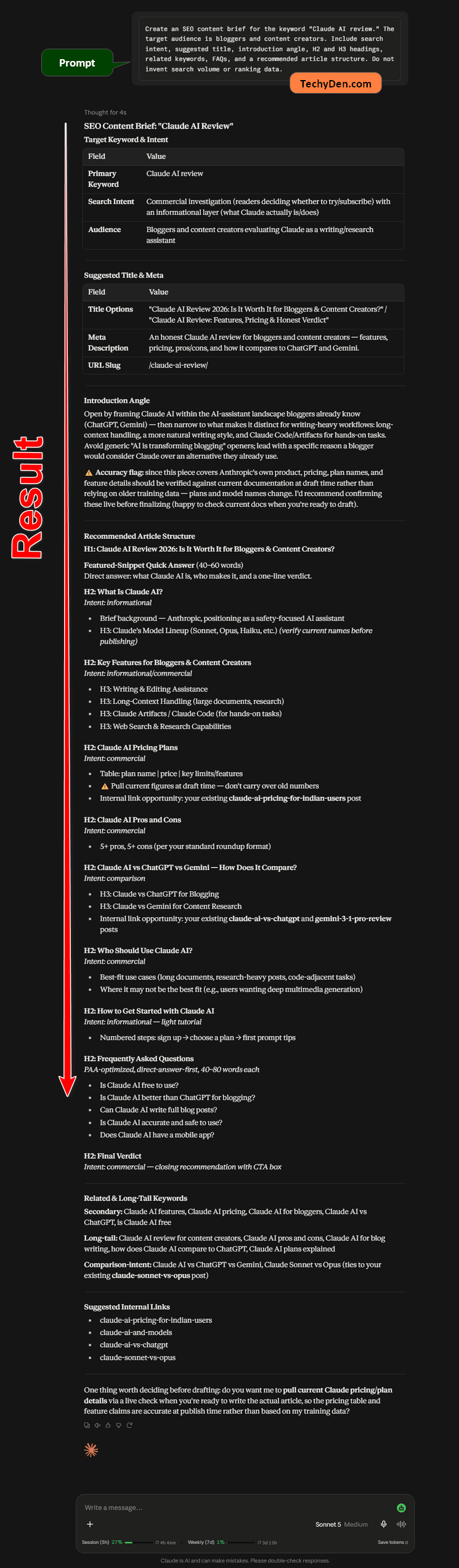
A content brief generated by Claude can include the following:
| Content brief element | What Claude can help with |
|---|---|
| Primary keyword | Organize the main target keyword. |
| Search intent | Explain what readers may want to know. |
| Target audience | Define the intended readers. |
| Article title | Suggest SEO-friendly title ideas. |
| H2 and H3 headings | Build a logical content structure. |
| Related keywords | Suggest relevant supporting terms. |
| FAQs | Generate potential reader questions. |
| Content angle | Suggest ways to make the article useful. |
How to improve the brief
After Claude generates the brief, compare it with:
- Google search results.
- People also ask questions.
- Competitor article structures.
- Your own Google Search Console data.
- Relevant product documentation.
- Your audience’s needs.
This helps turn a generic AI-generated outline into a more useful SEO content plan.
For your TechyDen website, Claude can be particularly useful for creating briefs for product reviews, AI tool comparisons, WordPress tutorials, and blogging guides.
6. Content Repurposing
Creating content for multiple platforms can take a lot of time. A single blog post can often be adapted into social media posts, email newsletters, video scripts, and short-form content.
Claude AI can help repurpose existing content into different formats while keeping the main message consistent.
For example, you can provide Claude with a published blog post and ask it to create a LinkedIn post, Facebook caption, or short video script.
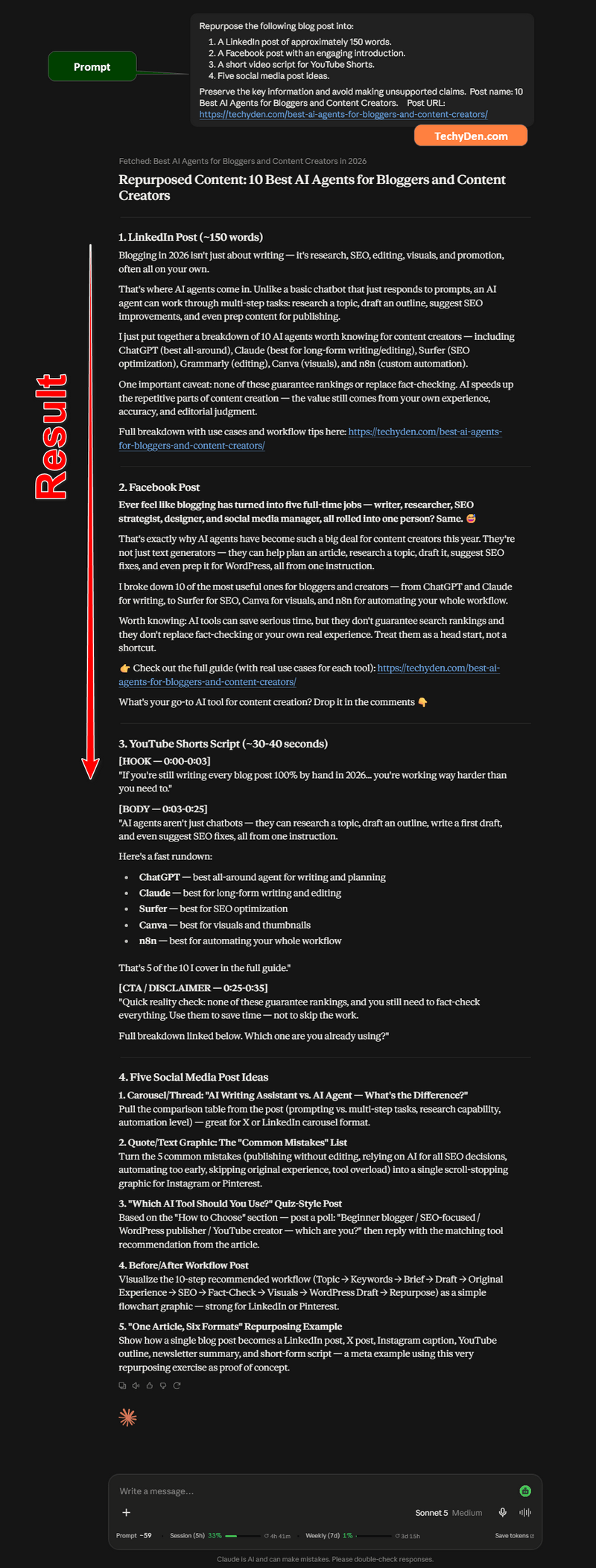
Example content repurposing prompt:
Repurpose the following blog post into:
- A LinkedIn post of approximately 150 words.
- A Facebook post with an engaging introduction.
- A short video script for YouTube Shorts.
- Five social media post ideas.
Preserve the key information and avoid making unsupported claims.
Claude can help you transform one piece of content into several formats.
Content formats you can create
- LinkedIn posts.
- Facebook captions.
- Instagram captions.
- YouTube video scripts.
- Short-form video ideas.
- Email newsletters.
- Content summaries.
- Blog post teasers.
- Social media carousel text.
Example for TechyDen
Suppose you publish an article titled “Best AI Tools for Blogging.”
You can ask Claude to create:
- A Facebook post introducing the article.
- A LinkedIn post explaining the benefits of AI for bloggers.
- A short video script covering three useful AI tools.
- An email newsletter promoting the article.
- Five social media posts based on the article’s key points.
This can help you maintain a consistent content publishing workflow across different platforms.
However, avoid copying the same content word-for-word everywhere. Each platform has a different audience and content format, so you should edit the output to match the platform.
7. Social Media Content Creation
Social media promotion is an important part of content marketing. Publishing a blog post is only the beginning; you also need to share it with your audience.
Claude AI can help create social media content based on your blog posts, products, and content campaigns.
For bloggers, this can reduce the time spent writing captions and promotional messages.
Example social media prompt:
Create five Facebook post ideas to promote a blog post about Claude AI for content creators. Use a friendly and informative tone. Include one question-based post, one educational post, one short promotional post, one practical tip, and one discussion prompt. Avoid exaggerated claims.
Claude can generate different content angles that you can review and adapt.
Social media tasks Claude can assist with
- Facebook content: Create educational posts, discussion prompts, and article promotion captions.
- LinkedIn content: Write professional posts about AI tools, blogging, SEO, and productivity.
- Instagram content: Suggest captions, carousel text, and short educational content ideas.
- YouTube content: Create video titles, descriptions, outlines, and scripts.
- Email marketing: Draft newsletter introductions and article promotion emails.
For TechyDen, this can be useful when promoting articles about AI tools, WordPress themes, hosting services, and blogging tips.
8. Claude AI for a Complete Blogging Workflow
The real value of Claude AI for content creators comes from combining multiple features into one workflow.
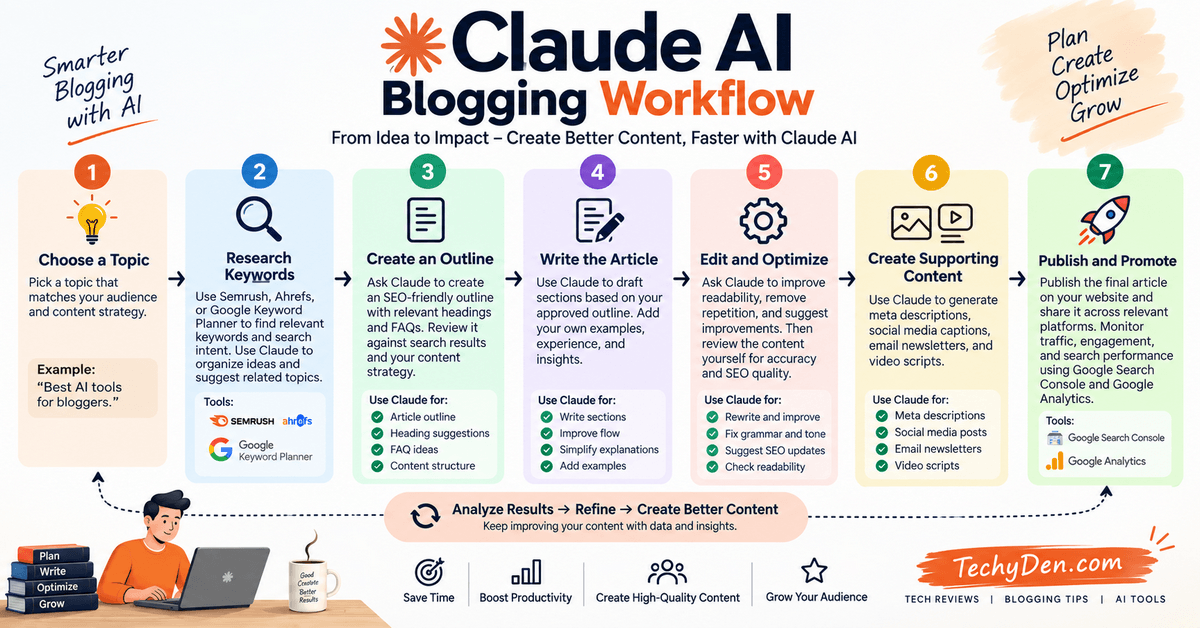
Instead of using Claude only for writing, you can use it across the entire content creation process.
- Step 1: Choose a topic: Start with a topic that matches your audience and content strategy. Example: “Best AI tools for bloggers.”
- Step 2: Research keywords: Use Semrush, Ahrefs, or Google Keyword Planner to identify relevant keywords and search intent. Use Claude to organize your keyword ideas and suggest related topics.
- Step 3: Create an outline: Ask Claude to create an SEO-friendly outline with relevant headings and FAQs. Review the outline against the search results and your own content strategy.
- Step 4: Write the article: Use Claude to draft sections based on your approved outline. Add your own examples, experience, and insights.
- Step 5: Edit and optimize: Ask Claude to improve readability, remove repetition, and suggest improvements. Then review the content yourself for accuracy and SEO quality.
- Step 6: Create supporting content: Use Claude to generate meta descriptions, social media captions, email newsletters, and video scripts.
- Step 7: Publish and promote: Publish the final article on your website and share it across relevant platforms. Monitor traffic, engagement, and search performance using Google Search Console and Google Analytics.
Claude AI for Bloggers: Pros and Limitations
| Benefits | Limitations |
|---|---|
| Helps generate content ideas. | Does not replace keyword research tools. |
| Creates article outlines quickly. | May produce inaccurate information. |
| Assists with blog writing. | Requires human editing and fact-checking. |
| Improves readability and tone. | May not match your writing style automatically. |
| Helps repurpose content. | Social media output needs platform-specific editing. |
| Supports content planning. | Current features and usage limits depend on the available plan. |
Our Take: Is Claude AI Useful for Bloggers?
Claude AI can be a useful assistant for bloggers and content creators who want to speed up content planning, writing, editing, and promotion.
Its biggest advantage is that you can use it for multiple content tasks instead of relying on it only for article generation. It can help turn a topic idea into an outline, transform notes into a draft, improve existing content, and create promotional material.
However, Claude should not replace your own editorial judgment. Keyword research, fact-checking, originality, and content quality still depend on the creator.
For TechyDen, Claude is worth exploring as part of an AI-assisted blogging workflow. The next step is to test how it performs on real content creation tasks and compare the results with other AI tools.
Claude AI Hands-on Content Writing Test
A feature list can tell you what Claude AI is designed to do, but it does not always show how useful it is in real content creation. For bloggers and SEO professionals, the important questions are
- Can Claude write a helpful article? Does it follow instructions?
- How much editing does the output require? And
- How does it compare with other AI writing tools?
In this section of our Claude AI review 2026, we will look at a practical content writing test designed for bloggers and content creators. The goal is to evaluate Claude using the same prompts and compare its output with competing AI tools.
Testing note: This is a hands-on testing framework and review methodology. The actual output samples, editing times, and accuracy scores should be recorded from your own tests before publication. The observations below explain what to measure rather than presenting unverified test results as completed experiments.
To evaluate Claude as a content-writing assistant, I tested it across several tasks that are relevant to bloggers and content creators.
The goal was not simply to see whether Claude could generate text, but to evaluate how useful the output was after considering accuracy, structure, readability, originality, and editing requirements.
Tests Included
| Test | Model Used | What I Evaluated |
|---|---|---|
| Blog introduction | Claude Sonnet 5.5 | Tone and readability |
| SEO article outline | Claude Sonnet 5.5 | Structure and search intent |
| Long-form article | Claude Sonnet 5.5 | Content quality and consistency |
| Content rewriting | Claude Sonnet 5.5 | Readability and originality |
| Research task | Claude Opus 5.5 | Reasoning and information organization |
| FAQ generation | Claude Sonnet 5.5 | Relevance and PAA-style answers |
| Meta descriptions | Claude Sonnet 5.5 | Length and search intent |
What I Looked For
During the testing process, I evaluated:
- How well Claude followed the instructions.
- Whether the content sounded natural.
- How much editing was required.
- Whether important information was missing.
- Whether factual claims required additional verification.
- How well the content matched the intended search intent.
- Whether the output was useful for a real publishing workflow.
How We Tested Claude AI for Content Creation
To evaluate Claude fairly, use the same topic, instructions, source material, and content requirements across Claude and competing AI tools.
For example, you can compare Claude with ChatGPT and Google Gemini on a blog post about AI tools for bloggers.
The test should include:
- The same topic and primary keyword.
- The same target audience.
- The same article length.
- The same content structure.
- The same source material.
- The same writing tone.
- The same instructions for accuracy and originality.
This approach helps reduce differences caused by the prompt rather than the AI tool itself.
Tools Included in the Comparison
For this review, you can compare the following AI assistants:
| AI tool | Main purpose in the test |
|---|---|
| Claude AI | Content writing, editing, and research assistance. |
| ChatGPT | Blog writing, SEO planning, and content editing. |
| Google Gemini | Content drafting and research-related tasks. |
Use the same model tier and comparable settings where possible. Record the model name, plan, and test date because AI tools and their capabilities change over time.
If you are deciding between the two popular AI assistants, our Claude vs ChatGPT comparison looks at their features, capabilities, and best use cases.
Test 1: Blog Post Outline Creation
The first test evaluates how well each AI tool creates a structured blog post outline.
A good outline should cover the main topic, address the reader’s search intent, and provide a logical flow between sections.
Prompt used for the test:
Create an SEO-friendly blog post outline for the keyword "best AI tools for bloggers." The target audience is beginner and experienced bloggers. Include H2 and H3 headings, practical examples, pros and cons, and FAQs. Avoid unnecessary sections and do not invent keyword search volume or ranking data.
What to evaluate
- Does the outline match the primary keyword?
- Does it cover the reader’s likely questions?
- Are the headings organized logically?
- Does it include useful supporting topics?
- Are there unnecessary or repetitive sections?
- Can the outline be used to write a comprehensive article?
Quality observation
Claude’s outline should be judged by how well it supports the complete article, not simply by the number of headings it generates.
A shorter, well-organized outline may be more useful than a long outline filled with repetitive topics.
Test 2: Blog Writing
The second test focuses on the actual writing quality of the AI-generated article.
For this test, choose a topic that is relevant to your website and provide the same instructions to all tools.
Example prompt:
Write a 1,500-word blog post about the best AI tools for bloggers. Use a clear, professional, beginner-friendly tone. Include an introduction, H2 headings, practical examples, pros and cons, and a conclusion. Avoid exaggerated claims and unsupported statistics. Make the article useful for bloggers who want to improve their content creation workflow.
After generating the content, compare the results manually.
What to evaluate
- Writing quality: Does the article read naturally, or does it sound repetitive and generic?
- Structure: Does the content follow the requested headings and maintain a logical flow?
- Usefulness: Does the article provide practical information, examples, and actionable advice?
- Originality: Does the content offer meaningful insights, or does it rely on common AI-generated statements?
- Accuracy: Are the product names, features, and factual claims correct?
- Editing requirements: How much work is needed before the article is ready for publication?
Test 3: Content Editing
Many bloggers already have existing articles that need improvement. An AI writing assistant should be useful not only for generating new content but also for improving existing drafts.
For this test, provide each AI tool with the same paragraph from your blog.
Example editing prompt:
Edit the following blog post section for grammar, readability, and clarity. Preserve the original meaning and important technical details. Remove unnecessary repetition and use a professional, friendly tone. Do not add unsupported facts.
What to evaluate
- Grammar and spelling corrections.
- Sentence clarity.
- Paragraph structure.
- Preservation of the original meaning.
- Tone and readability.
- Unnecessary changes or invented information.
A useful editing tool should improve the content without removing important details or changing the author’s intended message.
For TechyDen, this test can be performed on articles about AI tools, WordPress, SEO, and blogging.
Test 4: SEO Content Brief
The next test evaluates how well Claude and competing AI tools assist with SEO content planning.
A good content brief should help a writer understand the target keyword, audience, search intent, article structure, and important topics to cover.
Example prompt:
Create an SEO content brief for the keyword "Claude AI review." The target audience is bloggers and content creators. Include the search intent, suggested title, introduction angle, H2 and H3 headings, related keywords, FAQs, and a recommended article structure. Do not invent search volume or keyword difficulty data.
What to evaluate
| Evaluation area | What to look for |
|---|---|
| Search intent | Does the brief address what readers want to know? |
| Keyword relevance | Are the suggested keywords related to the topic? |
| Article structure | Are the headings useful and logically organized? |
| Content depth | Does the brief cover important review topics? |
| Originality | Does it suggest a useful angle beyond generic AI content? |
| SEO accuracy | Does it avoid unsupported keyword metrics and claims? |
Claude can help create an initial content brief, but actual keyword research should be validated with tools such as Semrush, Ahrefs, and Google Search Console.
Test 5: Content Repurposing
A blog post can be transformed into several different content formats. This test evaluates how well each AI tool repurposes an existing article without losing its main message.
Example prompt:
Repurpose the following blog post into a LinkedIn post of approximately 150 words, a Facebook post, five social media post ideas, and a short YouTube video script. Preserve the key information and avoid unsupported claims. Adapt the tone and structure for each platform.
What to evaluate
- Does the repurposed content preserve the original meaning?
- Are the posts suitable for their intended platforms?
- Does each version have a useful opening?
- Is the content engaging without exaggerated claims?
- Does the AI avoid repeating the same wording across formats?
For TechyDen, this can be useful when promoting articles about AI tools, WordPress plugins, hosting services, and blogging tips.
Editing Time and Accuracy
Writing quality is only one part of an AI content writing test. The amount of editing required is also important.
An AI tool that generates a quick draft but requires extensive corrections may not save as much time as expected.
How to measure editing time
Use the following process for each tool:
- Generate the article using the same prompt.
- Record the time taken to generate the draft.
- Read the article and identify factual or structural issues.
- Edit the article for clarity, accuracy, and usefulness.
- Record the total editing time.
- Note the major changes made before publication.
You can use a simple table to record your results.
| Metric | Claude AI | ChatGPT | Google Gemini |
|---|---|---|---|
| Draft generation time | Record test result | Record test result | Record test result |
| Editing time | Record test result | Record test result | Record test result |
| Factual corrections | Count corrections | Count corrections | Count corrections |
| Structure changes | Note changes | Note changes | Note changes |
| Final quality | Describe observations | Describe observations | Describe observations |
Important: Do not assign ratings or claim one tool is better based on a test unless you have actually performed the same evaluation across all tools. Different topics, prompts, models, and editing standards can produce different results.
Accuracy and Fact-Checking
AI-generated content should always be fact-checked before publication, especially for product reviews and technical articles.
For example, while testing Claude AI, you may ask it to explain the latest features of an AI writing tool. The output may contain outdated pricing, incorrect model names, or features that are available only on certain plans.
Check important claims against:
- Official product documentation.
- Official pricing pages.
- Company announcements.
- Reliable research sources.
- Your own hands-on testing.
For a Claude AI review, verify all claims about Claude’s models, pricing, usage limits, web search, Projects, Artifacts, and other capabilities before publishing.
What Makes a Good AI Content Writing Tool?
Based on the testing framework above, a useful AI writing assistant should be evaluated across several areas.
- Writing quality: Does it produce readable and useful content?
- Instruction following: Does it follow the requested tone, structure, and length?
- Editing efficiency: How much time is needed to improve the draft?
- Factual accuracy: Does it provide reliable information?
- SEO usefulness: Does it help with content planning without inventing keyword metrics?
- Workflow flexibility: Can it assist with outlines, drafts, editing, and repurposing?
- Human control: Can the writer easily review, revise, and improve the output?
These factors matter more than simply counting the number of features an AI tool offers.
Our Hands-on Testing Approach for TechyDen
For TechyDen, the most useful test would be based on a real article topic from your blogging and AI tools content cluster.
For example, you could test Claude on:
- A blog post about AI tools for bloggers.
- A review of an AI writing assistant.
- An SEO content brief.
- A WordPress tutorial.
- A content repurposing workflow.
Use the same prompt across Claude, ChatGPT, and Gemini, then compare the drafts and editing requirements.
This approach can produce original observations that make your review more valuable to readers.
Claude AI Content Writing Test
Claude AI has several capabilities that make it relevant to bloggers and content creators, including writing, editing, research assistance, and content planning.
However, the best way to understand its value is through practical testing. A feature list alone cannot tell you how much editing a draft requires or whether the generated content is accurate and useful.
For this reason, your Claude AI review should include real examples, screenshots, test dates, and clear observations from your own workflow.
In the next section, we will explore Claude AI pricing and plans, including the available subscription options and what content creators should consider before choosing a paid plan.
How I Use Claude in My Blogging Workflow
I don’t use Claude as a tool that simply generates an entire article and publishes it without review. For a professional blog such as TechyDen, I use Claude as a research, writing, editing, and productivity assistant within a broader human-led workflow.
The process starts with SEO data and ends with human review and original experience.
- Step 1: Keyword Research in Semrush: I start by using Semrush to research the primary keyword, related keywords, search intent, keyword difficulty, competing pages, and potential content opportunities. This provides the actual SEO data needed to make informed decisions.
- Step 2: Build the Content Brief: Next, I create a content brief based on the keyword research. The brief defines the target audience, search intent, article angle, important subtopics, questions, entities, and content requirements.
- Step 3: Give Research and Context to Claude: I provide Claude with the relevant research, source material, notes, URLs, existing TechyDen content, and specific instructions. Giving Claude sufficient context usually produces much better results than asking it to write from a single keyword.
- Step 4: Create the Article Outline: Claude helps transform the research into a logical H2 and H3 structure. I then review the outline and remove unnecessary sections, identify content gaps, and make sure the article satisfies the intended search intent.
- Step 5: Write Section by Section: Instead of asking Claude to generate one huge article, I work through the content section by section. This gives me greater control over accuracy, depth, tone, examples, and the overall structure.
- Step 6: Fact-Check the Content: AI-generated content can contain outdated or incorrect information. I verify important claims, product specifications, pricing, software features, release dates, and other time-sensitive information against reliable sources.
- Step 7: Human Edit: This is one of the most important steps. I review Claude’s output for accuracy, originality, readability, tone, unnecessary repetition, and unsupported claims. I also add my own knowledge and experience.
- Step 8: SEO Optimization: After the article is written, I optimize the title, headings, keyword usage, internal links, meta description, images, and other on-page SEO elements based on the original search intent and SEO research.
- Step 9: Add Screenshots and Original Experience: For technology articles, I add screenshots, test results, examples, product experiences, and other original material wherever possible. This makes the article more useful and differentiates it from generic AI-generated content.
- Step 10: Publish in WordPress: Finally, I format and review the article in WordPress, check links and images, verify the final layout, and publish it only after the content has passed the final human review.
The key principle is simple: Semrush provides the SEO data, Claude helps with the content workflow, and human expertise makes the final article trustworthy and useful.
Claude AI Pricing and Plans
Claude AI offers several subscription options for individual users, developers, teams, and large organizations. You can start with the Free plan and upgrade when you need higher usage limits, advanced features, collaboration tools, or developer capabilities.

Pricing note: Claude pricing can vary by country, billing cycle, taxes, and payment platform. The prices below reflect Anthropic’s current listed pricing and should be checked again before publishing.
Claude AI Pricing Overview
| Claude Plan | Current Pricing | Best For |
|---|---|---|
| Free | $0 | Casual users and beginners |
| Pro | $20/month or $200/year | Bloggers, creators, researchers, and regular users |
| Max 5x | $100/month | Heavy Claude users |
| Max 20x | $200/month | Very heavy professional use |
| Team Standard | $20/user/month annually | Teams needing regular Claude access |
| Team Premium | $100/user/month annually | Teams needing significantly higher usage |
| Enterprise | Seat fee + usage-based charges | Large organizations |
| API | Pay-as-you-go | Developers and AI applications |
1. Claude Free Plan
The Claude Free plan costs $0 and is suitable for users who want to try Claude before paying for a subscription.
Depending on availability and account limits, Free users can use Claude for:
- Writing and editing.
- Brainstorming article ideas.
- Summarizing documents.
- Asking questions.
- Web-based research.
- Coding assistance.
- Working with supported files.
- Creating and using supported Artifacts.
- Using Claude on the web, desktop, and mobile apps.
The main limitation is usage capacity. Free users can reach their limits sooner when using Claude frequently or working with larger and more complex tasks.
Best for: Beginners, occasional users, students, and bloggers who want to test Claude before subscribing.
2. Claude Pro
Claude Pro is designed for people who use Claude regularly for writing, research, coding, and productivity.
The current US pricing is:
- $20 per month when billed monthly.
- $200 per year when billed annually, equivalent to about $17 per month.
Pro provides higher usage than the Free plan and access to additional Claude capabilities, including supported features such as Claude Code, Projects, Research, Claude in Chrome, Claude Design, Claude Docs, Claude Slides, and other advanced workflows.
For bloggers, Pro can be useful for:
- Writing long-form articles.
- Creating SEO content briefs.
- Researching topics.
- Editing existing content.
- Creating content calendars.
- Working with documents.
- Developing supporting content.
3. Claude Max
Claude Max is designed for users who work with Claude extensively and regularly reach the limits of lower-tier plans.
There are two Max options:
| Plan | Price | Usage Level |
|---|---|---|
| Max 5x | $100/month | Up to 5x the usage of Pro |
| Max 20x | $200/month | Up to 20x the usage of Pro |
Max plans also provide higher output limits, priority access during high-traffic periods, and early access to selected features.
Best for: Professional developers, researchers, agency owners, content teams, and power users who rely on Claude throughout the day.
4. Claude Team
Claude Team is designed for organizations that need multiple users working with Claude.
The current Team pricing includes:
| Team Plan | Annual Billing | Monthly Billing |
|---|---|---|
| Standard | $20/user/month | $25/user/month |
| Premium | $100/user/month | $125/user/month |
Team plans provide features for collaboration, administration, security, and centralized management.
The Premium seat is designed for team members who require significantly more usage than a Standard seat.
Best for: Content agencies, marketing teams, SEO teams, software companies, and other organizations with multiple Claude users.
5. Claude Enterprise
Claude Enterprise is designed for larger organizations that require additional administration, security, identity management, and governance features.
Anthropic’s current Enterprise model combines a seat fee with usage-based charges. Enterprise features can include:
- Centralized administration.
- Single sign-on.
- SCIM.
- Audit logs.
- Role-based controls.
- IP allowlisting.
- Enterprise security controls.
- Usage management.
- Additional compliance features.
Enterprise pricing depends on the organization’s requirements and selected configuration, so businesses should contact Anthropic or check the current Enterprise pricing information before budgeting.
6. Claude API Pricing
Claude API pricing is separate from Claude’s consumer subscriptions. A Claude Pro or Max subscription does not automatically include unlimited API usage.
The API uses pay-as-you-go pricing based primarily on input and output tokens.
Current Claude API Pricing
| Model | Input / 1M Tokens | Output / 1M Tokens |
|---|---|---|
| Claude Opus 5.5 | $4 | $20 |
| Claude Sonnet 5.5 | $2 | $10 |
| Claude Haiku 4.5 | $1 | $5 |
| Claude Fable 5.1 | $10 | $50 |
Claude Opus 5.5 currently costs $4 per million input tokens and $20 per million output tokens. Anthropic says this is about 40% less expensive to run than Opus 5 for typical token-billed workloads.
Claude Sonnet 5.5 costs $2 per million input tokens and $10 per million output tokens, the same base price as Sonnet 5, although Anthropic says Sonnet 5.5 typically uses fewer tokens and can therefore cost up to 30% less per task.
Claude Fable 5.1 costs $10 per million input tokens and $50 per million output tokens, with cache reads priced at $0.25 per million tokens.
API Batch Processing and Prompt Caching
Developers can reduce API costs through features such as batch processing and prompt caching.
Batch processing can provide significant discounts compared with standard API pricing, while prompt caching can reduce the cost of repeatedly sending the same context.
The exact pricing depends on the model and API feature being used, so developers should check Anthropic’s current API pricing before calculating production costs.
7. Claude Usage Bundles
Anthropic also allows eligible Pro, Max, and Team users to purchase usage bundles when they need additional capacity.
Current bundle options include:
| Bundle | Discount | Amount Paid |
|---|---|---|
| $50 usage | 10% | $45 |
| $250 usage | 20% | $200 |
| $1,000 usage | 30% | $700 |
The usage balance can be used across supported Claude products, including Claude, Claude Code, Claude Desktop, Claude Mobile, Cowork, and supported third-party products.
This is particularly useful for heavy users who occasionally need more usage without immediately moving to a higher subscription tier.
8. Claude AI India Pricing
Claude supports local-currency pricing in selected markets, but India pricing should not be treated as a permanently fixed INR amount because regional pricing, taxes, exchange rates, and billing arrangements can change.
For Indian users, the safest approach is to check the price displayed on the Claude upgrade or checkout page before subscribing.
You can also see our detailed guide:
This is preferable to publishing a fixed INR table that could become outdated when Anthropic changes its regional pricing.
Which Claude Plan Should You Choose?
- Choose Claude Free if you want to try Claude or only use AI occasionally.
- Choose Claude Pro if you are a blogger, writer, researcher, or regular Claude user.
- Choose Claude Max 5x if you frequently reach Pro usage limits.
- Choose Claude Max 20x if Claude is part of your daily professional workflow.
- Choose Claude Team if several people need managed access to Claude.
- Choose Claude Enterprise if your organization requires advanced administration and security.
- Choose the Claude API if you are building software, websites, AI agents, or automated applications.
For most individual bloggers and content creators, Claude Pro is the logical starting point. It provides substantially more access than the Free plan without the much higher cost of Max.
If your Claude usage becomes intensive enough to regularly hit Pro limits, Max provides higher usage capacity. Developers should evaluate API pricing separately because Claude subscriptions and API usage are billed independently.
Claude AI Pros and Cons
Claude AI is a useful writing and research assistant for bloggers and content creators. However, it also has some limitations that you should understand before using it for your complete content workflow.
Pros of Claude AI
- Produces natural-sounding and well-structured content.
- Useful for writing blog posts, outlines, introductions, and conclusions.
- Provides clear explanations for complex topics.
- Works well for rewriting and improving existing content.
- Can summarize long documents and research material.
- Helps generate fresh content ideas and headlines.
- Useful for proofreading grammar, tone, and readability.
- Supports coding and technical content creation.
- Projects help organize related chats and files.
- Offers advanced features for professional users and teams.
Cons of Claude AI
- The free plan has limited usage during busy periods.
- Claude can sometimes provide inaccurate or outdated information.
- It may generate content that requires fact-checking.
- It does not automatically guarantee SEO-optimized content.
- Keyword research and search-volume data require separate SEO tools.
- Some advanced features are available only on paid plans.
- Higher usage limits can be expensive for individual creators.
- Long responses may still require editing for accuracy and originality.
- Claude’s writing style may sound similar across multiple articles.
- API usage requires separate payment based on token consumption.
Is Claude AI Worth It for Content Creators?
Claude AI can save time during research, writing, editing, and content planning. It is especially useful for bloggers who want help creating structured drafts and improving readability.
However, content creators should still verify facts, add personal experience, include original examples, and optimize articles using dedicated SEO tools. Claude works best as a content assistant rather than a complete replacement for human judgment and editorial review.
How Bloggers Can Use Claude
Claude can be useful throughout the blogging workflow, from choosing a topic to updating an existing article. Its ability to understand context, analyze text, follow detailed instructions, and generate structured content makes it a practical assistant for many everyday blogging tasks.
Here are some of the most useful ways bloggers can use Claude:
- Keyword and Topic Brainstorming: Ask Claude to generate relevant topic ideas, long-tail keyword variations, content angles, and questions readers may have around a subject.
- Content Briefs: Claude can turn a primary keyword and search intent into a structured content brief containing suggested headings, subtopics, FAQs, entities, and content requirements.
- Article Outlines: It can create detailed H2 and H3 structures for blog posts, helping you organize information before you start writing.
- Drafting Articles: Claude can help create first drafts, introductions, sections, summaries, FAQs, and other content components based on your instructions and source material.
- Content Editing: Existing articles can be improved for grammar, readability, clarity, flow, and consistency without completely changing the author’s original meaning or tone.
- Content Refreshes: Claude can identify outdated sections, suggest improvements, rewrite old passages, and help update articles with new information.
- Content Expansion: If an article has thin sections, Claude can suggest additional explanations, examples, FAQs, and supporting information.
- FAQ Generation: Claude can generate relevant questions and draft concise answers that can strengthen an article’s usefulness and topical coverage.
- Internal-Link Planning: Given a list of existing articles, Claude can suggest relevant internal-link opportunities and contextual anchor text.
- Content Repurposing: A blog post can be transformed into social media posts, email content, summaries, video scripts, or other formats.
- Competitor and Content Analysis: When you provide competitor content or search-result information, Claude can identify common topics, missing subtopics, content gaps, and opportunities for differentiation.
- Content Audits: Claude can review an existing article and identify issues involving structure, clarity, outdated information, missing sections, internal links, and overall content quality.
Claude Is an SEO Assistant, Not an SEO Data Platform
There is an important distinction bloggers should understand: Claude can assist with SEO, but it is not a replacement for an SEO data platform such as Semrush.
Claude can analyze information you provide and help turn SEO data into actionable content recommendations. However, it does not replace the need for reliable keyword-volume data, ranking positions, backlink databases, competitor traffic estimates, keyword difficulty metrics, or other specialized SEO datasets.
For a site such as TechyDen, the most effective approach is to combine both. Use an SEO platform such as Semrush to discover keywords, analyze competitors, identify ranking opportunities, and evaluate backlinks. Then use Claude to interpret that information and turn it into content briefs, outlines, drafts, refresh plans, and internal-link strategies.
In other words, SEO tools provide the data, while Claude can help turn that data into useful content workflows. This combination is much more effective than relying on AI-generated SEO recommendations alone.
Claude AI vs ChatGPT vs Gemini
Claude, ChatGPT, and Google Gemini are all capable AI assistants, but their features and integrations are different.
Claude is particularly relevant for long-form writing, document work, research, coding, and professional workflows. ChatGPT offers a broad collection of writing, research, coding, file, and productivity capabilities. Gemini is especially relevant to users who work extensively with Google’s ecosystem.
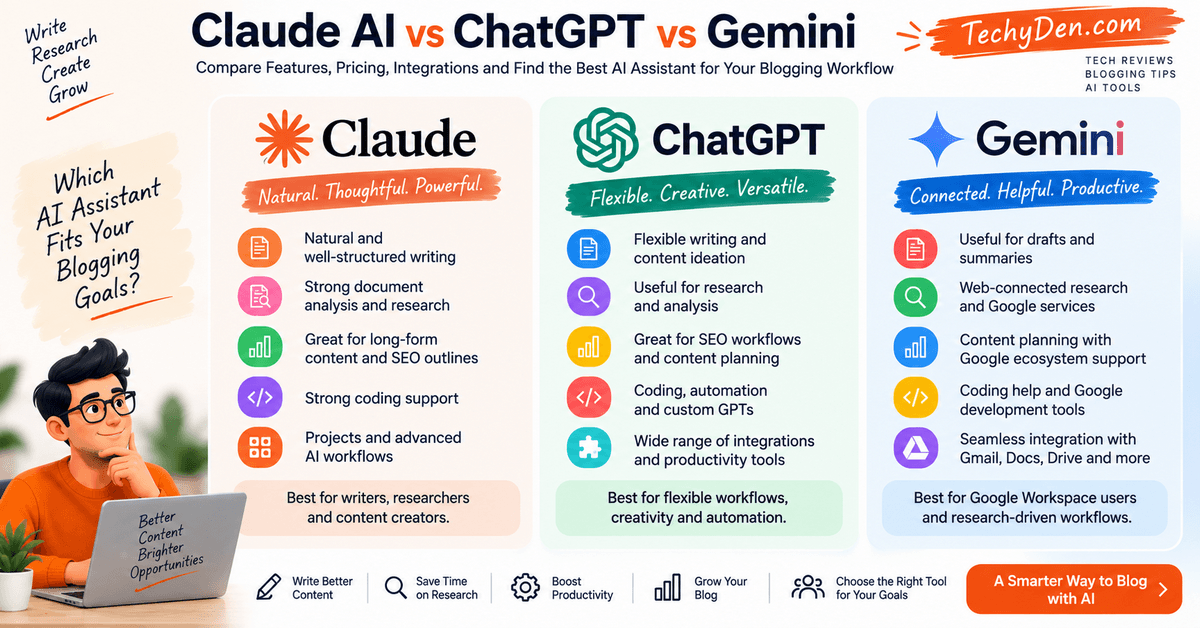
Claude AI vs ChatGPT vs Gemini: Quick Comparison
| Feature | Claude | ChatGPT | Gemini |
|---|---|---|---|
| Writing | Strong long-form writing and editing | Broad writing and content workflows | Writing and Google-based productivity |
| Research | Research and document analysis | Research and analysis | Google-connected research |
| Coding | Claude Code and coding assistance | Coding and development workflows | Coding and development assistance |
| Documents | Docs, files and document workflows | File and document analysis | Google Docs and Workspace |
| Integrations | Connectors, Microsoft 365 and browser tools | Connected apps and productivity tools | Google Workspace ecosystem |
| Browser workflow | Claude in Chrome | Supported browser/web capabilities | Google ecosystem |
| Advanced models | Opus, Sonnet, Haiku and specialized models | Multiple model options | Multiple Gemini models |
1. Writing and Editing
- Claude AI is useful for producing natural-sounding articles, rewriting paragraphs, improving readability, and maintaining a consistent tone across long-form content.
- ChatGPT offers a broad writing workflow, including brainstorming, outlining, drafting, editing, headline generation, and creating different writing styles.
- Gemini is useful for drafting content, summarizing information, and working with documents inside the Google ecosystem.
For bloggers, the practical difference often depends on the type of content being created. Claude may be preferred for polished long-form writing, ChatGPT for flexible content workflows, and Gemini for users who already work heavily with Google tools.
| Test | Claude | ChatGPT | Gemini |
|---|---|---|---|
| Outline quality | 9/10 | 8.5/10 | 8/10 |
| Writing quality | 9/10 | 8.5/10 | 8/10 |
| Editing | 9.5/10 | 9/10 | 8.5/10 |
| Research | 9/10 | 9/10 | 9.5/10 |
| Fact accuracy | 8.5/10 | 9/10 | 9/10 |
| SEO workflow | 8/10 | 9/10 | 8/10 |
2. Research and Information Gathering
- Claude AI can help summarize documents, compare information, explain difficult subjects, and organize research notes. It is useful when a creator already has source material to analyze.
- ChatGPT can support research planning, explanations, structured comparisons, data analysis, and content briefs. Depending on the available tools and settings, it can also assist with web-based research.
- Gemini is useful for users who want research assistance connected with Google services and search-related workflows.
Regardless of the platform, AI-generated research should be fact-checked before publishing. AI tools can misunderstand sources, miss context, or provide outdated information.
3. SEO and Content Workflows
All three tools can support different stages of an SEO content workflow.
Claude AI Workflow
- Generate topic ideas.
- Create detailed article outlines.
- Develop topic clusters.
- Draft introductions and sections.
- Improve readability and content flow.
- Rewrite outdated content.
- Create FAQs and meta descriptions.
- Review content for missing subtopics.
ChatGPT Workflow
- Generate keyword-based content ideas.
- Create SEO briefs.
- Build content calendars.
- Draft blog posts and social media content.
- Create title and meta description variations.
- Analyze content structure.
- Prepare email and promotional copy.
- Assist with automation and custom workflows.
Gemini Workflow
- Research topics using Google-related tools.
- Summarize documents from Google Drive.
- Draft content in Google Docs.
- Assist with spreadsheets and data-based tasks.
- Create content ideas from existing Google Workspace materials.
- Support research and productivity workflows.
AI tools can assist with SEO content creation, but they do not replace tools such as Google Search Console, Google Analytics, Semrush, Ahrefs, or dedicated keyword research platforms.
4. Integrations and Productivity
Claude AI is suitable for users who want projects, document analysis, coding assistance, and professional AI workflows.
ChatGPT provides a wide range of productivity features, including file analysis, custom GPTs, connected applications, image-related tools, and automation options depending on the plan.
Gemini is particularly relevant for users who already use:
- Gmail.
- Google Docs.
- Google Drive.
- Google Sheets.
- Google Meet.
- Other Google Workspace products.
For example, a blogger working primarily in Google Docs and Drive may prefer Gemini for convenience, while a creator who wants a broader collection of AI writing and productivity tools may consider ChatGPT or Claude.
5. Pricing and Subscription Options
The pricing of Claude AI, ChatGPT, and Gemini can change based on region, billing cycle, taxes, and product updates.
Generally, each platform offers:
- A free plan with usage limits.
- One or more paid plans for individual users.
- Higher-priced plans for power users or professionals.
- Business or enterprise subscriptions.
- Separate API pricing for developers.
Claude offers individual Pro and Max plans, along with Team and Enterprise options.
ChatGPT offers individual subscriptions and business-focused plans, with pricing depending on the selected tier.
Gemini is connected to Google’s AI subscription options, while business users can access additional capabilities through Google Workspace and Google Cloud offerings.
Before subscribing, compare the actual features included in your country rather than comparing only the monthly price.
6. Which Tool Fits Your Content Workflow?
| Content Requirement | Tool Features to Consider |
|---|---|
| Long-form blog writing | Natural writing, context handling, and editing |
| SEO content planning | Outlines, keyword organization, and content briefs |
| Google Workspace workflow | Gmail, Docs, Drive, and Sheets integration |
| Coding and technical writing | Code generation, debugging, and explanations |
| Content repurposing | Social posts, emails, scripts, and summaries |
| Document analysis | File uploads, summaries, and source comparison |
| Advanced automation | APIs, connected apps, and workflow tools |
| Team collaboration | Shared workspaces, administration, and security |
Claude AI vs ChatGPT vs Gemini: Which One Should You Use?
There is no single tool that is ideal for every blogger or content creator.
- Choose Claude AI if you want help with polished writing, long-form editing, document analysis, and structured content development.
- Choose ChatGPT if you want a flexible assistant for writing, research, coding, content planning, and a broad range of AI workflows.
- Choose Gemini if you work extensively with Google Search, Google Docs, Gmail, Drive, and other Google Workspace tools.
Many professional creators use more than one AI assistant. For example, you can use one tool for research, another for drafting, and a third for editing or content repurposing. The most useful choice depends on your workflow, budget, preferred integrations, and the type of content you publish.
The practical difference depends on your workflow. A blogger who focuses heavily on long-form writing may use Claude, while another creator may prefer ChatGPT or Gemini because of specific integrations or existing tools.
There is no universal winner. The best option depends on your content process, preferred ecosystem, budget, and the type of work you perform.
Who Should Use Claude AI?

Claude AI is useful for people who need help with writing, research, coding, learning, or everyday business tasks. Its features can support different workflows depending on the user’s goals.
- Bloggers: Bloggers can use Claude AI to create article outlines, draft blog posts, generate headlines, and improve existing content.
- Freelance Writers: Freelance writers can use Claude AI to prepare drafts, rewrite paragraphs, adjust tone, and complete writing projects faster.
- SEO Professionals: SEO professionals can use Claude AI to create keyword-based content briefs, suggest topic clusters, write meta descriptions, and improve content structure.
- Students: Students can use Claude AI to understand difficult subjects, summarize study materials, create notes, and practice questions.
- Developers: Developers can use Claude AI to write code, explain programming concepts, find bugs, and document software projects.
- Content Creators: Content creators can use Claude AI to generate video ideas, social media captions, scripts, and content calendars.
- Digital Marketers: Digital marketers can use Claude AI to create campaign ideas, email copy, product descriptions, and promotional content.
- Researchers: Researchers can use Claude AI to summarize documents, compare information, organize ideas, and explain complex topics.
- Small Businesses: Small businesses can use Claude AI for customer-support drafts, business emails, website content, marketing plans, and internal documentation.
- Large Teams and Enterprises: Businesses with multiple employees can use Claude Team or Enterprise plans for collaboration, administration, security, and centralized AI workflows.
Who May Not Need Claude AI?
Users who only need occasional answers may find the Free plan sufficient. People who require real-time search data, advanced SEO metrics, or guaranteed factual accuracy should combine Claude AI with reliable research and professional tools.
Overall, Claude AI is most useful for anyone who wants to save time, improve written content, organize information, or assist with technical and creative tasks.
Is Claude AI Worth It in 2026?
Claude AI is worth considering in 2026 if you regularly create content, research topics, edit articles, analyze documents, write code, or manage multi-step workflows. Anthropic’s newer Claude Opus 5.5 and Claude Sonnet 5.5 models have expanded Claude beyond traditional AI writing, while features such as Research, Claude in Chrome, Skills, Connectors, Projects, and task workflows make it useful for broader productivity tasks.
For content creators, Claude is most valuable when it becomes part of an overall workflow rather than being used only to generate an article from a single prompt.
When Claude AI Is Worth It
Claude AI can be useful for:
- Creating detailed blog post outlines.
- Drafting long-form articles.
- Rewriting and improving existing content.
- Researching and organizing information.
- Summarizing long documents.
- Creating headlines and content ideas.
- Preparing FAQs and meta descriptions.
- Creating social media captions and email copy.
- Reviewing grammar, tone, and readability.
- Analyzing PDFs and other supported documents.
- Assisting with coding and technical content.
- Working through multi-step content projects.
- Researching information through supported web features.
- Creating reusable workflows with Claude Skills.
For bloggers, one of Claude’s biggest advantages is that it can support several stages of the content process. You can begin with a topic, organize research, create an outline, draft sections, edit the article, prepare supporting content, and refine the final piece within the same broader workflow.
Claude Opus 5.5 and Sonnet 5.5 for Content Creators
The introduction of Claude Opus 5.5 and Claude Sonnet 5.5 makes the choice of model more relevant for professional users.
- Claude Sonnet 5.5 is particularly suitable for everyday blogging, writing, editing, document creation, and coding. It offers a balance between capability, speed, and cost.
- Claude Opus 5.5 is designed for more complex reasoning, research, coding, and demanding professional workflows. It can be useful when a content project involves deeper analysis or multiple complex steps.
For most bloggers, Sonnet 5.5 is likely to be sufficient for regular content creation, while Opus 5.5 becomes more useful for complex research, technical work, and demanding projects.
Claude’s New Features Add More Value
Claude is no longer limited to a traditional chat-based writing workflow.
Features such as Claude in Chrome can assist with browser-based research and tasks. Claude Skills allow users to create reusable instructions and resources for specialized workflows. Connectors can bring information from supported external services into Claude, while Research and Projects can help organize larger information and content workflows.
These features can be particularly useful for bloggers who manage multiple websites, research competitors, work with large documents, or regularly perform repetitive content tasks.
When Claude AI May Not Be Worth It
A paid Claude plan may not be necessary if you only use AI occasionally. The Free plan can be sufficient for simple questions, short writing tasks, brainstorming, and occasional research.
Claude may also not be the right choice if you need:
- Guaranteed factual accuracy.
- Complete keyword research data.
- Live SEO performance reports.
- A replacement for human editorial review.
- Unlimited usage without additional costs.
- A single platform containing every SEO and marketing tool.
- Automatic publishing without checking the final content.
Claude can assist with SEO content, but it is not a replacement for dedicated SEO platforms. For keyword research and performance analysis, combine Claude with tools such as Google Search Console, Google Analytics, Semrush, Ahrefs, or Google Keyword Planner.
Is Claude Pro Worth the Price for Bloggers?
Claude Pro can be worth paying for if you use Claude regularly for writing, research, editing, document analysis, coding, and content planning.
The value becomes easier to justify when Claude is saving meaningful time across multiple tasks rather than being used only to generate occasional paragraphs.
Before upgrading, consider:
- How many articles you create each month.
- How frequently you use Claude.
- Whether you regularly reach the Free plan limits.
- Whether you need advanced Claude features.
- Whether Claude saves significant time in your workflow.
- Whether you need Claude Code, Research, Claude in Chrome, or other advanced features.
- Whether the subscription fits your monthly content budget.
Claude Free vs Pro vs Max for Bloggers
- Claude Free is suitable for occasional users who want to experiment with AI-assisted writing and research.
- Claude Pro is a practical option for bloggers and content creators who use Claude regularly and need higher usage and access to additional features.
- Claude Max is aimed at heavy users who work with Claude throughout the day and frequently reach Pro usage limits.
You do not necessarily need Max simply because you publish frequently. The important factor is how intensively you use Claude and whether the additional usage justifies the higher subscription cost.
My Take: Is Claude AI Worth It?
For bloggers and content creators, Claude AI has become more useful in 2026 because it now combines strong writing and reasoning capabilities with research, coding, browser, document, and workflow features.
Claude Sonnet 5.5 is the most practical starting point for most content workflows, while Claude Opus 5.5 is better suited to complex research, advanced reasoning, coding, and demanding professional tasks.
Claude should still be treated as an AI assistant rather than an automatic publishing system. The strongest results come from combining Claude’s capabilities with your own expertise, original experiences, reliable sources, SEO data, and editorial judgment.
If you regularly create content and can integrate Claude into several parts of your workflow, the Free or Pro plan can provide practical value. If you only need occasional AI assistance, starting with the Free plan is a more sensible approach.
Frequently Asked Questions About Claude AI
Is Claude AI free to use?
Yes, Claude AI offers a Free plan for users who want to try its writing, research, summarization, and coding features. The Free plan does not require a subscription, but usage limits apply. Message availability may change depending on demand, task length, and the features being used.
How much does Claude Pro cost?
Claude Pro is generally listed at $20 per month or $200 per year in the United States. India pricing may be displayed in rupees and can vary because of taxes, billing methods, and regional pricing updates. Always check the final price on the official Claude checkout page.
Is Claude AI good for content writing?
Yes, Claude AI is useful for content writing because it can create outlines, introductions, blog sections, conclusions, FAQs, and social media posts. It can also rewrite existing content and improve readability. Writers should add original examples, verify facts, and edit the final draft before publishing.
Can Claude AI write SEO-friendly blog posts?
Claude AI can help create SEO-friendly blog posts by suggesting titles, headings, keyword placements, FAQs, and content structures. However, it does not automatically guarantee search rankings. Use keyword research tools, analyze search intent, add useful information, and review the article for accuracy and originality.
Is Claude AI better than ChatGPT for bloggers?
Claude AI and ChatGPT support different content workflows, so there is no universal winner. Claude is useful for natural writing, long-form editing, and document analysis. ChatGPT offers broad writing, research, coding, and productivity features. Bloggers should test both tools with their own content requirements.
Can Claude AI help with keyword research?
Claude AI can suggest keyword ideas, related topics, search-intent categories, and content clusters. However, it may not provide reliable search volume, keyword difficulty, or traffic data by itself. For accurate SEO research, combine Claude with tools such as Semrush, Ahrefs, Google Keyword Planner, or Google Search Console.
Can Claude AI rewrite or update old blog posts?
Yes, Claude AI can help update old blog posts by improving headings, rewriting outdated paragraphs, creating new FAQs, and making the content easier to read. You should verify all current facts, links, statistics, and product details before publishing the updated article.
Is Claude AI safe for private documents?
Claude AI includes privacy and security controls, but users should still review the current privacy policy and account settings before uploading sensitive documents. Avoid sharing passwords, financial details, confidential business information, or personal data unless you understand how the information is handled.
Does Claude AI use my conversations to train its models?
Claude’s data-use practices depend on the account type, settings, and applicable policies. Individual users should review the available privacy controls, while business and enterprise customers may receive additional data protections. Check Anthropic’s latest privacy documentation before using Claude for confidential work.
What are the best alternatives to Claude AI?
Popular Claude AI alternatives include ChatGPT, Google Gemini, Microsoft Copilot, Perplexity, and Google AI Studio. Each platform offers different writing, research, coding, integration, and pricing features. The best alternative depends on whether you prioritize content creation, web research, Google Workspace, coding, or automation.
Can Claude AI create content for social media?
Yes, Claude AI can create social media captions, post ideas, short scripts, promotional messages, and content calendars. You can provide the platform, audience, topic, and preferred tone to improve the result. Always review the content to ensure that it matches your brand voice.
Is Claude AI worth paying for?
Claude AI may be worth paying for if you use it frequently for writing, research, editing, coding, or document analysis. The paid plans offer higher usage limits and additional features. Occasional users may find the Free plan sufficient, while regular creators should compare the time saved with the subscription.
Claude AI Review 2026: Final Verdict
Claude AI has evolved significantly beyond a simple AI chatbot. With newer models such as Claude Opus 5.5 and Claude Sonnet 5.5, along with features for research, coding, document creation, browser-based tasks, Projects, Skills, and other workflows, Claude can support many stages of a modern content creation process.
For bloggers and content creators, Claude Sonnet 5.5 is a practical choice for everyday writing, editing, research, document creation, and content planning. Claude Opus 5.5 is more suitable for complex reasoning, advanced research, coding, and demanding professional workflows.
Claude can help you save time with tasks such as creating outlines, drafting articles, rewriting content, analyzing documents, generating FAQs, preparing social media content, and organizing research. However, AI-generated content still needs human review. You should verify important facts, statistics, sources, product information, and SEO data before publishing.
Claude also should not be treated as a replacement for dedicated SEO tools. Combining Claude with Google Search Console, Google Analytics, Semrush, Ahrefs, or Google Keyword Planner can provide a more complete content and SEO workflow.
Current Claude Models
| Model | Best For |
|---|---|
| Claude Opus 5.5 | Complex reasoning, coding, research and professional work |
| Claude Sonnet 5.5 | Writing, documents, coding and everyday tasks |
| Claude Fable 5.1 | Advanced coding and knowledge work |
| Claude Mythos 5.1 | Specialized cybersecurity and life-sciences research |
| Claude Haiku 5.5 | Expected high-volume and cost-sensitive workloads |
Editor’s note: Anthropic’s model lineup changes frequently. Model names, availability, pricing, and access can change, so verify the latest information before updating this table.
Should You Try Claude AI?
If you are a blogger, freelance writer, SEO professional, researcher, developer, or content creator, Claude is worth testing against your own workflow.
Start with the Free plan if you only need occasional AI assistance. If you regularly create content and need higher usage limits and additional features, Claude Pro provides a broader set of capabilities. Heavy users can consider the Max plans when their workflow consistently reaches the limits of lower-tier plans.
The most important thing is not simply choosing the newest Claude model. Instead, choose the model and plan that match the complexity, frequency, and type of work you actually perform.
Overall, Claude AI is a powerful content and productivity assistant in 2026, but its real value comes from how effectively you integrate it into your workflow. Use it to accelerate research, writing, editing, and repetitive tasks while keeping human expertise, fact-checking, originality, and editorial judgment at the center of your content strategy.