Your Android browser can reveal more about your online habits than you might realize. Websites, advertising networks, and other third parties may use cookies, trackers, and browser fingerprinting techniques to collect information about your activity.
Choosing a privacy-focused browser can help reduce this tracking while making everyday browsing safer.
The good news is that you do not have to sacrifice usability to improve your privacy. Several Android browsers include built-in tracker blocking, private browsing, protection against malicious websites, and tools to control the information websites collect.
If you also browse the web on a computer, check out our guide to the best web browsers for Windows to compare desktop browsers based on privacy, security, speed, and everyday usability.
Users concerned about browser fingerprinting should also understand how private browsing and anti-tracking technologies work.
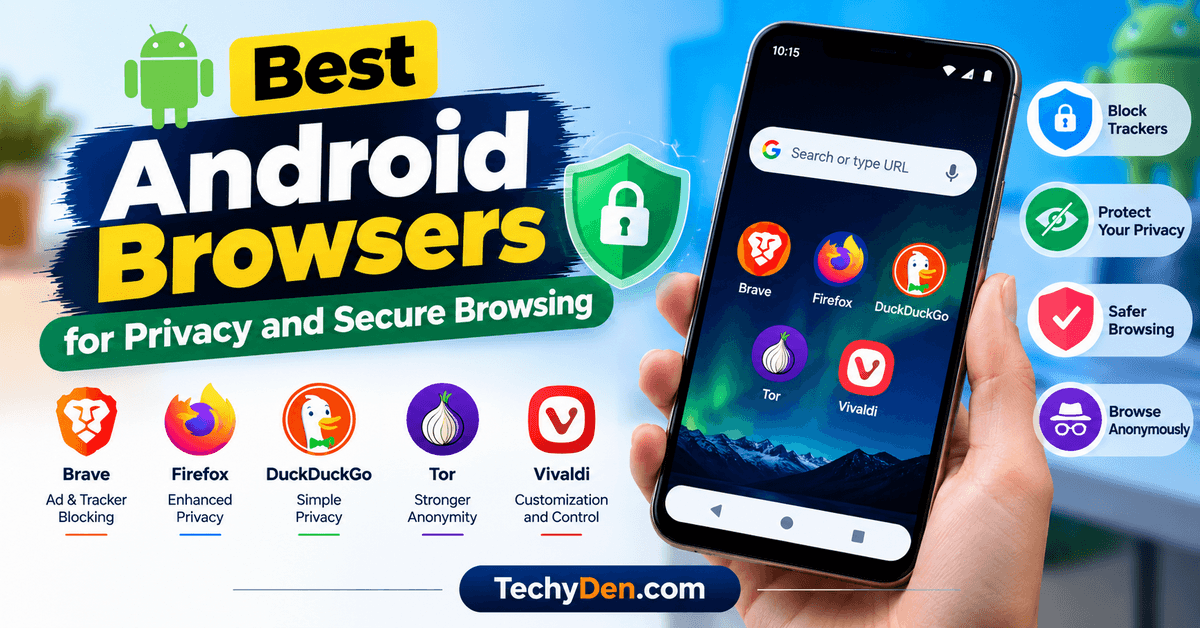
In this guide, we compare the best Android browsers for privacy and secure browsing in 2026, including Brave, Firefox, DuckDuckGo, Tor Browser, and Vivaldi. You will learn their key features, advantages, limitations, and which browser best fits your needs.
Best Android Browsers for Privacy at a Glance
If you want a quick recommendation, use this comparison to narrow down your choices.
| Android Browser | Best For | Main Privacy Features | Main Limitation |
|---|---|---|---|
| Brave | Everyday private browsing | Ad and tracker blocking, fingerprinting protection | Some websites may need Shields adjustments |
| Firefox | Customization and tracking protection | Enhanced Tracking Protection, privacy settings, extensions | Some extensions and sites may have limitations |
| DuckDuckGo Privacy Browser | Simple, low-maintenance privacy | Tracker blocking, cookie consent controls, Fire Button | Fewer customization options than Firefox |
| Tor Browser | Stronger anonymity | Tor network routing, security levels, anti-tracking protections | Can be slower and some sites may block access |
| Vivaldi | Customization and browser controls | Tracker and ad blocking options, privacy settings | Requires configuration to suit your preferences |
Our quick recommendation: Brave is a strong starting point for everyday privacy because its built-in Shields block many ads and trackers by default.
Choose Firefox if you want more control and customization, DuckDuckGo for simplicity, or Tor Browser when reducing the link between your identity and browsing activity is especially important.
If you want a browser with AI-powered search, assistants, and productivity features in addition to privacy controls, explore our guide to the best AI browsers to discover more options.
1. Brave Browser

Best for: Everyday browsing with built-in privacy protection
Brave is one of the strongest choices for Android users who want fewer advertisements and less tracking without installing several additional tools. Its built-in Brave Shields feature blocks many third-party ads and trackers and includes protections against cross-site cookie tracking and browser fingerprinting.
Brave is based on Chromium, the open-source browser project also used by several popular browsers. This helps maintain compatibility with many modern websites while offering additional privacy controls.
Key Privacy and Security Features
- Brave Shields: Blocks many ads, trackers, and tracking-related requests.
- Fingerprinting protection: Helps make it harder for websites to identify your browser using device and browser characteristics.
- Cookie controls: Helps reduce cross-site tracking through cookies.
- HTTPS connections: Supports secure HTTPS browsing when websites provide it.
- Safe Browsing protection: Helps warn users about known dangerous websites and downloads.
- Private browsing: Lets you browse without retaining ordinary local browsing history in that private session.
- Optional Tor windows: Brave offers Tor-based private windows, although the experience differs from using the standalone Tor Browser.
Pros and Cons
Pros
- Strong default ad and tracker blocking.
- No separate ad-blocking extension is required for its basic protections.
- Chromium-based compatibility with many websites.
- Useful privacy controls for everyday browsing.
Cons
- Aggressive blocking can occasionally break website features.
- Some users may find its extra features unnecessary.
- A private window does not provide the same anonymity as the Tor network.
Verdict: Brave is an excellent first choice if you want a practical balance of privacy, convenience, and website compatibility.
2. Firefox for Android

Best for: Privacy controls, customization, and extensions
Firefox for Android is a good option if you want more control over your browsing experience. Mozilla provides Enhanced Tracking Protection, which blocks many known trackers, and offers privacy settings that let you adjust how the browser handles websites and browsing data.
Firefox also supports selected extensions on Android. Depending on compatibility and availability, these can provide additional functionality, including content blocking and productivity tools.
Key Privacy and Security Features
- Enhanced Tracking Protection: Blocks many known tracking technologies.
- Cookie protection: Helps limit cross-site tracking.
- HTTPS-Only Mode: Can help prevent unencrypted connections when a secure version of a site is available.
- Private Browsing: Avoids saving ordinary browsing history in the private session.
- Extension support: Compatible add-ons can provide additional controls.
- Fingerprinting protection: Includes protections against some browser fingerprinting techniques.
- Encrypted DNS options: Supported configurations can encrypt DNS requests.
- Privacy settings: Gives you control over certain data collection and browsing behaviors.
Pros and Cons
Pros
- Offers meaningful tracking protection.
- Provides more customization than many basic mobile browsers.
- Supports compatible Android extensions.
- Includes controls for managing browsing data.
Cons
- Some extensions available on desktop are not supported on Android.
- Strict privacy settings can affect certain websites.
- Users may need to adjust settings to get their preferred experience.
Verdict: Choose Firefox if you want a customizable browser with built-in tracking protection and the flexibility to add compatible extensions.
3. DuckDuckGo Privacy Browser

Best for: Simple privacy protection with minimal setup
DuckDuckGo Privacy Browser is designed for people who want to reduce tracking without spending time configuring a long list of browser settings. It includes tracker blocking, privacy controls, and a Fire Button that lets you clear browsing data quickly.
The browser also includes features for handling certain cookie consent pop-ups and reducing some tracking-related interruptions. Its protections have platform and website limitations, so not every tracker or consent request can be handled in every situation.
Key Privacy and Security Features
- Tracker blocking: Attempts to prevent many third-party trackers from loading.
- Fire Button: Clears selected browsing data quickly.
- Cookie consent controls: Helps handle supported cookie consent pop-ups.
- Private search: Integrates DuckDuckGo Search.
- HTTPS upgrades: Helps use secure connections where supported.
- Privacy information: Provides information about protection activity on supported pages.
- Simple interface: Keeps the browsing experience relatively straightforward.
- App Tracking Protection: On supported Android versions and configurations, DuckDuckGo offers a separate feature that can block some trackers in other apps. This is distinct from browser-only protection.
Pros and Cons
Pros
- Easy to use, even for privacy beginners.
- Tracker blocking is built into the browser.
- Convenient option for clearing browsing data.
- Does not require extensive configuration for basic protection.
Cons
- Offers fewer customization options than Firefox.
- Tracker and cookie-consent protections are not universal.
- Clearing browser data does not erase information already collected by websites or online services.
Verdict: DuckDuckGo is a good choice if you want a simple Android browser that reduces common tracking without requiring much maintenance.
4. Tor Browser for Android

Best for: Users who need stronger browsing anonymity
Tor Browser is designed for people who want to make it harder for websites and network observers to connect their browsing activity to their regular IP address. It routes traffic through the Tor network, which uses multiple relays rather than connecting directly to a website from your normal network address.
Tor Browser also includes privacy-oriented design choices intended to reduce tracking and browser fingerprinting. It offers security levels that can disable certain website features to reduce potential risks.
However, Tor Browser is not necessarily the most convenient option for every daily task. Connections can be slower, some websites may block Tor traffic, and signing into personal accounts can still reveal your identity to those services.
Key Privacy and Security Features
- Tor network routing: Routes browser traffic through the Tor network.
- IP address masking: Websites generally see a Tor exit-node address rather than your normal public IP address.
- Anti-tracking design: Includes protections intended to limit cross-site tracking.
- Security levels: Lets you restrict certain web features for stronger security.
- Private browsing approach: Is designed to reduce persistent local browsing data.
- Onion-site support: Can access websites available through the Tor network’s onion services.
- Reduced fingerprinting: Uses design choices intended to make users’ browser characteristics more alike.
Pros and Cons
Pros
- Strong option for reducing the connection between your IP address and browsing activity.
- Routes traffic through the Tor network.
- Offers configurable security levels.
- Useful for people with heightened privacy requirements.
Cons
- Browsing can be slower than with conventional browsers.
- Some websites may block access or require extra verification.
- Logging into identifiable accounts can undermine anonymity.
- It is not a replacement for device security or safe browsing habits.
Verdict: Choose Tor Browser when anonymity is a priority rather than simply blocking advertisements. For regular shopping, video streaming, and everyday browsing, Brave or Firefox may be more convenient.
Official website:
5. Vivaldi Browser
Best for: Users who want privacy controls and customization
Vivaldi is a customizable browser for Android with built-in ad and tracker blocking options. It is worth considering if you want to control how much blocking the browser applies while also tailoring its interface to your preferences.
You can configure blocking behavior and choose settings that suit different websites. As with other browsers, the exact balance between privacy and compatibility depends on the configuration you select.
Key Privacy and Security Features
- Tracker blocking: Can block known tracking requests.
- Ad blocking: Offers configurable ad-blocking options.
- Blocking levels: Lets users choose how aggressively to block content.
- Private tabs: Provides a separate private browsing mode.
- Search engine choices: Allows users to select from supported search providers.
- Browser customization: Offers interface and browsing controls.
- Privacy settings: Provides options for managing browser behavior and data.
Pros and Cons
Pros
- Flexible blocking controls.
- Useful customization options.
- Combines everyday browsing tools with privacy settings.
- Lets users adjust protection when websites do not work properly.
Cons
- Some features require manual configuration.
- Blocking can affect website functionality.
- It does not provide Tor-style network anonymity.
Verdict: Vivaldi is a sensible option if you prefer a customizable browser and want to control how advertisements and trackers are handled.
Official website:
Which Android Browser Is the Most Secure?
There is no single browser that is best for every threat. Security means protecting your device and connections from malicious activity, while privacy focuses on reducing unwanted collection and tracking of your information. Anonymity is a separate goal.
Use this table to match a browser to your main requirement.
| Your Main Requirement | Browser to Consider | Why |
|---|---|---|
| Everyday ad and tracker blocking | Brave | Shields are enabled by default |
| Privacy customization | Firefox | Offers adjustable tracking protection and compatible extensions |
| Simple privacy tools | DuckDuckGo | Provides built-in tracker protection and quick data clearing |
| Stronger browsing anonymity | Tor Browser | Routes traffic through the Tor network |
| Flexible browser configuration | Vivaldi | Provides configurable blocking and interface settings |
A browser’s security also depends on receiving updates. Install browsers from their official websites or trusted app-store listings, keep Android updated, and avoid unofficial APK files from unknown sources.
How to Choose a Private Browser for Android
Before choosing a browser, consider what you want to protect and how you normally use your phone.
- Look for Built-In Tracker Blocking: Tracker blocking can reduce requests to known advertising and analytics services. Brave, Firefox, DuckDuckGo, and Vivaldi provide different forms of tracking protection. Remember that blocking trackers is not the same as blocking every advertisement, and no browser catches every tracking technique. If you are also looking for a privacy-focused browser for your computer, read our LibreWolf browser guide to learn more about another browser designed with privacy in mind.
- Check Security Update Support: A browser needs timely security fixes to address newly discovered vulnerabilities. Check whether the browser is actively maintained and update it regularly. Avoid choosing a browser based only on claims that it is private. Current maintenance and security support are equally important.
- Understand Private Browsing: Private or incognito mode generally limits what the browser saves locally after a session. It does not automatically hide your IP address, make you anonymous to websites, or prevent your internet provider or network administrator from seeing all network activity. Use Tor Browser when you specifically need Tor-based routing, and understand its limitations before relying on it for sensitive activity.
- Review Search Engine and Data Settings: Your browser and search engine are separate components. A privacy-focused browser can still send searches to a provider that collects data according to its own policies. Review the default search engine, synchronization settings, diagnostic-data options, and any optional services you enable.
- Balance Privacy with Compatibility: Strict tracker blocking may prevent sign-in widgets, embedded media, payment flows, or other website features from working correctly. If a trusted website breaks, you may be able to adjust its blocking settings temporarily. Avoid disabling protections globally just to fix one page.
How to Make Android Browsing More Private and Secure
Installing a privacy-focused browser is only the first step. Follow these practices to improve your overall protection.
For another perspective on browser privacy, read our Ulaa Browser review to explore its privacy modes, tracking protections, and browsing features.
- Keep your browser updated. Install security updates as soon as they become available.
- Use a screen lock. Protect your phone with a strong PIN, password, or supported biometric authentication.
- Review website permissions. Allow camera, microphone, location, and notification access only when necessary.
- Limit unnecessary extensions. Every additional extension can introduce permissions, maintenance requirements, or security risks.
- Use HTTPS websites. Look for secure connections, especially when signing in or entering payment details.
- Avoid suspicious links and downloads. A private browser cannot make a malicious website or file safe.
- Use a trusted network. Be cautious when connecting to unfamiliar public Wi-Fi networks.
- Review synchronization settings. Understand what data is synced and which account or service receives it.
- Clear data when appropriate. Remove saved cookies, site data, and history when you no longer need them.
- Use a reputable password manager. Create unique passwords and enable multifactor authentication where available.
A VPN can encrypt traffic between your device and the VPN provider, but it does not automatically stop browser fingerprinting, cookies, or account-based tracking. It also shifts some trust from your network provider to the VPN service.
Frequently Asked Questions on Best Android Browsers
Which is the best Android browser for privacy?
Brave is a strong all-round choice for users who want built-in ad and tracker blocking with little setup. Firefox is better suited to users who want more customization, while DuckDuckGo is useful for simple privacy controls. The best choice depends on your specific requirements.
Is Brave safer than Chrome on Android?
Brave adds privacy features such as built-in ad and tracker blocking. Chrome also receives security updates and provides protections against dangerous websites. The better choice depends on whether you prioritize default tracking controls, Google’s ecosystem, or other browser features. Keep either browser updated.
Is Firefox good for private browsing on Android?
Yes. Firefox includes Enhanced Tracking Protection, private browsing, and other privacy settings. Compatible extensions can provide additional functionality. However, private browsing does not make you anonymous to websites or network providers.
Does incognito mode hide my IP address?
No. Incognito mode primarily limits the browsing data saved locally by the browser. Websites and network services may still see your public IP address. Tor Browser provides a different approach by routing browser traffic through the Tor network.
Is Tor Browser safe to use on Android?
Tor Browser is a legitimate privacy tool that routes traffic through the Tor network and offers configurable security levels. It can improve anonymity, but it does not protect against every threat. Signing into personal accounts, downloading unsafe files, or using a compromised device can still expose you to risks.
Can a private browser stop all ads and trackers?
No. Privacy browsers can block many known ads and trackers, but no browser can guarantee complete protection against every advertising system, tracking method, or website behavior. Some websites may also require certain scripts or cookies to function correctly.
Do I need a VPN if I use a privacy-focused browser?
Not necessarily. A browser’s tracking protection and a VPN solve different problems. A VPN can help protect traffic from local network observers, depending on the setup, but it does not replace tracker blocking, safe browsing, or HTTPS. Choose a VPN only if its additional protection fits your needs.
Final Verdict: Which Android Browser Should You Use?
The best Android browser for privacy and secure browsing depends on your priorities.
- Choose Brave for built-in ad and tracker blocking and convenient everyday browsing.
- Choose Firefox for customizable privacy controls and compatible extensions.
- Choose DuckDuckGo if you want a straightforward browser with simple privacy tools.
- Choose Tor Browser when reducing the connection between your identity and browsing activity is a major priority.
- Choose Vivaldi if you prefer flexible blocking settings and interface customization.
For most Android users, Brave is a practical starting point, with Firefox a strong alternative for those who want greater control. If anonymity is your primary concern, consider Tor Browser and learn how its limitations affect your use case.
Whatever you choose, keep the browser updated, review permissions, use strong account security, and remember that a privacy-focused browser reduces certain risks but cannot guarantee complete anonymity or security.