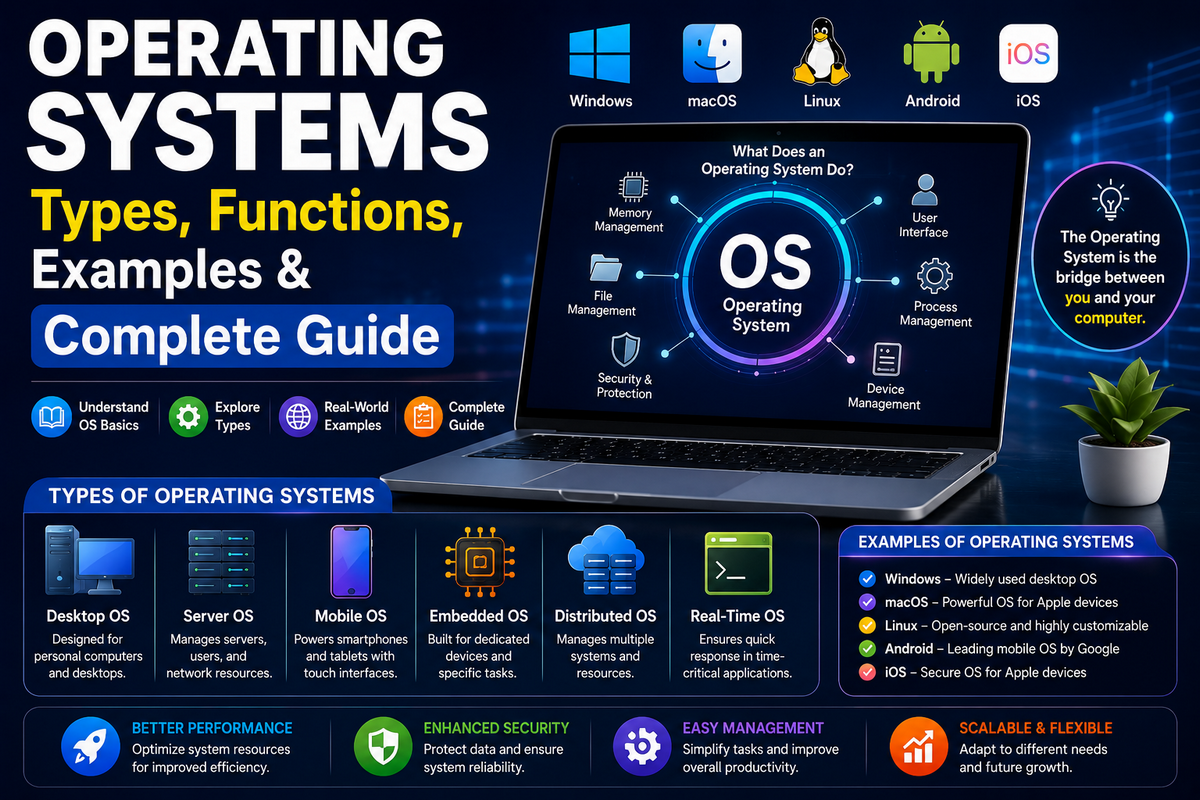
Whether you’re using a Windows PC, a MacBook, an Android smartphone, an iPhone, a Chromebook, or even a smart TV, one piece of software makes everything work seamlessly—the operating system (OS).
It is the invisible foundation of every modern computing device, managing hardware resources, running applications, organizing files, and providing the interface that allows you to interact with your device.
Without an operating system, your computer or smartphone would simply power on without knowing how to execute programs or communicate with its hardware.
Operating systems have evolved dramatically over the past several decades. Early computers required users to manually enter commands and process one task at a time, whereas today’s operating systems support multitasking, artificial intelligence (AI), cloud computing, virtualization, biometric security, and synchronization across multiple devices.
Modern operating systems not only improve performance and security but also make technology accessible to billions of people through intuitive graphical interfaces and intelligent automation.
Today, billions of devices worldwide rely on operating systems every second, including:
- Desktop computers
- Laptops
- Smartphones
- Tablets
- Servers
- Gaming consoles
- Smart TVs
- Smartwatches
- Internet of Things (IoT) devices
- Embedded systems
Some of the most widely used operating systems include:
| Device | Popular Operating Systems |
| Desktop & Laptop | Windows, macOS, Linux, ChromeOS |
| Smartphones | Android, iOS, HarmonyOS |
| Servers | Linux, Windows Server, UNIX |
| Embedded Devices | FreeRTOS, Embedded Linux, Zephyr |
Whether you’re a student choosing your first laptop, a gamer building a high-performance PC, a developer writing software, or a business owner managing enterprise systems, understanding how operating systems work helps you make better technology decisions.
Choosing the right operating system can improve productivity, enhance security, extend the life of your hardware, and ensure compatibility with the applications you use every day.
In this comprehensive guide, you’ll learn what an operating system is, how it has evolved over time, the different types of operating systems, their core components and functions, the most popular desktop and mobile operating systems, free and open-source alternatives, security best practices, and how to choose the best operating system for your specific needs.
You’ll also find comparison tables, practical examples, and answers to frequently asked questions to help you understand one of the most important technologies behind modern computing.
Today, the most popular operating systems used in mobile phones are Android, iOS, and HarmonyOS. These mobile phone operating systems power billions of smartphones worldwide and are designed to deliver fast performance, advanced security, long battery life, and access to millions of mobile apps.
Operating System at a Glance
- Definition: Software that manages computer hardware and software.
- Popular Examples: Windows, macOS, Linux, Android, iOS, ChromeOS.
- Types: Desktop, Mobile, Server, Embedded, RTOS, Cloud.
- Best For: Gaming, programming, business, students, servers.
- Latest Trend: AI-powered operating systems.
Quick Take: An operating system is the essential software that connects users, applications, and hardware. It manages your device’s resources, enables applications to run efficiently, and provides the secure, user-friendly experience that powers everything from personal computers and smartphones to cloud servers and smart devices.
What Is an Operating System?
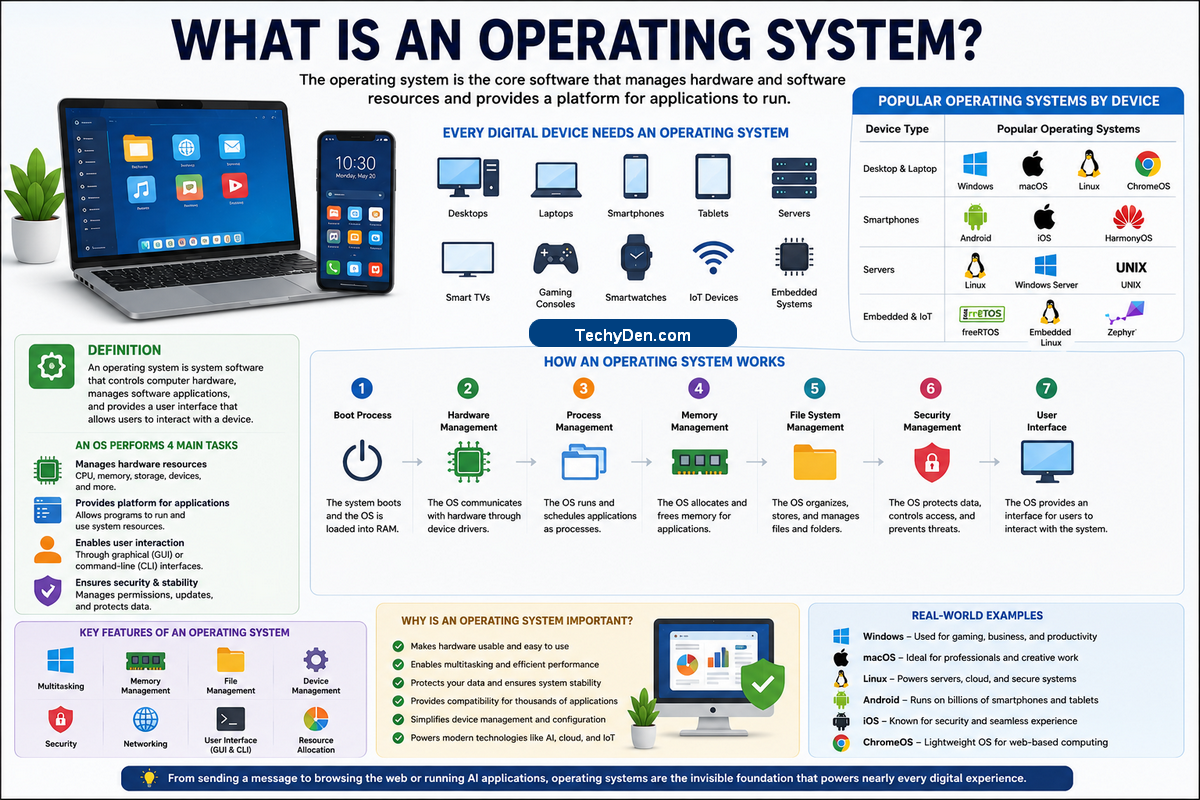
An operating system (OS) is the core system software that manages a computer’s or mobile device’s hardware and software resources. It acts as an intermediary between the user, applications, and the physical hardware, ensuring that every component works together efficiently. Whether you’re browsing the internet, editing documents, streaming videos, playing games, or using AI-powered applications, the operating system makes these tasks possible.
An operating system is the software that controls your computer or smartphone. It connects the hardware and applications, allowing you to open programs, save files, browse the internet, and use your device safely and efficiently.
Think of an operating system as the manager of a company. Just as a manager coordinates employees, schedules work, allocates resources, and ensures everything runs smoothly, an operating system coordinates the processor, memory, storage, input devices, and applications to deliver a fast, secure, and reliable computing experience.
Quick Answer
An operating system (OS) is system software that manages computer hardware, runs applications, controls memory, organizes files, and enables users to interact with a computer or mobile device.
Every modern digital device depends on an operating system, including:
- Desktop computers
- Laptops
- Smartphones
- Tablets
- Servers
- Smart TVs
- Gaming consoles
- Smartwatches
- IoT (Internet of Things) devices
Popular Operating Systems by Device
| Device | Popular Operating Systems |
| Desktop & Laptop | Windows, macOS, Linux, ChromeOS |
| Smartphones | Android, iOS, HarmonyOS |
| Servers | Linux, Windows Server, UNIX |
| Embedded & IoT | FreeRTOS, Embedded Linux, Zephyr |
Today, operating systems power billions of devices worldwide, making them one of the most essential technologies in modern computing.
Definition of an Operating System
An operating system is system software that controls computer hardware, manages software applications, and provides a user interface that enables people to interact with a device.
In simple terms, an operating system performs four essential tasks:
- Manages hardware resources such as the CPU, memory, storage, and peripherals.
- Provides the platform needed for software applications to run.
- Enables users to interact with the device through graphical or command-line interfaces.
- Protects the system by managing permissions, security features, and updates.
Without an operating system, a computer or smartphone would not know how to load applications, access storage, display information on the screen, or respond to user input.
Technical Definition
From a technical perspective, an operating system is a collection of programs that manages hardware resources and provides common services for application software. It acts as a bridge between hardware and software by handling process scheduling, memory allocation, file management, device communication, networking, and security.
Modern operating systems also support advanced technologies such as virtualization, cloud integration, artificial intelligence, and containerized applications, enabling today’s computers and mobile devices to perform complex tasks efficiently.
How Does an Operating System Work?
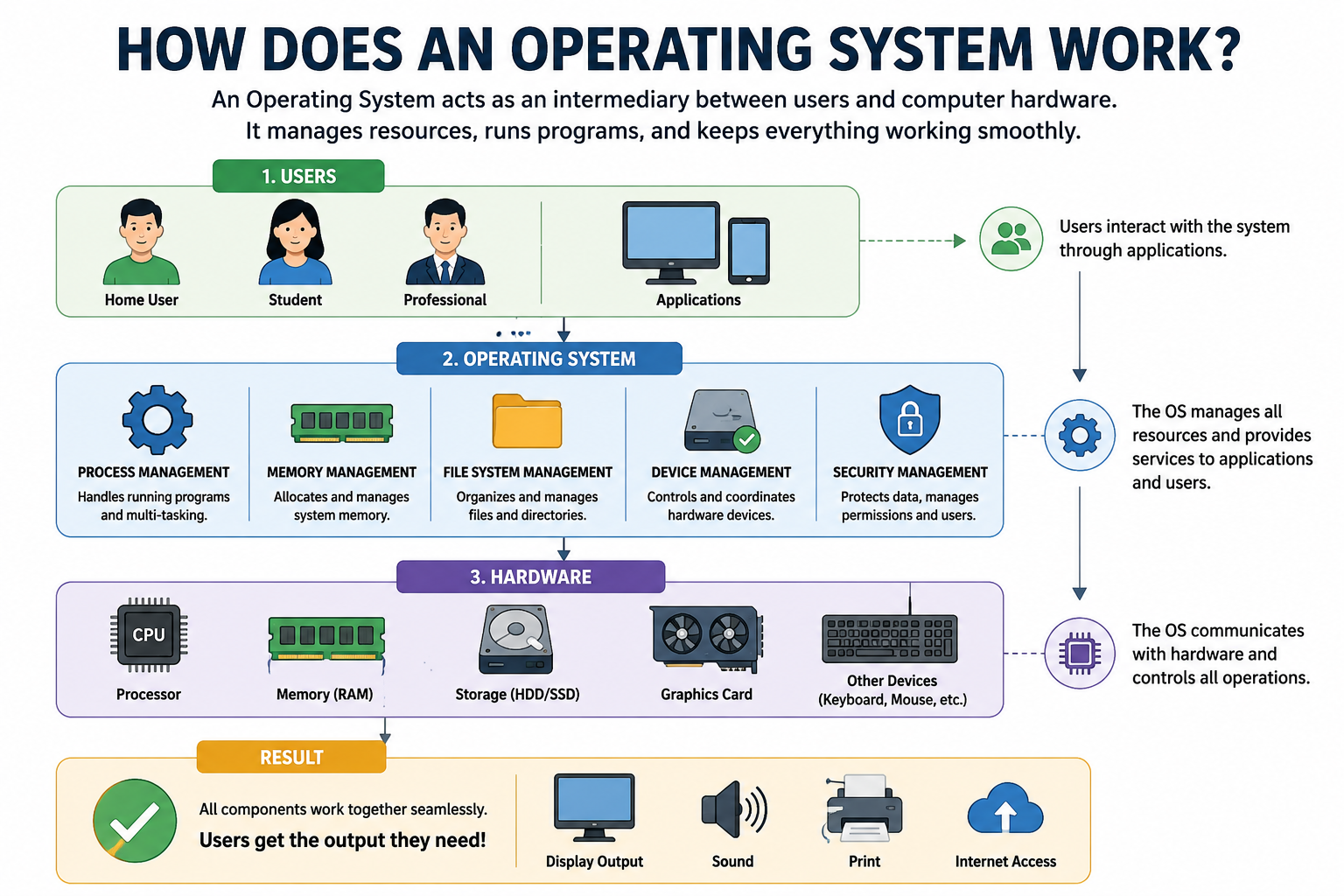
Although an operating system performs thousands of operations every second, its overall workflow follows a straightforward sequence.
- Booting the System: When you press the power button, the device firmware (BIOS or UEFI on most PCs) checks the hardware and loads the operating system from storage into memory (RAM). The operating system then initializes essential services and prepares the device for use.
- Managing Hardware: Once the system starts, the operating system communicates with hardware components using device drivers. These drivers allow the OS to control devices such as the keyboard, mouse, monitor, graphics card, storage drives, printers, and network adapters without applications needing to communicate directly with the hardware.
- Running Applications: Every application you open becomes a process managed by the operating system. The OS determines how much processor time, memory, and other resources each application receives, allowing multiple programs to run simultaneously without interfering with one another.
- Managing Memory and Storage: The operating system allocates RAM to active applications and frees it when programs are closed. It also organizes files on storage devices using file systems, making it easy to create, save, search, move, and delete files.
- Protecting the System: Modern operating systems include built-in security mechanisms such as user authentication, file permissions, encryption, firewalls, and automatic security updates to protect devices against malware, ransomware, and unauthorized access.
Key Features of an Operating System
Modern operating systems provide a wide range of features that improve performance, security, and usability.
| Feature | Purpose |
| Process Management | Runs multiple applications efficiently. |
| Memory Management | Allocates RAM and optimizes system performance. |
| File Management | Organizes files and folders on storage devices. |
| Device Management | Controls communication with hardware components. |
| Security | Protects data through authentication, encryption, and updates. |
| Networking | Enables internet connectivity and resource sharing. |
| User Interface | Provides graphical (GUI) and command-line (CLI) environments. |
| Multitasking | Allows multiple applications to run simultaneously. |
Operating System Facts
- Android powers billions of active devices worldwide.
- Windows remains the leading desktop operating system.
- Linux powers most web servers and supercomputers.
- iOS is widely used on Apple mobile devices.
- ChromeOS is popular in education because of its simplicity and security.
Why Is an Operating System Important?
An operating system is much more than software that starts your computer—it is the foundation that makes every digital device usable.
Its importance can be summarized in several key areas:
- It enables hardware components to work together efficiently.
- It allows users to run multiple applications simultaneously.
- It manages system resources to improve speed and stability.
- It protects personal data through built-in security features.
- It provides compatibility for thousands of software applications.
- It simplifies device management by handling drivers, updates, networking, and storage automatically.
Without an operating system, modern computers, smartphones, tablets, and servers would be unable to perform even the simplest tasks.
Real-World Examples of Operating Systems
Different operating systems are designed for different types of devices and users.
- Microsoft Windows is the most widely used desktop operating system and is popular for productivity, gaming, and business computing.
- macOS powers Apple Mac computers and is known for its performance, security, and seamless integration with the Apple ecosystem.
- Linux is an open-source operating system widely used in servers, cloud computing, cybersecurity, and software development.
- ChromeOS is Google’s lightweight operating system designed for web-based computing and Chromebooks.
- Android is the world’s most popular mobile operating system, powering billions of smartphones, tablets, TVs, and wearable devices.
- iOS is Apple’s mobile operating system, offering strong security, excellent performance, and long-term software support for iPhones.
- HarmonyOS is Huawei’s operating system designed to connect smartphones, tablets, wearables, and smart devices within a unified ecosystem.
Key Takeaways
- An operating system is the essential software that manages hardware and software resources.
- It serves as the bridge between users, applications, and computer hardware.
- Every modern device—including PCs, smartphones, servers, and IoT devices—depends on an operating system.
- Core responsibilities include process management, memory management, file management, device management, security, and networking.
- Popular operating systems include Windows, macOS, Linux, ChromeOS, Android, and iOS, each designed for different devices and use cases.
History of Operating Systems
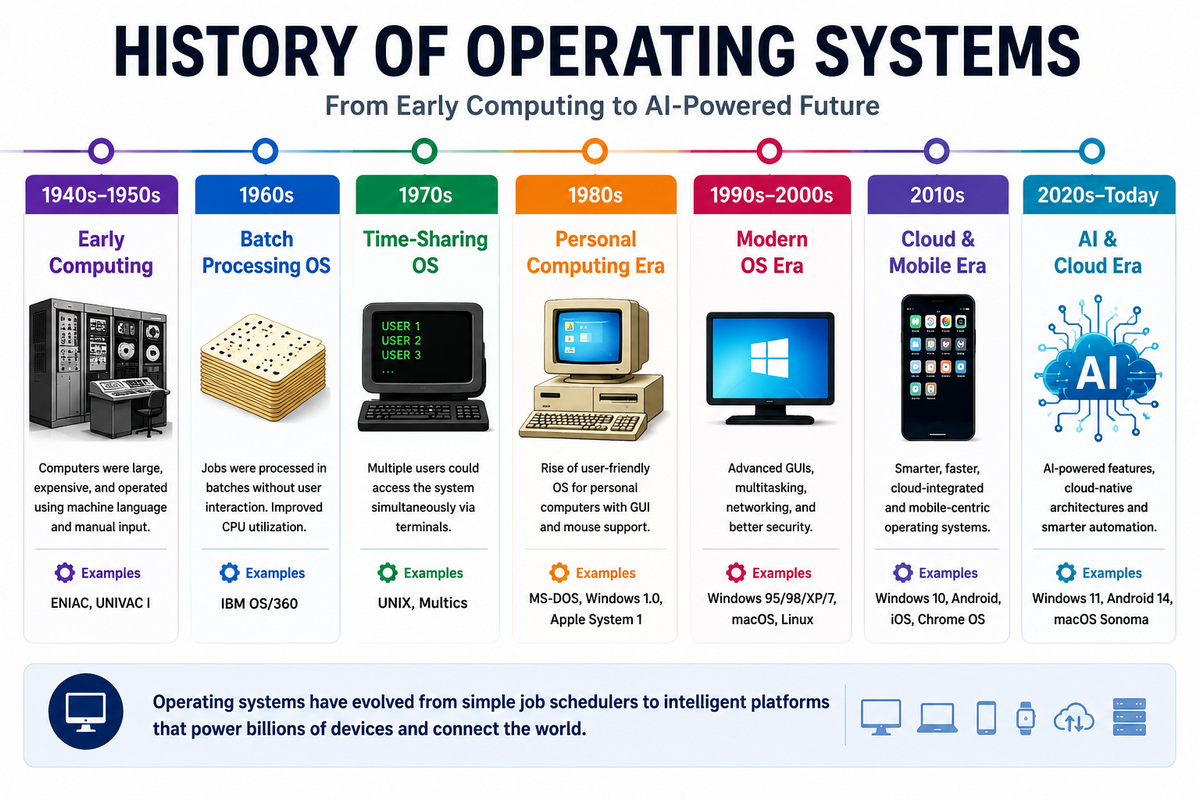
The history of operating systems reflects the rapid evolution of computing technology. From the earliest computers that required manual programming to today’s AI-powered platforms, operating systems have transformed the way people interact with digital devices.
What began as simple software for managing basic hardware has evolved into intelligent systems capable of multitasking, cloud integration, virtualization, advanced security, and artificial intelligence.
Understanding this evolution provides valuable insight into how modern operating systems such as Windows, macOS, Linux, Android, and iOS became the powerful platforms we rely on every day.
Evolution of Operating Systems
The development of operating systems can be divided into several major eras, each introducing innovations that made computers faster, easier to use, and more capable.
| Era | Time Period | Major Innovation |
| Early Computer Systems | 1940s–1960s | Manual programming and batch processing |
| DOS Era | 1970s–1980s | Command-line operating systems for personal computers |
| GUI Revolution | 1980s–2000s | Graphical user interfaces with Windows and macOS |
| Open-Source Movement | 1990s–Present | Linux and community-driven development |
| Mobile Computing | 2007–Present | Android and iOS power smartphones and tablets. |
| AI Era | 2020s–Present | AI assistants, cloud integration, and intelligent automation |
Early Computer Systems (1940s–1960s)
The earliest electronic computers had no operating system. Every program was loaded manually using punch cards, switches, or paper tape, and each computer could execute only one task at a time. Programming these machines required significant technical expertise and often took hours or even days.
To improve efficiency, engineers introduced batch processing systems, which grouped similar jobs together and processed them automatically. This innovation reduced idle time and laid the foundation for modern operating systems.
DOS Era (1970s–1980s)
As personal computers became more affordable, command-line operating systems gained popularity. One of the most influential was MS-DOS (Microsoft Disk Operating System), which allowed users to manage files and run software by typing text commands.
Although DOS lacked a graphical interface and multitasking capabilities, it played a crucial role in making personal computing accessible to homes, schools, and businesses. It also served as the foundation for the first versions of Microsoft Windows.
The first Windows operating system released by Microsoft was Windows 1.0, introduced in 1985. Although it offered limited functionality compared to modern versions, it marked the beginning of the Windows operating system family that now powers millions of computers worldwide.
Graphical User Interface (GUI) Revolution
The introduction of graphical user interfaces (GUIs) transformed computing by replacing typed commands with windows, icons, menus, and mouse-driven navigation. Apple’s Macintosh and later Microsoft Windows made computers significantly easier for everyday users.
This era also introduced features that are now standard in modern operating systems, including:
- Multitasking
- Drag-and-drop functionality
- File Explorer and Finder
- Plug-and-play hardware support
- Improved networking and internet connectivity
These innovations helped personal computers become an essential part of homes, offices, and schools worldwide.
Linux and Open-Source Software
A major milestone came in 1991 when Linus Torvalds released the Linux kernel. Unlike proprietary operating systems, Linux was open source, allowing developers worldwide to improve and distribute the software.
Today, Linux powers most web servers, cloud platforms, supercomputers, and many embedded devices. Popular distributions such as Ubuntu, Fedora, Debian, and Linux Mint have also made Linux accessible to desktop users.
Mobile Operating System Revolution
The launch of the iPhone in 2007 and Android in 2008 completely changed personal computing. Smartphones evolved into powerful handheld computers capable of running millions of applications, connecting to cloud services, and supporting advanced technologies such as GPS, biometrics, and mobile payments.
Modern mobile operating systems now power not only smartphones but also tablets, smartwatches, TVs, and connected vehicles, making mobile computing an integral part of everyday life.
AI-Powered Operating System Era
Today’s operating systems are evolving beyond traditional resource management by integrating artificial intelligence (AI) directly into the user experience. Modern platforms such as Windows 11, macOS, Android, and ChromeOS now include AI-powered features that enhance productivity, security, and accessibility.
Common AI capabilities include:
- Intelligent search and recommendations
- Voice assistants
- Real-time translation
- AI-powered writing and image creation
- Predictive automation
- Enhanced cybersecurity
As AI continues to advance, operating systems are becoming smarter, more personalized, and better equipped to anticipate user needs.
Key Milestones in Operating System History
| Year | Milestone | Significance |
| 1950s | Batch Processing Systems | Automated repetitive computing tasks |
| 1981 | MS-DOS | Popularized personal computer operating systems |
| 1984 | Apple Macintosh | Introduced a user-friendly graphical interface |
| 1985 | Windows 1.0 | Brought GUI computing to Microsoft PCs |
| 1991 | Linux | Started the open-source operating system movement |
| 2007 | iPhone & iOS | Revolutionized mobile computing |
| 2008 | Android | Expanded the smartphone ecosystem globally |
| 2020s | AI Integration | Introduced intelligent assistants and AI-powered features |
Key Takeaways
- Operating systems have evolved from simple batch-processing software to intelligent platforms that power billions of devices.
- The introduction of graphical user interfaces made computers easier and more accessible for everyday users.
- Linux accelerated innovation through open-source development and now dominates servers and cloud infrastructure.
- Android and iOS transformed smartphones into powerful computing platforms.
- Modern operating systems are entering an AI-driven era, offering smarter automation, enhanced security, and seamless cross-device experiences.
Types of Operating Systems
Operating systems are designed to meet different computing requirements. While every operating system manages hardware, memory, storage, and applications, each type is optimized for a specific purpose. Some operating systems handle large-scale data processing, while others power smartphones, cloud platforms, industrial machines, or mission-critical systems where reliability and speed are essential.
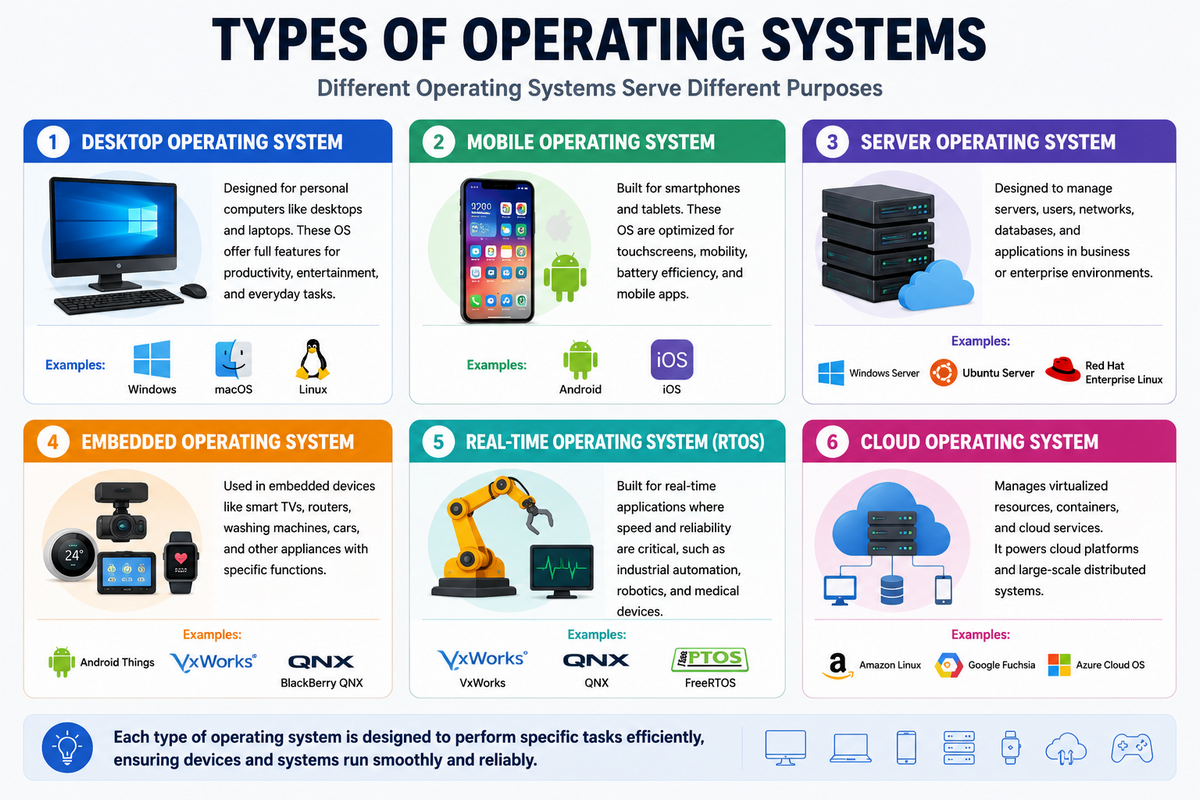
Understanding the different types of operating systems helps you choose the right platform for your device, workload, or business environment.
Major Types of Operating Systems
The following table summarizes the most common operating system types and their primary use cases.
| Operating System Type | Primary Purpose | Common Examples |
| Batch Operating System | Process jobs automatically in batches. | IBM OS/360 |
| Time-Sharing Operating System | Allow multiple users to share one system | UNIX, Linux |
| Distributed Operating System | Manage multiple computers as one system. | Amoeba, Plan 9 |
| Network Operating System | Manage network resources and users. | Windows Server, Linux Server |
| Real-Time Operating System (RTOS) | Execute time-critical tasks | FreeRTOS, QNX, VxWorks |
| Embedded Operating System | Power-dedicated electronic devices | Embedded Linux, Zephyr |
| Desktop Operating System | Personal computers and laptops | Windows, macOS, Linux, ChromeOS |
| Mobile Operating System | Smartphones and tablets | Android, iOS, HarmonyOS |
| Server Operating System | Enterprise servers and data centers | Windows Server, Ubuntu Server |
| Cloud Operating System | Cloud infrastructure and virtualization | OpenStack, Azure Stack |
1. Batch Operating System
A Batch Operating System processes multiple jobs together without requiring user interaction. Instead of executing one task at a time, similar jobs are collected into batches and processed automatically.
Batch operating systems were widely used in early mainframe computers for repetitive business tasks such as payroll processing, banking transactions, and utility billing. Although they are rarely used in personal computing today, they introduced many concepts that influenced modern operating systems.
Best for: Large-scale repetitive data processing
2. Time-Sharing Operating System
A Time-Sharing Operating System allows multiple users to access the same computer simultaneously by rapidly switching the processor between different tasks. Each user receives a small portion of CPU time, creating the impression that everyone has exclusive access to the system.
This approach greatly improved resource utilization and became the foundation for many modern multi-user systems.
Examples: UNIX, Linux
Best for: Universities, enterprise servers, and shared computing environments
3. Distributed Operating System
A Distributed Operating System connects multiple independent computers and manages them as a single system. Instead of relying on one powerful machine, workloads are distributed across several interconnected computers.
Distributed operating systems improve scalability, reliability, and performance, making them ideal for scientific research, cloud infrastructure, and high-performance computing environments.
Best for: Computer clusters and distributed computing
4. Network Operating System (NOS)
A Network Operating System (NOS) manages computers connected through a network and provides centralized services such as file sharing, printer sharing, user authentication, and remote administration.
Unlike distributed operating systems, each computer maintains its own operating system while sharing resources over the network.
Examples: Windows Server, Linux Server
Best for: Businesses, schools, government organizations, and enterprise networks
5. Real-Time Operating System (RTOS)
A Real-Time Operating System (RTOS) is designed for applications that must respond within strict time limits. Instead of maximizing overall performance, RTOS focuses on predictable and reliable execution.
Real-time operating systems are commonly used in robotics, medical equipment, industrial automation, aerospace systems, and automotive electronics where delays could lead to critical failures.
Examples: FreeRTOS, QNX, VxWorks
Best for: Mission-critical and time-sensitive applications
6. Embedded Operating System
An Embedded Operating System is built into dedicated hardware devices to perform specific tasks. These operating systems are lightweight, energy-efficient, and optimized for devices with limited processing power and memory.
Embedded operating systems power smart TVs, routers, digital cameras, smartwatches, medical devices, home appliances, and IoT devices.
Examples: Embedded Linux, Zephyr, FreeRTOS
Best for: Consumer electronics and embedded systems
7. Desktop Operating System
A Desktop Operating System is designed for personal computers and laptops. It provides a graphical user interface, multitasking capabilities, hardware compatibility, and support for thousands of software applications.
Desktop operating systems are the most familiar to everyday users and are widely used for productivity, education, gaming, programming, and creative work.
Popular Examples:
- Microsoft Windows
- macOS
- Linux
- ChromeOS
Best for: Home users, students, professionals, and gamers
8. Mobile Operating System
A Mobile Operating System is specifically designed for smartphones, tablets, and wearable devices. It includes touch-friendly interfaces, battery optimization, wireless connectivity, and app ecosystems optimized for mobile computing.
Modern mobile operating systems support features such as biometric authentication, AI assistants, GPS navigation, mobile payments, and cloud synchronization.
Popular Examples:
- Android
- iOS
- HarmonyOS
Best for: Smartphones, tablets, and wearable devices
9. Server Operating System
A Server Operating System is built to support enterprise servers, websites, databases, virtualization platforms, and cloud services. These operating systems prioritize stability, security, scalability, and continuous uptime over graphical features.
Server operating systems can support thousands of users and applications simultaneously.
Popular Examples:
- Windows Server
- Ubuntu Server
- Red Hat Enterprise Linux (RHEL)
Best for: Data centers, web hosting, and enterprise infrastructure
10. Cloud Operating System
A Cloud Operating System manages virtualized computing resources across cloud environments rather than a single physical computer. It enables organizations to deploy, monitor, and scale applications across multiple servers efficiently.
Cloud operating systems play a key role in modern cloud computing, container orchestration, and software-as-a-service (SaaS) platforms.
Popular Examples:
- OpenStack
- Azure Stack
- Google Kubernetes Engine (GKE)
Best for: Cloud platforms, AI workloads, and enterprise applications
Quick Comparison of Operating System Types
| Type | Typical Devices | Main Purpose |
| Batch OS | Mainframes | Bulk data processing |
| Time-Sharing OS | Shared computers | Multi-user computing |
| Distributed OS | Computer clusters | Resource sharing |
| Network OS | Servers | Network management |
| RTOS | Industrial devices | Time-critical operations |
| Embedded OS | Smart devices | Dedicated hardware control |
| Desktop OS | PCs & Laptops | Personal computing |
| Mobile OS | Smartphones & Tablets | Mobile computing |
| Server OS | Enterprise Servers | Hosting and virtualization |
| Cloud OS | Cloud Infrastructure | Scalable cloud services |
Choosing the Right Operating System Type
The best operating system depends on your specific requirements. Desktop and mobile operating systems are ideal for everyday users, while server and cloud operating systems are designed for enterprise environments. Embedded and real-time operating systems power specialized devices that require reliability and fast response times, whereas distributed and network operating systems support large-scale computing and resource sharing.
As technology continues to evolve, these operating system types increasingly work together to power everything from smartphones and laptops to cloud platforms, autonomous vehicles, smart factories, and AI-driven applications.
Key Takeaways on Choosing the Right Operating System
- Operating systems are classified based on their purpose and computing environment.
- Desktop and mobile operating systems dominate personal computing.
- Server and cloud operating systems power modern internet services.
- Embedded and real-time operating systems are essential for IoT devices and industrial automation.
- Understanding these operating system types helps you select the right platform for your device, application, or business.
Components of an Operating System
Every operating system is made up of several core components that work together to manage hardware, run applications, and provide a smooth user experience. Think of these components as different departments within an organization—each has a specific responsibility, but all must work together for the system to function efficiently.
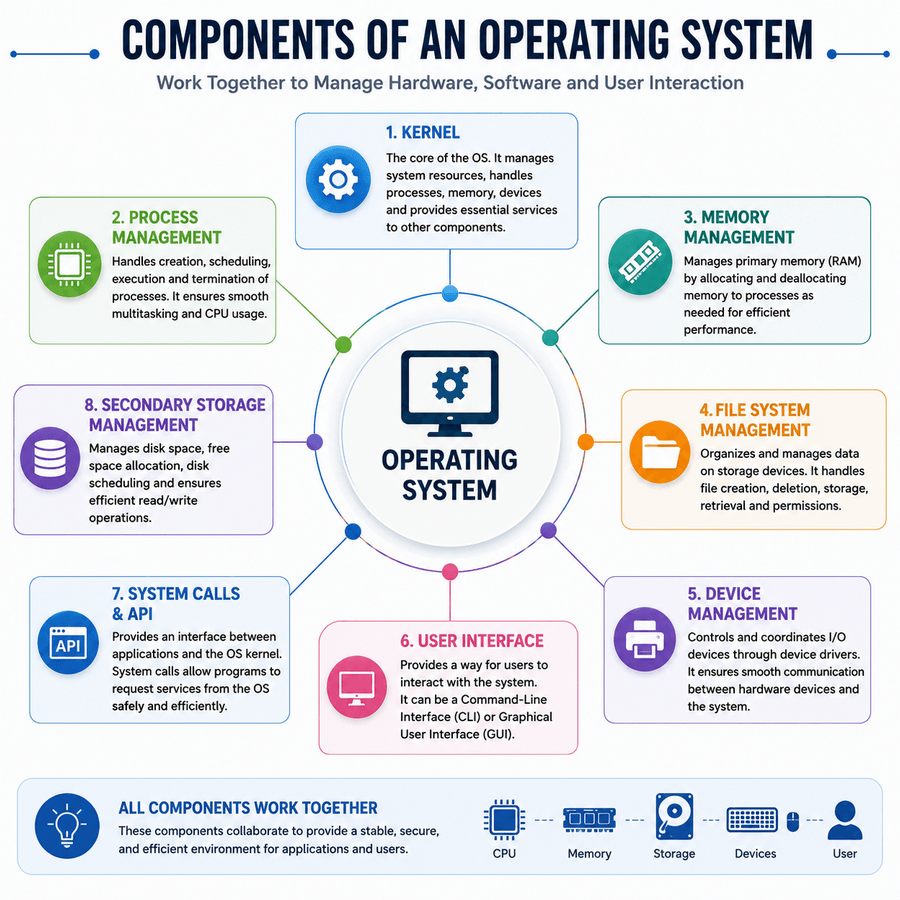
Whether you’re using Windows, macOS, Linux, Android, iOS, or ChromeOS, these essential components form the backbone of the operating system.
| Component | Primary Function |
| Kernel | Manages hardware and system resources |
| Shell | Allows users to interact with the operating system |
| Device Drivers | Enable communication between hardware and the OS |
| File System | Organizes and manages stored data |
| Memory Manager | Allocates and optimizes RAM usage |
| Process Scheduler | Distributes CPU time among running applications |
| Security Layer | Protects the system from threats and unauthorized access |
| User Interface (UI) | Provides graphical or command-line interaction |
1. Kernel
The kernel is the heart of an operating system. It is the first major component loaded into memory during the boot process and remains active until the system shuts down. Acting as the bridge between software and hardware, the kernel manages critical resources such as the processor, memory, storage, and input/output devices.
Its primary responsibilities include:
- Managing CPU processes
- Allocating memory
- Handling device communication
- Scheduling system tasks
- Managing hardware interrupts
- Enforcing security policies
For example, when you launch a web browser, the kernel allocates processor time, reserves memory, accesses files from storage, and ensures the application communicates correctly with your hardware.
2. Shell
The shell is the interface between the user and the operating system. It receives commands from users and forwards them to the kernel for execution.
Modern operating systems support two types of shells:
- Graphical User Interface (GUI): Uses windows, icons, menus, and touch controls, making the operating system easy for most users.
- Command-Line Interface (CLI): Allows users to enter text-based commands through a terminal. Developers and system administrators often prefer CLI for automation and advanced system management.
Examples include Windows PowerShell, Linux Terminal, and macOS Terminal.
3. Device Drivers
Device drivers are specialized software components that enable the operating system to communicate with hardware devices. Without the correct driver, hardware such as printers, graphics cards, webcams, and Wi-Fi adapters cannot function properly.
Common device drivers include:
- Graphics drivers
- Audio drivers
- Network drivers
- Printer drivers
- USB drivers
When you connect new hardware, the operating system automatically detects and loads the appropriate driver, allowing the device to operate seamlessly.
4. File System
The file system organizes and manages data stored on hard drives, SSDs, and other storage devices. It determines how files are named, stored, retrieved, and protected.
Popular file systems include:
| Operating System | Common File System |
| Windows | NTFS, exFAT |
| macOS | APFS |
| Linux | ext4 |
| Android | ext4, F2FS |
A file system enables users to create folders, save documents, search files, manage permissions, and efficiently organize storage space.
5. Memory Manager
The memory manager controls how RAM is allocated and released for applications and background processes. Every time you open or close a program, the memory manager ensures memory is used efficiently.
Its responsibilities include:
- Allocating RAM to applications
- Releasing unused memory
- Preventing memory conflicts
- Managing virtual memory
- Optimizing multitasking performance
Efficient memory management helps keep computers responsive even when multiple applications are running simultaneously.
6. Process Scheduler
The process scheduler determines which applications receive CPU time and in what order. Modern operating systems often manage hundreds of background and foreground processes at once, and the scheduler ensures each process gets fair access to the processor.
Key functions include:
- CPU scheduling
- Process prioritization
- Context switching
- Load balancing
- Efficient multitasking
For example, while you’re editing a document, streaming music, and downloading files, the scheduler coordinates these tasks so they run smoothly without noticeably affecting performance.
7. Security Layer
The security layer protects the operating system, applications, and user data from cyber threats and unauthorized access. Modern operating systems include multiple security mechanisms that work together to keep devices secure.
Common security features include:
- User authentication
- File encryption
- Secure Boot
- Firewall protection
- Permission management
- Automatic security updates
- Biometric authentication
These features help defend against malware, ransomware, phishing attacks, and unauthorized access while protecting sensitive information.
8. User Interface (UI)
The user interface (UI) is the visible part of the operating system that allows users to interact with their devices. It enables users to launch applications, manage files, change settings, and perform everyday tasks.
Most operating systems provide:
- Graphical User Interface (GUI): Windows, icons, menus, buttons, taskbars, and touch gestures.
- Command-Line Interface (CLI): Text-based commands for advanced administration and automation.
A well-designed user interface makes the operating system easier to learn and improves overall productivity.
How These Components Work Together
Although each component has a unique responsibility, they function as an integrated system to deliver a seamless computing experience.
For example, when you open a web browser:
- The User Interface receives your click.
- The Shell sends the request to the Kernel.
- The Kernel asks the Process Scheduler to allocate CPU time.
- The Memory Manager reserves RAM for the application.
- The File System loads the browser’s files from storage.
- Device Drivers activate the display, keyboard, mouse, and network hardware.
- The Security Layer verifies permissions and protects the application while it runs.
All of these operations occur within seconds, allowing applications to launch quickly and run efficiently.
Key Takeaways of components of Operating system
The components of an operating system work together to provide speed, stability, security, and reliability across every modern computing device.
- The Kernel manages hardware and system resources.
- The Shell enables communication between users and the operating system.
- Device Drivers allow hardware components to function correctly.
- The File System organizes and protects stored data.
- The Memory Manager optimizes RAM usage.
- The Process Scheduler ensures smooth multitasking.
- The Security Layer safeguards the system against cyber threats.
- The User Interface provides an intuitive way to interact with the operating system.
Together, these components form the foundation of every operating system, ensuring applications run efficiently while delivering a secure and responsive user experience.
Functions of an Operating System
An operating system performs a wide range of functions that enable computers, smartphones, tablets, and servers to operate efficiently. It acts as the central controller of the entire system, managing hardware resources, coordinating software applications, and ensuring users can interact with their devices without worrying about the underlying complexity.
Whether you’re browsing the web, editing a document, playing a game, or running enterprise applications, the operating system works behind the scenes to allocate resources, manage processes, protect data, and maintain system stability.
What are the core functions of an operating system?
The following are the primary functions performed by every modern operating system.
| Function | Purpose |
| Process Management | Manages running programs and CPU scheduling |
| Memory Management | Allocates and optimizes RAM usage |
| File Management | Organizes files and directories |
| Device Management | Controls communication with hardware devices |
| Storage Management | Manages disks and storage resources |
| Security Management | Protects users, data, and system resources |
| Networking | Enables communication over local and global networks |
| Resource Allocation | Distributes CPU, memory, and storage efficiently |
1. Process Management
Every application running on your device is known as a process. The operating system is responsible for creating, scheduling, monitoring, and terminating these processes while ensuring that multiple programs can run smoothly at the same time.
Modern operating systems use advanced scheduling algorithms to decide which process receives CPU time and for how long. This enables efficient multitasking without noticeably slowing down the system.
For example, you can browse the web, stream music, download files, and edit a document simultaneously because the operating system continuously switches the processor between active tasks.
Key Responsibilities
- Create and terminate processes
- Schedule CPU execution
- Support multitasking
- Synchronize running applications
- Prevent process conflicts
2. Memory Management
Memory management ensures that applications receive the RAM they need while preventing programs from interfering with each other. The operating system continuously monitors available memory and reallocates resources as applications open and close.
Modern operating systems also use virtual memory, allowing storage space to act as temporary RAM when physical memory becomes full.
Efficient memory management improves system responsiveness and enables users to work with multiple applications without frequent slowdowns.
Key Responsibilities
- Allocate RAM
- Free unused memory
- Manage virtual memory
- Prevent memory conflicts
- Optimize overall performance
3. File Management
The operating system organizes all files and folders stored on hard drives, SSDs, and removable media. Through the file system, users can easily create, save, rename, copy, move, search, and delete files.
Popular file systems include NTFS (Windows), APFS (macOS), ext4 (Linux), and F2FS (Android).
Without file management, locating or organizing data would be nearly impossible.
Key Responsibilities
- Create and organize folders
- Store and retrieve files
- Manage file permissions
- Protect data integrity
- Optimize storage organization
4. Device Management
Modern computers rely on numerous hardware devices, including keyboards, monitors, printers, graphics cards, webcams, storage drives, and network adapters. The operating system manages communication with these components through device drivers.
When new hardware is connected, the operating system detects the device, installs or loads the appropriate driver, and makes the hardware available to applications.
This abstraction allows software to work consistently across different hardware configurations.
Key Responsibilities
- Detect hardware devices
- Load and manage drivers
- Coordinate input and output operations
- Monitor hardware status
- Resolve device conflicts
5. Storage Management
Storage management controls how data is stored, organized, and accessed on physical storage devices such as SSDs, hard drives, and external storage.
The operating system ensures efficient use of available disk space while maintaining reliability and performance.
Advanced storage features such as disk partitioning, automatic optimization, compression, and backup support help improve storage efficiency and protect user data.
Key Responsibilities
- Manage storage devices
- Allocate disk space
- Optimize storage performance
- Support backup and recovery
- Monitor storage health
6. Security Management
Security is one of the most important functions of an operating system. Modern operating systems include multiple layers of protection to defend against malware, ransomware, unauthorized access, and data theft.
Built-in security technologies include user authentication, file encryption, secure boot, firewalls, automatic updates, application permissions, and biometric authentication.
Regular security updates also help protect devices from newly discovered vulnerabilities.
Key Responsibilities
- Authenticate users
- Control access permissions
- Encrypt sensitive data
- Detect security threats
- Apply security updates
7. Networking
Networking enables devices to communicate over local networks and the internet. The operating system manages network adapters, wireless connections, IP addresses, and communication protocols to ensure reliable connectivity.
Networking also supports file sharing, cloud storage, remote access, online collaboration, and internet browsing.
Modern operating systems automatically detect available networks and simplify connection management for users.
Key Responsibilities
- Manage network connections
- Configure internet access
- Support file and printer sharing
- Enable remote communication
- Monitor network performance
8. Resource Allocation
Every computer has limited hardware resources. The operating system continuously allocates processor time, memory, storage, and input/output resources to applications based on their priority and requirements.
Efficient resource allocation improves system stability, prevents bottlenecks, and ensures that high-priority applications receive the resources they need.
For example, video editing software may receive more processing power than a background synchronization service while you’re actively editing a project.
Key Responsibilities
- Allocate CPU resources
- Distribute memory
- Balance system workloads
- Prioritize applications
- Improve hardware utilization
How Operating System Functions Work Together
Although each function has a specific role, they operate together to provide a fast, secure, and reliable computing experience.
Imagine you’re attending a video conference while downloading files and editing a presentation:
- Process Management schedules each running application.
- Memory Management allocates RAM efficiently.
- File Management saves and retrieves your presentation.
- Device Management controls your webcam, microphone, speakers, and network adapter.
- Storage Management writes downloaded files to disk.
- Networking maintains your internet connection.
- Security Management protects your meeting and personal data.
- Resource Allocation ensures all applications receive sufficient system resources.
This coordination allows users to multitask without manually managing hardware or software resources.
Key Takeaways of Operating System Working:
Modern operating systems perform far more than simply launching applications—they manage every aspect of a device’s operation.
- Process Management keeps applications running efficiently.
- Memory Management optimizes RAM usage.
- File Management organizes and protects stored data.
- Device Management enables hardware communication.
- Storage Management ensures efficient use of storage resources.
- Networking connects devices to local networks and the internet.
- Security Management safeguards users and data.
- Resource Allocation maximizes overall system performance.
Together, these functions make computers, smartphones, servers, and other digital devices fast, stable, secure, and capable of handling the complex workloads of modern computing.
Desktop Operating Systems
Desktop operating systems are designed for personal computers, laptops, and workstations. They provide the foundation for everything users do on their devices, from browsing the web and editing documents to software development, gaming, graphic design, and video production.
Today’s desktop operating systems offer intuitive graphical interfaces, advanced security, multitasking capabilities, and support for thousands of applications. While they all perform the same core functions, each operating system is built with different priorities, making some better suited for gaming, business, creativity, or software development.
The four most popular desktop operating systems are Microsoft Windows, macOS, Linux, and ChromeOS.
Popular Desktop Operating Systems
| Operating System | Developer | Best For |
| Windows | Microsoft | General users, gamers, businesses |
| macOS | Apple | Creative professionals, Apple users |
| Linux | Open Source Community | Developers, servers, advanced users |
| ChromeOS | Students, web-based computing |
1. Microsoft Windows
Microsoft Windows is the world’s most widely used desktop operating system, powering millions of personal computers and business workstations. Its broad hardware compatibility and extensive software library make it the preferred choice for home users, enterprises, and gamers.
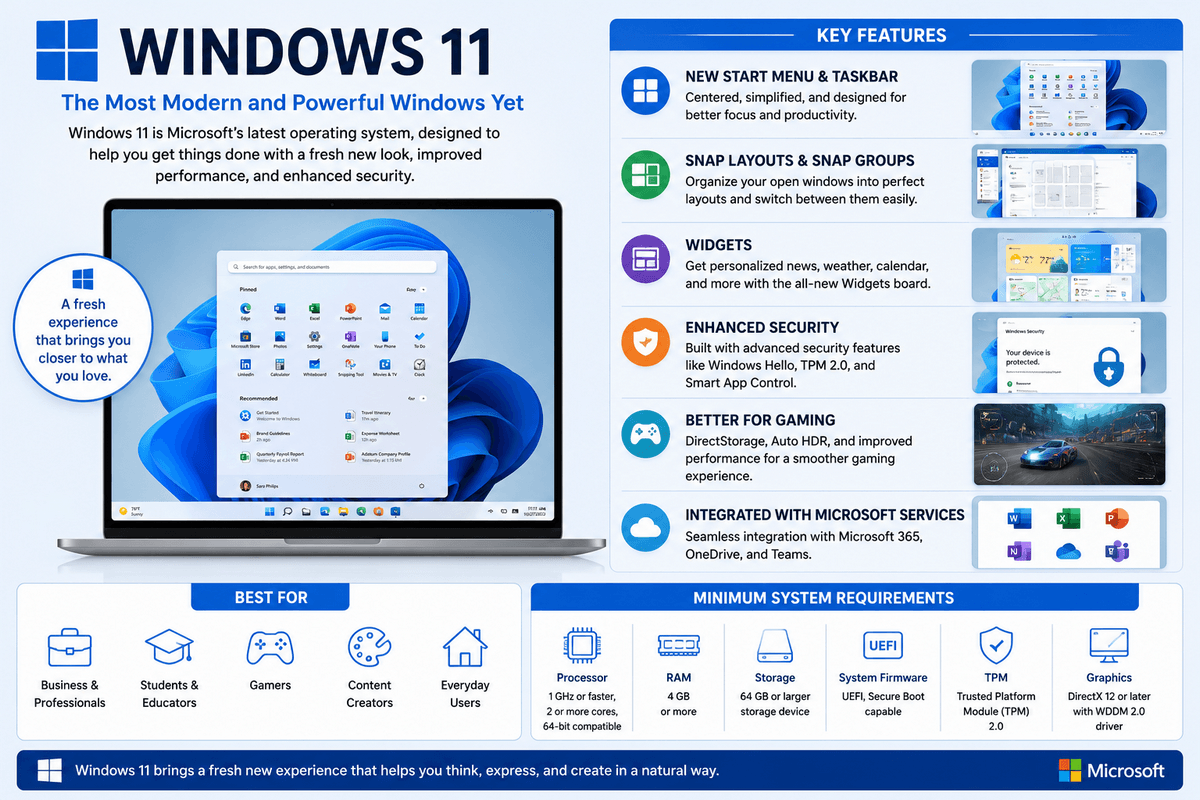
Windows supports thousands of applications, including Microsoft Office, Adobe Creative Cloud, AutoCAD, and most PC games. It also offers advanced security features such as Microsoft Defender, BitLocker encryption, and Windows Hello biometric authentication.
Key Features
- User-friendly graphical interface
- Extensive software compatibility
- Excellent gaming support
- Broad hardware compatibility
- Built-in security tools
- Regular feature and security updates
Strengths
- Largest application ecosystem
- Best operating system for PC gaming
- Supports a wide range of hardware
- Ideal for business and productivity
Limitations
- Commercial license required
- More frequently targeted by malware
- Regular updates may occasionally disrupt workflows
Best For: Home users, students, businesses, professionals, and gamers.
Related TechyDen Guides: Windows Version History | Windows 11 Features | Windows 11 Performance Optimization.
2. macOS
macOS is Apple’s desktop operating system developed exclusively for Mac computers. It is known for its elegant interface, strong security, excellent performance, and seamless integration with Apple’s ecosystem.
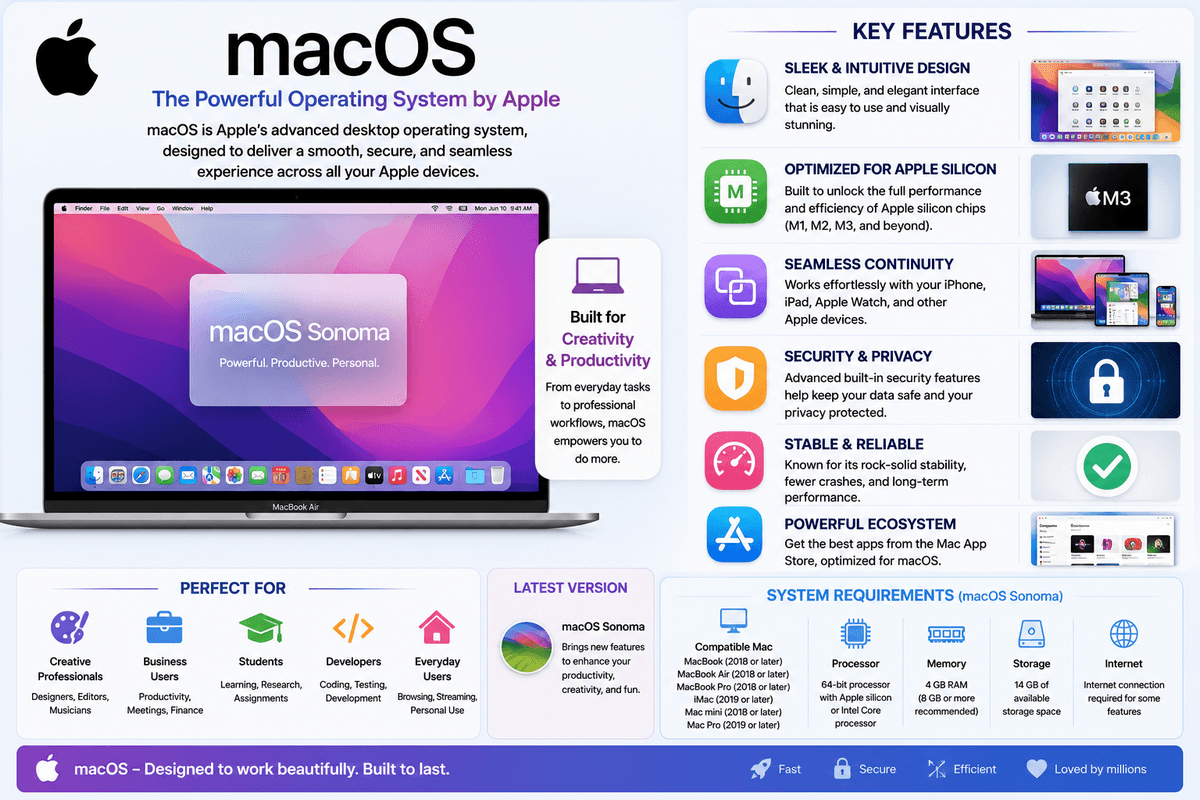
Because Apple designs both the hardware and software, macOS delivers a highly optimized and stable user experience. Creative professionals often prefer macOS for video editing, graphic design, music production, and software development.
Key Features
- Clean and intuitive interface
- Optimized performance on Apple hardware
- Strong privacy and security
- Tight integration with iPhone and iPad
- Built-in productivity and creative applications
Strengths
- Reliable and stable performance
- Excellent battery optimization on MacBooks
- Long software support lifecycle
- Ideal for creative workflows
Limitations
- Runs only on Apple hardware
- Higher hardware cost
- Limited gaming library compared to Windows
Best For: Designers, video editors, photographers, developers, and Apple ecosystem users.
Related Guides: macOS Version History
3. Linux
Linux is a free and open-source desktop operating system available in hundreds of distributions, commonly called distros. Popular choices include Ubuntu, Linux Mint, Fedora, Debian, and Arch Linux.
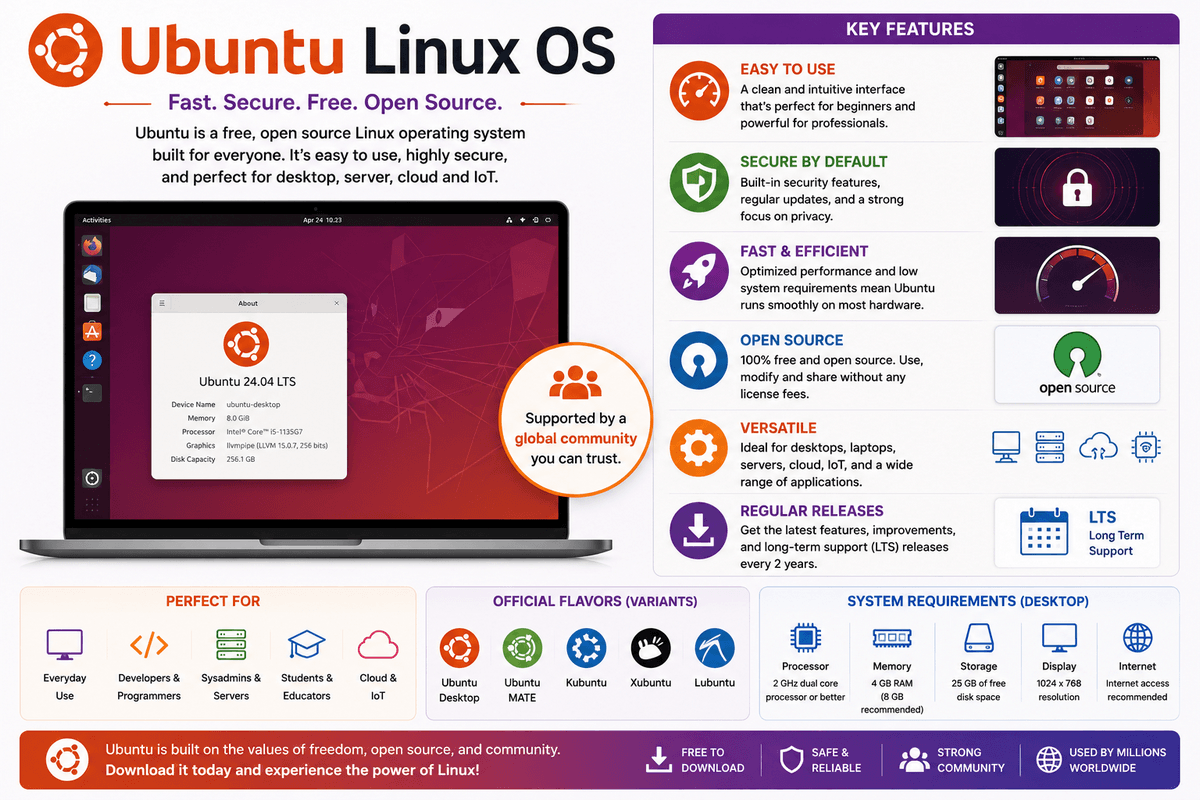
Linux is highly customizable, secure, and efficient, making it a favorite among developers, cybersecurity professionals, and system administrators. It also powers most web servers, cloud infrastructure, and supercomputers worldwide.
Since Linux distributions are completely free, many users consider them a cheap operating system alternative to commercial platforms like Windows and macOS because they eliminate software licensing costs while providing excellent performance.
Key Features
- Open-source and free to use
- Highly customizable
- Strong security architecture
- Lightweight and efficient
- Large developer community
Strengths
- No licensing costs
- Excellent performance on older hardware
- Powerful command-line tools
- Regular community-driven updates
Limitations
- Learning curve for beginners
- Some commercial software is unavailable
- Limited compatibility with certain games and specialized applications
Best For: Developers, programmers, cybersecurity professionals, and advanced users.
4. ChromeOS
ChromeOS is Google’s lightweight desktop operating system designed primarily for web-based computing. Built around the Chrome browser, it offers fast boot times, automatic updates, and built-in security while requiring minimal system resources.
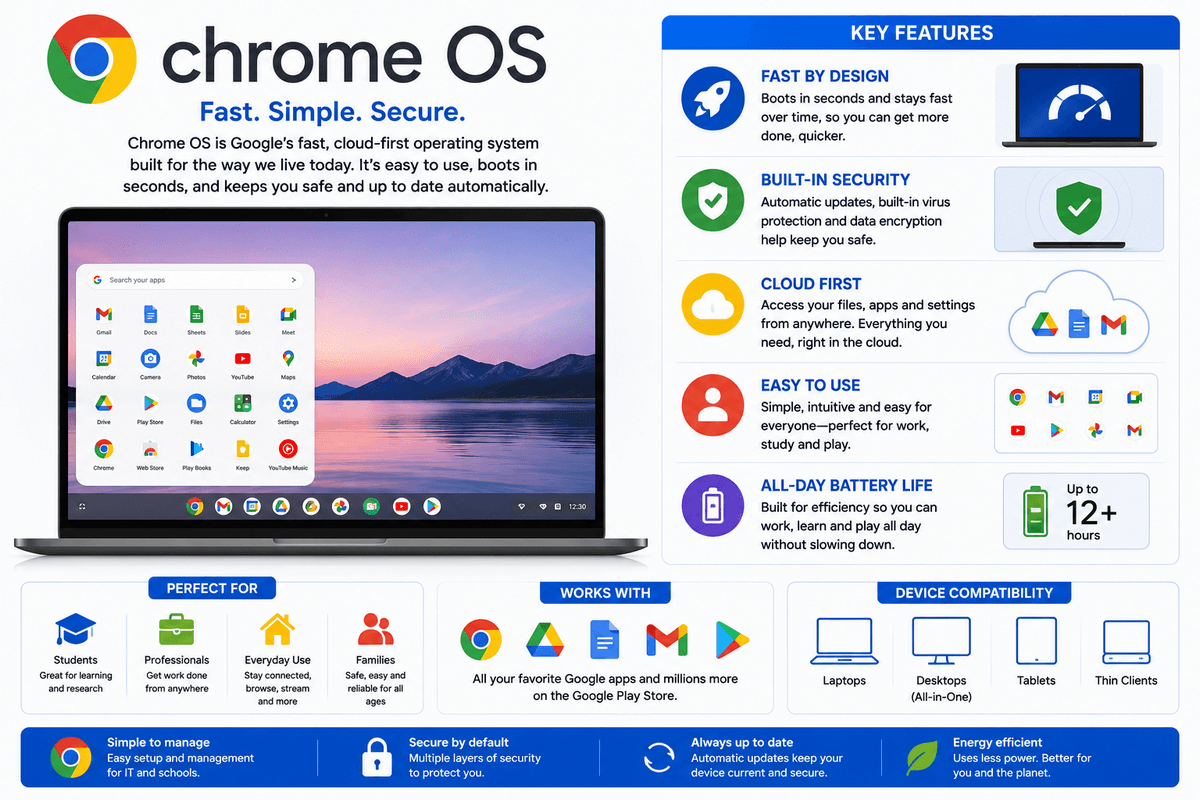
ChromeOS is especially popular in schools, businesses, and among users who spend most of their time using cloud-based applications such as Google Workspace and Microsoft 365.
Key Features
- Fast startup and performance
- Automatic security updates
- Cloud-first design
- Android app support on many devices
- Simple and easy-to-use interface
Strengths
- Excellent battery life
- High security with verified boot
- Performs well on low-cost hardware
- Minimal maintenance required
Limitations
- Limited offline capabilities for some tasks
- Fewer professional desktop applications
- Less flexibility than Windows or Linux
Best For: Students, educators, casual users, and web-based professionals.
Users looking for a Google Chrome operating system download or a Chrome operating system download can install ChromeOS Flex, Google’s free operating system designed to revive older Windows and Mac computers. The installation process is straightforward using Google’s official recovery tool.
If you’re wondering how to install Chrome operating system, Google provides ChromeOS Flex as the recommended solution, allowing users to create a bootable USB drive and install the operating system on compatible devices.
Desktop Operating System Comparison
| Feature | Windows | macOS | Linux | ChromeOS |
| Ease of Use | ⭐⭐⭐⭐⭐ | ⭐⭐⭐⭐⭐ | ⭐⭐⭐ | ⭐⭐⭐⭐⭐ |
| Software Compatibility | ⭐⭐⭐⭐⭐ | ⭐⭐⭐⭐ | ⭐⭐⭐ | ⭐⭐⭐ |
| Gaming Support | ⭐⭐⭐⭐⭐ | ⭐⭐⭐ | ⭐⭐⭐ | ⭐⭐ |
| Security | ⭐⭐⭐⭐ | ⭐⭐⭐⭐⭐ | ⭐⭐⭐⭐⭐ | ⭐⭐⭐⭐⭐ |
| Customization | ⭐⭐⭐ | ⭐⭐⭐ | ⭐⭐⭐⭐⭐ | ⭐⭐ |
| Performance on Older Hardware | ⭐⭐⭐ | ⭐⭐⭐ | ⭐⭐⭐⭐⭐ | ⭐⭐⭐⭐ |
| Cost | Paid | Included with Mac | Free | Included with Chromebook |
Which Desktop Operating System Should You Choose?
The best desktop operating system depends on how you use your computer.
- Choose Windows if you want maximum software compatibility, excellent gaming performance, and a versatile operating system for work and entertainment.
- Choose macOS if you’re invested in the Apple ecosystem or work in creative fields such as video editing, graphic design, or music production.
- Choose Linux if you value customization, open-source software, privacy, or software development.
- Choose ChromeOS if your work revolves around web applications and you want a lightweight, secure, and low-maintenance operating system.
Key Takeaways on Desktop Operating system choice
Desktop operating systems provide the platform that powers modern personal computing. While Windows dominates the consumer and business market, macOS excels in creative workflows, Linux leads in flexibility and development, and ChromeOS offers a fast, secure experience for web-first users.
Choosing the right desktop operating system depends on your hardware, budget, software requirements, and daily workflow. Understanding the strengths of each platform helps you make an informed decision and get the best performance from your computer.
Mobile Operating Systems
Mobile operating systems are specialized software platforms designed for smartphones, tablets, and other portable devices. They manage hardware resources, run mobile applications, provide touch-based interfaces, and optimize performance for battery-powered devices.
Unlike desktop operating systems, mobile operating systems are built for mobility, prioritizing battery efficiency, wireless connectivity, touch gestures, biometric security, and seamless integration with cloud services.
Today, billions of people rely on mobile operating systems for communication, entertainment, productivity, navigation, online banking, and shopping.
The three major mobile operating systems are Android, iOS, and HarmonyOS.
Popular Mobile Operating Systems
| Operating System | Developer | Best For |
| Android | Most smartphone users, customization, affordability | |
| iOS | Apple | Security, privacy, Apple ecosystem |
| HarmonyOS | Huawei | Huawei devices and connected ecosystems |
1. Android
Android is the world’s most widely used mobile operating system, powering smartphones and tablets from manufacturers such as Samsung, Google, OnePlus, Xiaomi, OPPO, Vivo, and Motorola.
Built on the Linux kernel, Android is known for its flexibility, customization options, and extensive hardware support. Users can personalize their devices with widgets, launchers, themes, and default applications, while developers benefit from a large app ecosystem through the Google Play Store.
Android is the world’s most popular operating system for smartphones and remains one of the leading operating systems for phones because of its flexibility, extensive app ecosystem, and availability across budget, mid-range, and flagship devices.
Key Features
- Highly customizable interface
- Millions of apps on Google Play
- Supports devices across all price ranges
- Google Assistant integration
- Advanced multitasking and widgets
- Regular security updates on supported devices
Best For: Users seeking flexibility, customization, and a wide range of smartphone options.
Did You Know? Android is the world’s most widely used operating system by installed devices, while Windows remains the leading desktop operating system.
2. iOS
iOS is Apple’s mobile operating system designed exclusively for iPhones. It is recognized for its smooth performance, strong privacy protections, regular software updates, and seamless integration with Apple’s ecosystem, including Macs, iPads, Apple Watch, and AirPods.
Apple controls both the hardware and software, resulting in a highly optimized user experience with consistent performance across supported devices.
Key Features
- Clean and intuitive interface
- Strong privacy and security features
- Fast and long-term software updates
- Seamless Apple ecosystem integration
- Optimized App Store experience
- Face ID and Touch ID authentication
Best For: Users who prioritize security, reliability, premium performance, and integration with Apple devices.
3. HarmonyOS
HarmonyOS is Huawei’s operating system designed for smartphones, tablets, smartwatches, smart TVs, and Internet of Things (IoT) devices. It emphasizes cross-device collaboration, allowing multiple Huawei devices to work together seamlessly.
Although HarmonyOS shares similarities with Android in some regions, Huawei has expanded its ecosystem with its own services, app marketplace, and connected device experience.
HarmonyOS is one of the new mobile operating systems developed to support smartphones, tablets, wearables, smart TVs, and other connected devices within Huawei’s ecosystem.
Key Features
- Cross-device collaboration
- Optimized performance
- Huawei ecosystem integration
- Intelligent device connectivity
- Enhanced multitasking
- AI-powered features
Best For: Users invested in Huawei’s ecosystem of smartphones and smart devices.
Mobile Operating System Comparison
| Feature | Android | iOS | HarmonyOS |
| Ease of Use | ⭐⭐⭐⭐ | ⭐⭐⭐⭐⭐ | ⭐⭐⭐⭐ |
| Customization | ⭐⭐⭐⭐⭐ | ⭐⭐⭐ | ⭐⭐⭐⭐ |
| Security & Privacy | ⭐⭐⭐⭐ | ⭐⭐⭐⭐⭐ | ⭐⭐⭐⭐ |
| App Ecosystem | ⭐⭐⭐⭐⭐ | ⭐⭐⭐⭐⭐ | ⭐⭐⭐ |
| Device Availability | ⭐⭐⭐⭐⭐ | ⭐⭐⭐ | ⭐⭐⭐ |
| Software Updates | Manufacturer-dependent | Excellent | Huawei devices |
| Best For | Flexibility | Premium experience | Huawei ecosystem |
Which Mobile Operating System Should You Choose?
The right mobile operating system depends on your priorities and preferred ecosystem.
- Choose Android if you want a wide variety of smartphones, extensive customization, and access to devices across different price ranges.
- Choose iOS if you value long-term software support, strong privacy, premium performance, and seamless integration with other Apple devices.
- Choose HarmonyOS if you use multiple Huawei products and want a connected ecosystem with cross-device collaboration.
Regardless of your choice, modern mobile operating systems provide excellent performance, advanced security, AI-powered features, cloud synchronization, and access to millions of applications that support both personal and professional needs.
Key Takeaways on Mobile Operating Systems
Mobile operating systems have transformed smartphones into powerful computing devices capable of handling communication, entertainment, productivity, and business tasks.
- Android offers the largest market share, extensive customization, and broad device compatibility.
- iOS delivers exceptional security, consistent performance, and a tightly integrated Apple ecosystem.
- HarmonyOS focuses on seamless connectivity across Huawei devices and smart ecosystems.
- Each platform provides unique strengths, making the best choice dependent on your budget, preferred features, and device ecosystem.
Best Operating Systems for Different Use Cases
Choosing the best operating system depends on how you use your computer. While all operating systems perform the same core functions, each one is optimized for specific tasks such as gaming, programming, business, creative work, cybersecurity, or server management.
Some users prioritize performance and software compatibility, while others value security, customization, stability, or affordability. Understanding the strengths of each operating system helps you select the right platform for your personal or professional needs.
Best Operating Systems at a Glance
| Use Case | Best Operating System | Why It’s the Best |
| Gaming | Windows 11 | Largest game library and DirectX support |
| Programming | Linux (Ubuntu) | Powerful development tools and open-source ecosystem |
| Business & Productivity | Windows 11 Pro | Enterprise features and Microsoft 365 integration |
| Creative Professionals | macOS | Optimized for design, video, and music production |
| Students | ChromeOS | Affordable, secure, and cloud-based |
| Cybersecurity | Kali Linux | Advanced penetration testing and security tools |
| Servers | Ubuntu Server / Red Hat Enterprise Linux | Stability, security, and scalability |
| Older Computers | Linux Mint | Lightweight and fast on aging hardware |
Best Operating System for Gaming
Winner: Windows 11
Windows remains the top choice for gamers because it supports the largest collection of PC games and gaming hardware. Technologies such as DirectX 12 Ultimate, Auto HDR, Variable Refresh Rate (VRR), and Game Mode help deliver smoother gameplay and improved graphics.
Most game developers release Windows versions first, making it the preferred platform for AAA titles and competitive esports.
Why Choose Windows for Gaming?
- Largest game library
- Excellent graphics driver support
- Compatible with Steam, Epic Games, Xbox, and more
- Broad support for gaming peripherals
- Optimized for high-performance hardware
Best Operating System for Programming
Winner: Ubuntu Linux
Linux is widely regarded as the best operating system for developers. Ubuntu, in particular, offers excellent support for programming languages, development frameworks, containers, and cloud-native tools.
Developers benefit from a powerful command-line interface, package managers, and native support for technologies such as Docker, Kubernetes, Python, Node.js, Java, and Git.
Why Developers Prefer Linux
- Open-source and free
- Powerful terminal environment
- Excellent programming tools
- Easy software package management
- Preferred platform for cloud development
Best Operating System for Business and Productivity
Winner: Windows 11 Pro
Businesses need security, compatibility, and productivity. Windows 11 Pro offers enterprise-grade features such as BitLocker encryption, Remote Desktop, Active Directory support, Microsoft 365 integration, and advanced device management.
Its compatibility with business software makes it the standard operating system for many organizations.
Why Businesses Choose Windows
- Broad software compatibility
- Enterprise security features
- Easy device management
- Microsoft Office integration
- Reliable vendor support
Best Operating System for Creative Professionals
Winner: macOS
Creative professionals often choose macOS because of its optimized performance, color accuracy, and excellent support for professional creative software.
Applications such as Final Cut Pro, Logic Pro, Adobe Creative Cloud, and DaVinci Resolve perform exceptionally well on modern Mac computers.
Ideal For
- Video editing
- Graphic design
- Photography
- Music production
- UI/UX design
Best Operating System for Students
Winner: ChromeOS
ChromeOS is an excellent choice for students thanks to its simplicity, affordability, and strong security. Chromebooks boot quickly, receive automatic updates, and integrate seamlessly with Google Workspace for online learning.
Since most educational work is web-based, ChromeOS offers everything many students need without requiring expensive hardware.
Why Students Love ChromeOS
- Easy to learn
- Affordable devices
- Excellent battery life
- Automatic updates
- Cloud-based productivity
Best Operating System for Cybersecurity
Winner: Kali Linux
Kali Linux is a specialized Linux distribution developed for cybersecurity professionals, penetration testers, and ethical hackers. It includes hundreds of pre-installed security tools used for vulnerability assessments, digital forensics, and network analysis.
Because of its advanced capabilities, Kali Linux is best suited for experienced users or those learning cybersecurity.
Popular Tools Include
- Nmap
- Metasploit Framework
- Wireshark
- Burp Suite
- Aircrack-ng
Best Operating System for Servers
Winner: Ubuntu Server and Red Hat Enterprise Linux
Linux dominates the server market because of its reliability, scalability, and security. Ubuntu Server is popular for startups and cloud deployments, while Red Hat Enterprise Linux (RHEL) is widely used in enterprise environments that require commercial support.
These operating systems power websites, cloud services, databases, virtualization platforms, and enterprise applications around the world.
Best Server Features
- High stability
- Excellent security
- Efficient resource usage
- Strong virtualization support
- Large community and enterprise support
Best Operating System for Older Computers
Winner: Linux Mint
Older computers often struggle with the hardware requirements of modern operating systems. Linux Mint offers a lightweight, user-friendly experience that can significantly improve performance on aging hardware.
It provides a familiar desktop environment, low resource consumption, and long-term support, making it an excellent choice for extending the life of older PCs.
Why Linux Mint Stands Out
- Lightweight and fast
- Beginner-friendly interface
- Low hardware requirements
- Free and open source
- Long-term updates
Comparison Table of OS and their Alternatives
| Use Case | Recommended Operating System | Alternative Options |
| Gaming | Windows 11 | SteamOS, Linux |
| Programming | Ubuntu Linux | Fedora, macOS |
| Business | Windows 11 Pro | macOS, Ubuntu |
| Creative Work | macOS | Windows 11 |
| Students | ChromeOS | Windows 11 Home |
| Cybersecurity | Kali Linux | Parrot OS |
| Servers | Ubuntu Server, RHEL | Debian, Rocky Linux |
| Older PCs | Linux Mint | Lubuntu, Zorin OS Lite |
How to Choose the Right Operating System
Before selecting an operating system, consider the following factors:
- Purpose: Will you use your computer for gaming, work, programming, or everyday tasks?
- Software Compatibility: Ensure your essential applications are supported.
- Hardware Requirements: Verify that your computer meets the operating system’s specifications.
- Security: Choose an operating system with regular security updates and strong built-in protections.
- Ease of Use: Beginners may prefer Windows, macOS, or ChromeOS, while advanced users often appreciate Linux’s flexibility.
- Budget: Windows and macOS typically require purchasing hardware or licenses, whereas many Linux distributions are free.
Evaluating these factors will help you choose an operating system that matches your current needs while remaining reliable as your requirements evolve.
Key Takeaways on Best Operating Systems for various purposes
The “best” operating system depends on your goals rather than a single universal winner.
- Windows 11 is the best all-around choice for gaming, business, and software compatibility.
- macOS excels in creative workflows and offers seamless integration with Apple devices.
- Ubuntu Linux is ideal for programming, development, and cloud computing.
- ChromeOS provides a simple, secure, and affordable experience for students and web-based users.
- Kali Linux is the preferred platform for cybersecurity professionals.
- Ubuntu Server and Red Hat Enterprise Linux dominate enterprise servers and cloud infrastructure.
- Linux Mint breathes new life into older computers with its lightweight performance.
By understanding the strengths of each operating system, you can confidently choose the platform that delivers the best balance of performance, security, compatibility, and usability for your specific needs.
Free and Open-Source Operating Systems
Free and open-source operating systems (FOSS) provide powerful alternatives to commercial platforms like Windows and macOS. Unlike proprietary operating systems, their source code is publicly available, allowing developers to inspect, modify, and distribute the software.
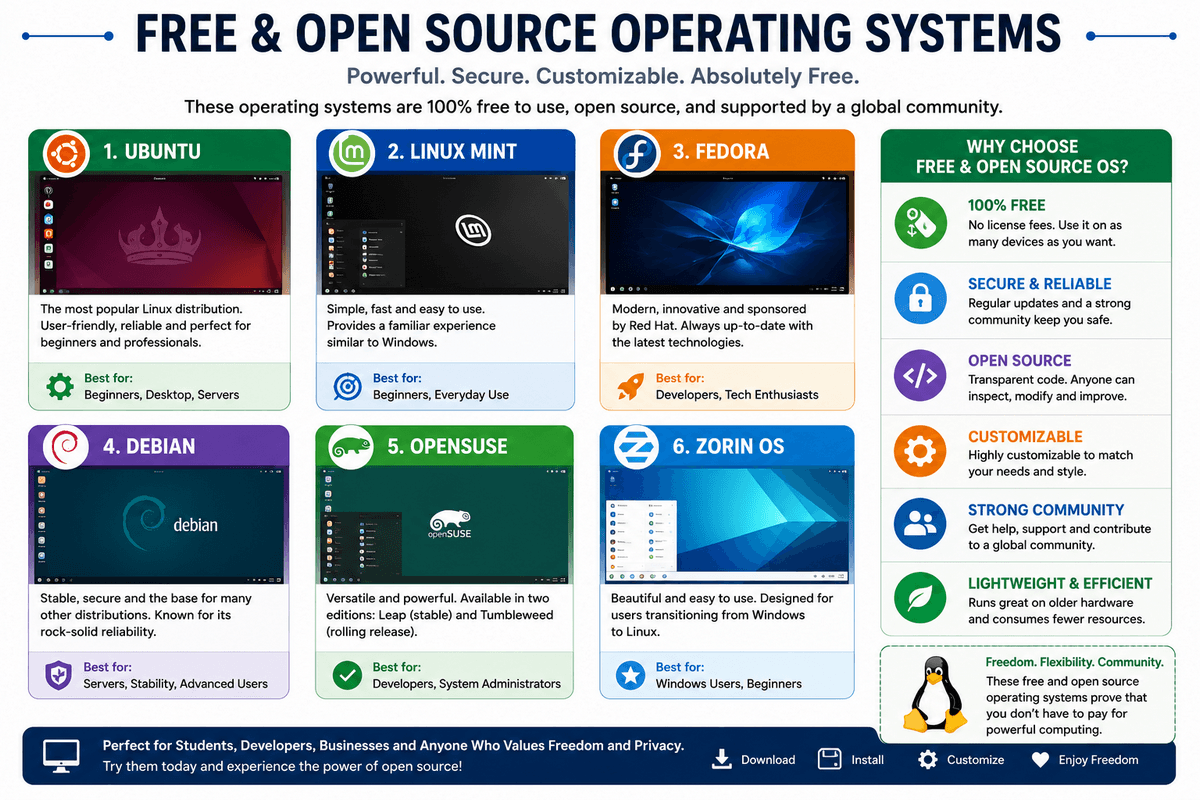
These operating systems are widely used by developers, students, businesses, educational institutions, and system administrators because they offer flexibility, security, customization, and zero licensing costs. Whether you’re reviving an old computer, building a server, or learning programming, there’s an open-source operating system to meet your needs.
If you’re looking for free operating systems for your computer, there are many excellent choices available. Ubuntu, Linux Mint, Fedora, Debian, and ChromeOS Flex are among the best free operating systems, offering modern features without licensing costs.
Popular Free and Open-Source Operating Systems
| Operating System | Best For | Difficulty |
| Ubuntu | Beginners, everyday users | ⭐ Easy |
| Linux Mint | Older computers, Windows users | ⭐ Easy |
| Fedora | Developers, latest technologies | ⭐⭐ Moderate |
| Debian | Servers, stability | ⭐⭐ Moderate |
| Arch Linux | Advanced users | ⭐⭐⭐ Advanced |
| ChromeOS Flex | Older laptops and PCs | ⭐ Easy |
| FreeBSD | Servers, networking | ⭐⭐⭐ Advanced |
| OpenBSD | Security-focused environments | ⭐⭐⭐ Advanced |
1. Ubuntu
Ubuntu is one of the most popular Linux distributions and an excellent starting point for users transitioning from Windows or macOS. Developed by Canonical, it offers a polished desktop environment, long-term support (LTS) releases, and a vast software repository.
Key Features
- Beginner-friendly interface
- Long-Term Support (LTS) versions
- Large software library
- Strong community support
- Regular security updates
Best For: Students, home users, developers, and small businesses.
2. Linux Mint
Linux Mint is built on Ubuntu and focuses on simplicity and ease of use. Its familiar desktop layout makes it especially appealing to users switching from Windows.
Linux Mint is also lightweight, making it an excellent choice for older computers that struggle with newer versions of Windows.
Key Features
- Familiar desktop experience
- Lightweight performance
- Easy installation
- Excellent multimedia support
- Stable and reliable
Best For: Beginners and users looking to revive older PCs.
3. Fedora
Sponsored by Red Hat, Fedora is known for delivering the latest Linux technologies while maintaining stability and security. It frequently introduces new features before they appear in enterprise Linux distributions.
Key Features
- Cutting-edge software
- Excellent developer tools
- Strong security features
- Frequent updates
- GNOME desktop environment
Best For: Developers, programmers, and technology enthusiasts.
4. Debian
Debian is one of the oldest and most respected Linux distributions. It emphasizes stability, reliability, and security, making it a popular choice for servers and enterprise environments.
Many well-known Linux distributions, including Ubuntu, are based on Debian.
Key Features
- Exceptional stability
- Large software repositories
- Reliable long-term support
- Strong security
- Community-driven development
Best For: Servers, system administrators, and advanced desktop users.
5. Arch Linux
Arch Linux is designed for experienced Linux users who want complete control over their operating system. It follows a minimalist philosophy, allowing users to install only the components they need.
While Arch requires more technical knowledge, it offers unmatched customization and access to the extensive Arch User Repository (AUR).
Key Features
- Highly customizable
- Rolling-release updates
- Minimal default installation
- Extensive software repository
- Comprehensive documentation
Best For: Advanced users, developers, and Linux enthusiasts.
6. ChromeOS Flex
ChromeOS Flex is Google’s free operating system that transforms older Windows and Mac computers into fast, cloud-focused devices. It delivers many of the benefits of ChromeOS, including quick startup times, automatic updates, and enhanced security.
Unlike traditional Linux distributions, ChromeOS Flex is optimized for users who primarily work with web applications and cloud services.
ChromeOS Flex is one of the best operating systems for PC free because it can transform older laptops and desktop computers into fast, secure, cloud-ready devices at no cost.
Key Features
- Fast boot times
- Automatic updates
- Lightweight performance
- Built-in security
- Cloud-first experience
Best For: Schools, businesses, and users with older laptops.
7. FreeBSD
Although not based on Linux, FreeBSD is a free and open-source Unix-like operating system known for its outstanding networking capabilities, performance, and reliability.
It is widely used for web hosting, storage servers, network appliances, and enterprise infrastructure.
Key Features
- High performance
- Advanced networking
- Strong security
- Excellent scalability
- Reliable server platform
Best For: Enterprise servers, networking, and storage systems.
8. OpenBSD
OpenBSD is a Unix-like operating system that places security above all else. It is renowned for its proactive security practices, code auditing, and minimal attack surface.
OpenBSD is frequently used in environments where security and reliability are critical.
Key Features
- Security-focused design
- Regular code audits
- Strong encryption support
- Stable networking
- Reliable firewall technologies
Best For: Security professionals, firewalls, and critical infrastructure.
Comparison of Free Operating Systems
| Operating System | Ease of Use | Security | Performance | Best Use Case |
| Ubuntu | ⭐⭐⭐⭐⭐ | ⭐⭐⭐⭐ | ⭐⭐⭐⭐ | General desktop use |
| Linux Mint | ⭐⭐⭐⭐⭐ | ⭐⭐⭐⭐ | ⭐⭐⭐⭐⭐ | Older computers |
| Fedora | ⭐⭐⭐⭐ | ⭐⭐⭐⭐⭐ | ⭐⭐⭐⭐ | Software development |
| Debian | ⭐⭐⭐ | ⭐⭐⭐⭐⭐ | ⭐⭐⭐⭐⭐ | Servers |
| Arch Linux | ⭐⭐ | ⭐⭐⭐⭐⭐ | ⭐⭐⭐⭐⭐ | Custom Linux systems |
| ChromeOS Flex | ⭐⭐⭐⭐⭐ | ⭐⭐⭐⭐⭐ | ⭐⭐⭐⭐ | Web-based computing |
| FreeBSD | ⭐⭐ | ⭐⭐⭐⭐⭐ | ⭐⭐⭐⭐⭐ | Enterprise servers |
| OpenBSD | ⭐⭐ | ⭐⭐⭐⭐⭐ | ⭐⭐⭐⭐ | Cybersecurity |
Which Free Operating System Should You Choose?
Your ideal operating system depends on your goals and technical experience.
- Ubuntu is the best overall choice for most users thanks to its ease of use and strong community support.
- Linux Mint is ideal if you’re switching from Windows or upgrading an older computer.
- Fedora is a great option for developers who want access to the latest technologies.
- Debian provides exceptional stability for servers and production environments.
- Arch Linux offers unmatched flexibility for experienced Linux users.
- ChromeOS Flex is perfect for breathing new life into aging laptops used primarily for web browsing and cloud applications.
- FreeBSD excels in networking and enterprise server deployments.
- OpenBSD is the preferred choice for security-focused systems and network infrastructure.
Key Takeaways on Free and Open-Source Operating Systems
Free and open-source operating systems offer powerful, secure, and cost-effective alternatives to proprietary software.
- Ubuntu is the best all-around Linux distribution for beginners.
- Linux Mint provides an easy transition for Windows users and performs exceptionally well on older hardware.
- Fedora delivers the latest innovations for developers.
- Debian is trusted for stability in server environments.
- Arch Linux offers maximum customization for advanced users.
- ChromeOS Flex transforms older computers into modern cloud-first devices.
- FreeBSD and OpenBSD are excellent Unix-like systems for enterprise networking and security.
Whether you’re learning Linux, deploying servers, extending the life of an older PC, or exploring open-source software, these operating systems provide reliable, flexible, and feature-rich solutions without licensing costs.
Operating System Comparison
With so many operating systems available, choosing the right one can feel overwhelming. Each platform has its own strengths, making it better suited for specific users and workloads. For example, Windows dominates gaming and business environments, macOS is favored by creative professionals, Linux excels in development and servers, ChromeOS focuses on simplicity and cloud computing, while Android and iOS power the vast majority of smartphones worldwide.
Comparing these operating systems side by side helps you understand their differences in performance, security, software compatibility, customization, pricing, and hardware support, making it easier to select the platform that best fits your needs.
Operating System Comparison at a Glance
| Feature | Windows | macOS | Linux | ChromeOS | Android | iOS |
| Developer | Microsoft | Apple | Open Source Community | Apple | ||
| Device Type | PCs & Laptops | Mac Computers | PCs, Servers | Chromebooks | Smartphones & Tablets | iPhone & iPad |
| License | Proprietary | Proprietary | Open Source | Proprietary | Open Source (AOSP) | Proprietary |
Feature Comparison
| Feature | Windows | macOS | Linux | ChromeOS | Android | iOS |
| Performance | ⭐⭐⭐⭐⭐ | ⭐⭐⭐⭐⭐ | ⭐⭐⭐⭐⭐ | ⭐⭐⭐⭐ | ⭐⭐⭐⭐⭐ | ⭐⭐⭐⭐⭐ |
| Ease of Use | ⭐⭐⭐⭐⭐ | ⭐⭐⭐⭐⭐ | ⭐⭐⭐ | ⭐⭐⭐⭐⭐ | ⭐⭐⭐⭐ | ⭐⭐⭐⭐⭐ |
| Security | ⭐⭐⭐⭐ | ⭐⭐⭐⭐⭐ | ⭐⭐⭐⭐⭐ | ⭐⭐⭐⭐⭐ | ⭐⭐⭐⭐ | ⭐⭐⭐⭐⭐ |
| Software Compatibility | ⭐⭐⭐⭐⭐ | ⭐⭐⭐⭐ | ⭐⭐⭐ | ⭐⭐⭐ | ⭐⭐⭐⭐⭐ | ⭐⭐⭐⭐⭐ |
| Customization | ⭐⭐⭐ | ⭐⭐⭐ | ⭐⭐⭐⭐⭐ | ⭐⭐ | ⭐⭐⭐⭐⭐ | ⭐⭐ |
| Gaming Support | ⭐⭐⭐⭐⭐ | ⭐⭐⭐ | ⭐⭐⭐ | ⭐ | ⭐⭐⭐⭐ | ⭐⭐⭐ |
| Hardware Compatibility | ⭐⭐⭐⭐⭐ | ⭐⭐⭐ | ⭐⭐⭐⭐⭐ | ⭐⭐⭐ | ⭐⭐⭐⭐⭐ | ⭐⭐⭐ |
| Price | Paid License | Included with Mac | Free | Included with Chromebook | Free | Included with iPhone |
1. Windows
Windows is the most versatile desktop operating system, offering excellent software compatibility, broad hardware support, and the largest gaming ecosystem. It works with virtually every major hardware manufacturer and supports countless productivity, engineering, and creative applications.
Best For
- Home users
- Businesses
- Students
- Gamers
- Professionals
2. macOS
macOS delivers outstanding stability, security, and seamless integration with Apple’s ecosystem. Because Apple develops both the hardware and software, Mac computers offer optimized performance, long battery life, and a polished user experience.
Best For
- Designers
- Video editors
- Music producers
- Developers
- Apple ecosystem users
3. Linux
Linux is a flexible, secure, and open-source operating system available in hundreds of distributions. It is widely used for programming, cybersecurity, cloud computing, and enterprise servers due to its reliability and customization options.
Although it has a steeper learning curve than Windows or macOS, Linux provides unmatched control over the operating system.
Best For
- Developers
- System administrators
- Cybersecurity professionals
- Open-source enthusiasts
4. ChromeOS
ChromeOS is Google’s lightweight operating system designed for cloud-first computing. It offers quick startup times, automatic updates, and strong built-in security while requiring very little maintenance.
Because it focuses primarily on web applications, ChromeOS is ideal for users who spend most of their time online.
Best For
- Students
- Schools
- Remote workers
- Casual users
5. Android
Android is the world’s most widely used mobile operating system. Its greatest strengths are flexibility, customization, and availability across devices from many manufacturers.
Users can choose from budget smartphones to premium flagship devices while enjoying access to millions of applications through the Google Play Store.
Best For
- Smartphone users
- Mobile gamers
- Budget-conscious buyers
- Users who prefer customization
Related posts:
6. iOS
iOS is Apple’s mobile operating system for iPhones. It is known for its smooth performance, strong privacy protections, long software support lifecycle, and excellent integration with other Apple devices.
Its carefully curated App Store and consistent updates contribute to a secure and reliable mobile experience.
Best For
- iPhone users
- Business professionals
- Privacy-conscious users
- Apple ecosystem customers
Which Operating System Is Best?
There is no single operating system that is perfect for everyone. The best choice depends on your device, budget, software requirements, and intended use.
| If You Need… | Recommended Operating System |
| Best overall desktop experience | Windows 11 |
| Best for gaming | Windows 11 |
| Best for creative work | macOS |
| Best for programming | Ubuntu Linux |
| Best for cybersecurity | Kali Linux |
| Best for servers | Ubuntu Server or Red Hat Enterprise Linux |
| Best for students | ChromeOS |
| Best smartphone flexibility | Android |
| Best smartphone security | iOS |
| Best for older computers | Linux Mint |
Key Factors to Consider Before Choosing
Before selecting an operating system, ask yourself the following questions:
- What will you primarily use your device for? (Gaming, work, development, education, or creative projects.)
- Which applications do you need? Ensure your essential software is available for the platform.
- What hardware do you own? Some operating systems only run on specific devices.
- How important are security and privacy? Consider built-in protections and update policies.
- Do you prefer simplicity or customization? Some platforms offer extensive personalization, while others focus on a streamlined experience.
- What is your budget? Free, open-source options such as Linux can reduce software costs.
Answering these questions will help narrow your choices and ensure your operating system aligns with your workflow and long-term needs.
Key Takeaways
Each operating system has been designed with different priorities, making it suitable for different users.
- Windows offers the best balance of compatibility, productivity, and gaming.
- macOS delivers outstanding performance for creative professionals and Apple users.
- Linux provides maximum flexibility, security, and customization for developers and enterprises.
- ChromeOS is ideal for lightweight, cloud-based computing.
- Android leads in mobile customization and device variety.
- iOS excels in privacy, security, and seamless ecosystem integration.
Rather than asking which operating system is universally “best,” focus on which one best matches your hardware, software requirements, and daily workflow. The right operating system will enhance your productivity, improve your user experience, and help you get the most from your devices.
Operating System Security and Best Practices
Modern operating systems store sensitive information such as personal files, financial records, passwords, photos, and business data. As cyber threats continue to evolve, securing your operating system is more important than ever. Malware, ransomware, phishing attacks, and unauthorized access can compromise your privacy and disrupt your work if proper security measures are not in place.
Fortunately, today’s operating systems—including Windows, macOS, Linux, Android, and iOS—include built-in security features that help protect users. By following a few essential best practices, you can significantly reduce the risk of security breaches and keep your device running smoothly.
Essential Operating System Security Practices
| Security Practice | Why It Matters |
| Enable Automatic Updates | Protects against newly discovered vulnerabilities |
| Install Antivirus Software | Detects and removes malware |
| Use a Firewall | Blocks unauthorized network access |
| Create Strong Passwords | Prevents unauthorized logins |
| Enable Multi-Factor Authentication (MFA) | Adds an extra layer of account security |
| Encrypt Your Data | Protects files if your device is lost or stolen |
| Perform Regular Backups | Helps recover data after hardware failure or cyberattacks |
| Practice Safe Browsing | Reduces the risk of phishing and malicious downloads |
1. Keep Your Operating System Updated
Software updates do more than add new features—they also fix security vulnerabilities discovered by developers and security researchers. Delaying updates can leave your device exposed to known threats.
Most modern operating systems support automatic updates, ensuring critical security patches are installed as soon as they become available.
Best Practices
- Enable automatic updates.
- Install security patches promptly.
- Update device drivers and firmware regularly.
- Restart your device after important updates.
2. Install Reliable Antivirus Software
Antivirus software helps detect, block, and remove malicious programs before they can damage your system or steal sensitive information.
While Windows includes Microsoft Defender, users who require additional features may consider reputable third-party security solutions. macOS, Linux, Android, and iOS users can also benefit from security tools appropriate for their platforms, especially when downloading software from multiple sources.
Best Practices
- Keep antivirus definitions updated.
- Schedule regular system scans.
- Download software only from trusted sources.
- Remove suspicious files immediately.
3. Enable the Firewall
A firewall monitors incoming and outgoing network traffic, preventing unauthorized devices or malicious software from accessing your computer.
Windows, macOS, and most Linux distributions include built-in firewall capabilities that should remain enabled unless there’s a specific reason to disable them.
Best Practices
- Keep the firewall enabled.
- Allow only trusted applications through the firewall.
- Review firewall permissions periodically.
- Disable unnecessary network services.
4. Use Strong Passwords and Multi-Factor Authentication (MFA)
Weak passwords remain one of the leading causes of compromised accounts. Creating unique, complex passwords significantly improves your security.
Whenever possible, enable Multi-Factor Authentication (MFA), which requires a second verification method—such as a mobile authentication app or security key—in addition to your password.
Password Tips
- Use at least 12–16 characters.
- Combine uppercase and lowercase letters, numbers, and symbols.
- Avoid using personal information.
- Use a password manager to generate and store unique passwords.
- Never reuse passwords across multiple accounts.
5. Encrypt Sensitive Data
Encryption converts your data into an unreadable format that can only be accessed with the correct authentication credentials. If your laptop or smartphone is lost or stolen, encrypted data remains protected.
Most modern operating systems include built-in encryption tools.
| Operating System | Built-in Encryption |
| Windows | BitLocker |
| macOS | FileVault |
| Linux | LUKS |
| Android | Device Encryption |
| iOS | Hardware-Based Encryption |
Enabling encryption is especially important for business users, students, and anyone who stores confidential information.
6. Back Up Your Data Regularly
Hardware failures, accidental deletion, ransomware attacks, and natural disasters can result in permanent data loss. Maintaining regular backups ensures you can restore important files quickly when needed.
A good strategy is the 3-2-1 backup rule:
- Keep 3 copies of your data.
- Store them on 2 different types of media.
- Keep 1 backup in an off-site or cloud location.
Cloud services and external drives make creating automated backups easier than ever.
7. Practice Safe Browsing Habits
Many cyberattacks begin with unsafe browsing or phishing emails rather than software vulnerabilities. Practicing safe online habits significantly reduces your exposure to threats.
Safe Browsing Tips
- Visit only trusted websites.
- Verify website addresses before entering passwords.
- Avoid clicking suspicious email links.
- Download software only from official websites or trusted app stores.
- Be cautious when opening unexpected email attachments.
- Use secure HTTPS websites whenever possible.
Good browsing habits are one of the simplest yet most effective ways to protect your operating system.
8. Remove Unnecessary Software and Monitor Permissions
Unused applications can consume system resources and sometimes introduce security risks if they are outdated or no longer supported. Periodically reviewing installed software helps keep your device clean and secure.
Similarly, mobile and desktop applications often request access to features such as your camera, microphone, location, contacts, or files. Grant permissions only when necessary and review them regularly.
Best Practices
- Uninstall software you no longer use.
- Keep installed applications updated.
- Review app permissions periodically.
- Disable startup applications that aren’t required.
- Install software only from trusted developers.
Security Checklist
Use this checklist to improve your operating system’s security:
- ✅ Enable automatic updates.
- ✅ Install and maintain antivirus protection.
- ✅ Keep the firewall enabled.
- ✅ Use strong, unique passwords.
- ✅ Turn on Multi-Factor Authentication (MFA).
- ✅ Encrypt sensitive files and storage devices.
- ✅ Back up important data regularly.
- ✅ Browse safely and avoid suspicious downloads.
- ✅ Remove unused software and review app permissions.
Key Takeaways
Protecting your operating system requires a combination of built-in security features and responsible user habits. No operating system is completely immune to cyber threats, but following security best practices dramatically reduces the risk of malware infections, data breaches, and unauthorized access.
- Keep your operating system and applications updated.
- Use antivirus software and enable your firewall.
- Create strong passwords and enable multi-factor authentication.
- Encrypt sensitive data to protect it from theft.
- Back up your files regularly using the 3-2-1 backup strategy.
- Practice safe browsing and download software only from trusted sources.
- Regularly review installed applications and their permissions.
By combining these practices with the security features built into modern operating systems, you can create a safer, more reliable computing environment for work, learning, and everyday use.
Frequently Asked Questions (FAQs)
What is an operating system?
An operating system (OS) is the core system software that manages a computer’s hardware and software resources. It acts as an interface between the user, applications, and hardware, enabling devices to run programs, manage files, allocate memory, and communicate with peripherals such as printers, keyboards, and storage devices. Without an operating system, a computer or smartphone cannot function effectively.
Why is an operating system important?
An operating system is essential because it controls every major function of a device. It manages hardware resources, launches applications, organizes files, provides security, enables networking, and creates a user-friendly interface. It also allows multiple applications to run simultaneously while maintaining system stability and performance.
What are the main functions of an operating system?
The primary functions of an operating system include process management, memory management, file management, device management, storage management, networking, security, and resource allocation. Together, these functions ensure applications run efficiently while making the best use of the computer’s hardware.
What are the different types of operating systems?
The main types of operating systems include Batch Operating Systems, Time-Sharing Operating Systems, Distributed Operating Systems, Network Operating Systems, Real-Time Operating Systems (RTOS), Embedded Operating Systems, Desktop Operating Systems, Mobile Operating Systems, Server Operating Systems, and Cloud Operating Systems. Each type is designed for specific computing environments and workloads.
What are some examples of operating systems?
Popular desktop operating systems include Microsoft Windows, macOS, Linux, and ChromeOS. On mobile devices, the most common operating systems are Android, iOS, and HarmonyOS. Enterprise environments often use Windows Server, Ubuntu Server, and Red Hat Enterprise Linux (RHEL).
Which operating system is the most popular?
Microsoft Windows remains the most widely used desktop operating system worldwide, while Android dominates the global smartphone market. Apple’s iOS holds a significant share of the premium smartphone market, and Linux powers most web servers, cloud infrastructure, and supercomputers.
Which operating system is best for gaming?
Windows 11 is widely considered the best operating system for gaming because it supports the largest collection of PC games and offers technologies such as DirectX 12 Ultimate, Auto HDR, and Game Mode. Most gaming hardware and software are optimized for Windows, making it the preferred platform for gamers.
Which operating system is best for programming?
Linux, particularly Ubuntu, is one of the best operating systems for programming. It provides powerful development tools, excellent command-line utilities, native support for programming languages and containers, and a highly customizable environment. macOS is also a popular choice among developers due to its Unix-based architecture.
Which operating system is the most secure?
There is no completely secure operating system, but macOS, Linux, and OpenBSD are widely recognized for their strong security architectures. Windows has significantly improved its security through Microsoft Defender, Secure Boot, BitLocker, and Windows Hello. Regardless of the platform, keeping the operating system updated and following good security practices is essential.
Is Linux completely free?
Most Linux distributions, including Ubuntu, Linux Mint, Fedora, Debian, and Arch Linux, are completely free to download, install, and use. Since Linux is open source, users can modify and distribute the software under the terms of its respective licenses.
What is the difference between an open-source and a proprietary operating system?
An open-source operating system allows users to view, modify, and distribute its source code. Linux is the most well-known example. A proprietary operating system, such as Windows or macOS, has closed source code controlled by its developer, and modifications are generally restricted.
Can I install multiple operating systems on one computer?
Yes. Many users configure a dual-boot or multi-boot system that allows them to choose between operating systems, such as Windows and Linux, when the computer starts. Another option is using virtualization software to run multiple operating systems simultaneously without restarting the computer.
How do I install a new operating system?
Installing an operating system typically involves downloading the installation image (ISO), creating a bootable USB drive, configuring the computer to boot from the USB device, and following the installation wizard. Before installing a new operating system, it’s recommended to back up important files to prevent data loss.
How often should I update my operating system?
You should install operating system updates as soon as they become available, especially security updates. Enabling automatic updates ensures your device receives the latest security patches, bug fixes, and performance improvements without requiring manual intervention.
Can an operating system become infected with malware?
Yes. Any operating system can be targeted by malware, ransomware, spyware, or phishing attacks. While some operating systems are attacked more frequently than others due to their popularity, practicing safe browsing, installing updates, using antivirus software where appropriate, and avoiding untrusted downloads greatly reduce security risks.
What happens if my operating system becomes corrupted?
A corrupted operating system may fail to boot, crash frequently, or experience severe performance issues. In many cases, built-in recovery tools, startup repair utilities, or restoring from a backup can resolve the problem. If recovery fails, reinstalling the operating system may be necessary.
Can I change my operating system without buying a new computer?
Yes, provided your hardware meets the new operating system’s requirements. Many users replace Windows with Linux to improve performance on older computers, while others install ChromeOS Flex on aging laptops. Before switching, verify hardware compatibility and back up your important data.
How much RAM and storage does an operating system require?
Hardware requirements vary depending on the operating system. Modern desktop operating systems generally perform best with 8 GB or more of RAM and an SSD for faster performance. Lightweight operating systems, such as Linux Mint or ChromeOS Flex, can run efficiently on systems with lower hardware specifications.
Which operating system is best for beginners?
For most beginners, Windows offers broad software compatibility and familiarity, macOS provides a polished and intuitive experience on Apple devices, and ChromeOS is an excellent option for users who primarily work online. Beginners interested in Linux often start with Ubuntu or Linux Mint because of their ease of use and extensive community support.
How do I choose the best operating system?
The best operating system depends on your specific needs. If you enjoy gaming or require extensive software compatibility, Windows is an excellent choice. Creative professionals often prefer macOS, developers frequently choose Linux, students benefit from ChromeOS, and smartphone users typically select Android or iOS based on their preferred ecosystem. Consider your hardware, budget, software requirements, and long-term goals before making a decision.
Can I use one operating system across all my devices?
Some ecosystems make it easier to use a consistent experience across multiple devices. For example, Apple offers macOS, iOS, iPadOS, and watchOS with seamless integration, while Google provides Android and ChromeOS with cloud synchronization. Microsoft also offers strong integration between Windows and Android through companion apps and cloud services, allowing users to access files, notifications, and applications across devices.
What is the difference between a 32-bit and a 64-bit operating system?
A 32-bit operating system can address up to approximately 4 GB of RAM, making it suitable only for older hardware. A 64-bit operating system supports significantly more memory, delivers better performance, and is compatible with modern processors and applications. Today, nearly all new computers and smartphones use 64-bit operating systems because they provide improved speed, security, and scalability.
What is a kernel in an operating system?
The kernel is the central component of an operating system. It manages communication between software and hardware by controlling the CPU, memory, storage, and input/output devices. Every application relies on the kernel to access system resources, making it the most critical part of any operating system.
Can I recover files after reinstalling an operating system?
In many cases, files can be recovered if they were backed up before reinstalling the operating system. Cloud storage services, external drives, and dedicated backup software simplify data restoration. If no backup exists and the storage hasn’t been overwritten, specialized data recovery tools may help recover some files, although success isn’t guaranteed.
What does the future of operating systems look like?
The future of operating systems is increasingly centered on artificial intelligence, cloud computing, automation, and enhanced security. AI-powered assistants, predictive resource management, real-time threat detection, edge computing, and seamless synchronization across devices are becoming standard features. As computing continues to evolve, operating systems will become more intelligent, personalized, and capable of supporting emerging technologies such as augmented reality (AR), virtual reality (VR), quantum computing, and the Internet of Things (IoT).
Can I download Google’s operating system?
Yes. Users looking for a Google operating system download can install ChromeOS Flex, Google’s free operating system for compatible Windows and Mac computers. ChromeOS Flex can be downloaded from Google’s official website and installed using a bootable USB drive.
Conclusion
An operating system (OS) is the backbone of every computer, smartphone, tablet, server, and smart device. It manages hardware, runs applications, organizes files, controls memory, protects your data, and provides the interface that allows you to use your device efficiently. Without an operating system, modern computing would not be possible.
In this guide, you learned what an operating system is, its history, types, components, functions, and how popular operating systems like Windows, macOS, Linux, ChromeOS, Android, and iOS compare. You also explored the best operating systems for different use cases, free and open-source operating systems, and essential operating system security best practices.
Which Operating System Is Best?
The best operating system depends on your needs:
- Windows – Best for gaming, business, and everyday computing.
- macOS – Best for creative professionals and Apple users.
- Linux – Best for programming, servers, and advanced users.
- ChromeOS – Best for students and web-based computing.
- Android – Best for smartphone flexibility and customization.
- iOS – Best for security, privacy, and the Apple ecosystem.
No matter which operating system you choose, keep it updated, use strong passwords, enable multi-factor authentication (MFA), and back up your important data regularly to improve security and performance.
Final Thoughts
Whether you’re buying a new computer, learning about operating systems, or choosing the best platform for work, gaming, programming, or business, understanding how an operating system works helps you make smarter technology decisions.
As technology continues to evolve with artificial intelligence (AI), cloud computing, IoT, and automation, operating systems will become even faster, smarter, and more secure.
Keep exploring TechyDen for more operating system tutorials, Windows guides, Linux tutorials, macOS tips, Android and iPhone guides, and the latest technology updates to enhance your knowledge and stay ahead in the digital world.