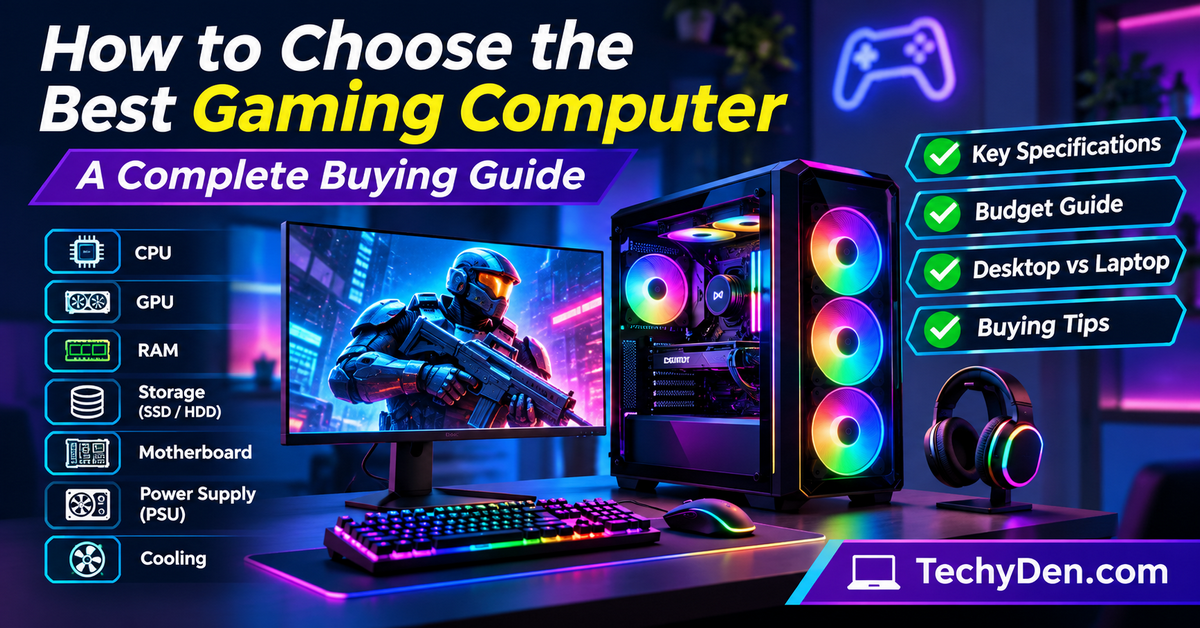
Choosing the right gaming computer can make a significant difference in your gaming experience. Whether you enjoy casual games, competitive esports, or graphics-intensive AAA titles, you need a computer with the right hardware to deliver smooth performance, faster loading times, and excellent graphics.
However, buying a gaming PC is not as simple as selecting a computer with a powerful processor or an expensive graphics card. You must consider several components, including the CPU, GPU, RAM, storage, motherboard, power supply, cooling system, and monitor.
If you are wondering how to choose the best gaming computer, this guide will help you understand the essential specifications, compare different configurations, and select a gaming PC that matches your requirements and budget.
Let’s explore the important things to consider before purchasing a gaming computer.
What Is a Gaming Computer?
A gaming computer is a desktop PC or laptop specifically designed to run video games smoothly. Unlike ordinary computers, gaming PCs generally feature more powerful processors, dedicated graphics cards, faster memory, and advanced cooling systems.
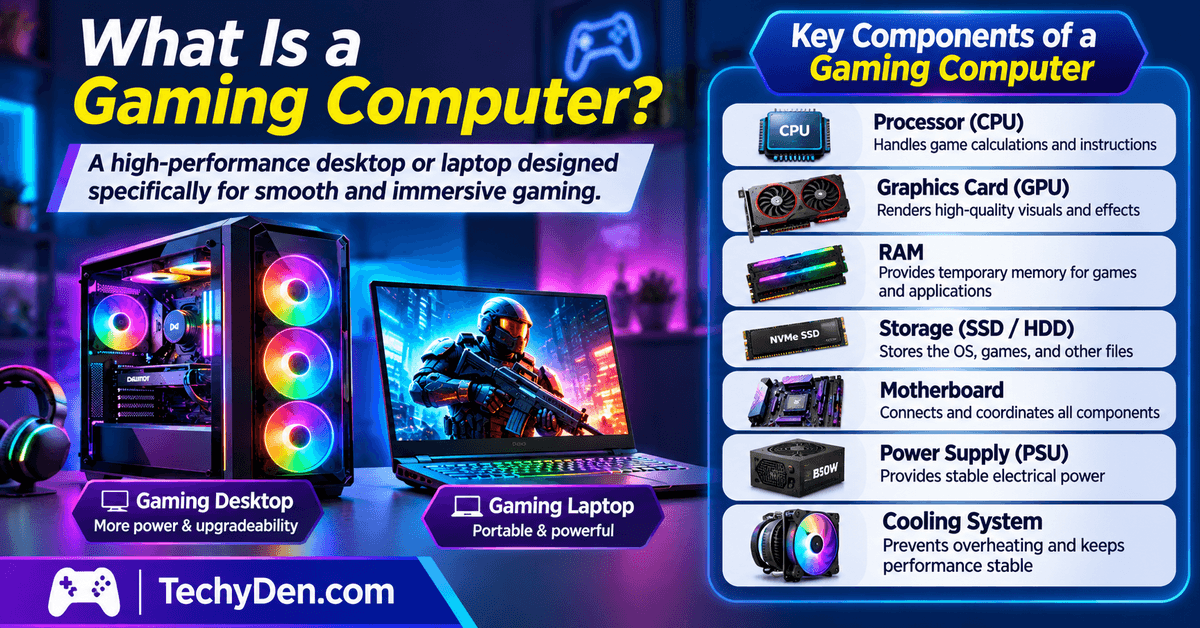
These components work together to handle demanding games, render high-quality graphics, and maintain consistent frame rates.
A gaming computer typically includes:
- Processor (CPU): Handles game calculations, instructions, and background processes.
- Graphics card (GPU): Renders images, animations, textures, and visual effects.
- RAM: Provides temporary memory for running games and applications.
- Storage: Stores the operating system, games, applications, and other files.
- Motherboard: Connects all hardware components.
- Power supply (PSU): Provides electrical power to the computer.
- Cooling system: Prevents hardware components from overheating.
Gaming computers are available in two primary forms: gaming desktops and gaming laptops. Desktop computers generally offer better upgradeability and cooling flexibility, while gaming laptops provide portability.
If you are also comparing different laptop platforms for professional work and software development, check out our MacBook vs Windows laptops comparison.
How to Choose the Best Gaming Computer
When selecting a gaming computer, you should evaluate its hardware specifications according to the games you want to play, your preferred resolution, and your budget.

Here are the 10 most important factors to consider when choosing a gaming PC.
1. Choose the Right Processor (CPU)
The processor, commonly known as the CPU (Central Processing Unit), is one of the most important components of a gaming computer.
It handles game logic, artificial intelligence calculations, physics simulations, background applications, and other system operations.
A powerful processor helps prevent CPU-related performance limitations, particularly when playing CPU-intensive games or targeting high frame rates.
Intel Core vs AMD Ryzen
Two popular processor families for gaming computers are Intel Core and AMD Ryzen.
- Intel Core: Offers a wide range of processors for budget, mainstream, and high-performance gaming computers.
- AMD Ryzen: Provides processors with different core counts and performance levels for gaming and productivity.
Both manufacturers offer excellent gaming processors. The best choice depends on the exact processor model, gaming benchmarks, motherboard compatibility, and price.
Important CPU specifications to consider:
- Core count: More cores can help with multitasking and games that support parallel processing.
- Thread count: Threads allow processors to handle multiple tasks efficiently.
- Clock speed: Higher clock speeds can improve performance in certain workloads.
- Cache memory: Processor cache helps access frequently used data quickly.
- Socket compatibility: The processor must be compatible with the motherboard.
Which CPU should you choose?
For an entry-level gaming computer, a modern six-core processor is a reasonable starting point. Mid-range gaming systems can benefit from modern six-core or eight-core processors, while high-end configurations may use more powerful CPUs depending on gaming and productivity requirements.
Remember that buying the most expensive processor does not automatically deliver the best gaming experience. Balance your CPU investment with your graphics card budget.
If you prefer an AMD-based gaming computer, check the AMD Ryzen desktop processor specifications to compare processor models, core counts, clock speeds, and platform compatibility.
2. Select a Powerful Graphics Card (GPU)
The graphics processing unit (GPU) is generally the most important component when building or purchasing a gaming computer.
It renders game graphics, processes textures, produces visual effects, and determines much of the gaming performance at higher resolutions.
A powerful graphics card allows you to play demanding games with better visual quality and higher frame rates.
NVIDIA GeForce RTX vs AMD Radeon RX
The two major graphics card families to consider are NVIDIA GeForce RTX and AMD Radeon RX.
- NVIDIA GeForce RTX: Known for features such as ray tracing, DLSS upscaling, and supported AI-powered graphics technologies.
- AMD Radeon RX: Offers competitive gaming performance and technologies such as FSR (FidelityFX Super Resolution) on supported games.
Both brands offer graphics cards for different gaming budgets.
Important GPU specifications to consider:
- VRAM: Video memory stores graphics-related data, including textures and frame buffers.
- GPU performance: Determines how efficiently the card renders games.
- Memory bandwidth: Influences how quickly graphics data can be transferred.
- Ray tracing: Provides more realistic lighting, reflections, and shadows in supported games.
- Upscaling technology: DLSS and FSR can improve performance by rendering at a lower resolution and reconstructing the output.
- Power requirements: The GPU must be compatible with your power supply.
Choose a graphics card according to gaming resolution
| Gaming resolution | Recommended GPU category | Suitable for |
|---|---|---|
| 1080p | Entry-level to mid-range | Casual and competitive gaming |
| 1440p | Mid-range to high-end | High-quality gaming |
| 4K | High-end enthusiast | Demanding AAA gaming |
These are general categories rather than fixed hardware requirements. Actual performance depends on the specific GPU, game, graphics settings, and desired frame rate.
Before selecting a graphics card, compare the NVIDIA GeForce graphics card specifications to understand GPU performance, memory, supported technologies, and available models.
My recommendation: Give your graphics card sufficient priority when choosing a gaming computer. A balanced CPU and GPU combination is generally better than spending most of your budget on one component.
3. Check the RAM Capacity
RAM (Random Access Memory) is another important specification to consider when buying a gaming computer.
It temporarily stores data that your operating system, games, and applications need to access quickly.
Insufficient RAM can cause performance problems, particularly when running demanding games alongside browsers, streaming applications, and other background programs.
How much RAM do you need for gaming?
| RAM capacity | Suitable for |
|---|---|
| 8GB | Basic gaming and older titles; limited for modern gaming |
| 16GB | Many modern games and everyday multitasking |
| 32GB | Demanding games, multitasking, and streaming |
| 64GB | Heavy productivity workloads and specialized requirements |
For most new gaming computers, 16GB is a reasonable starting point, while 32GB provides additional flexibility for demanding games and multitasking.
DDR4 vs DDR5 RAM
DDR4 and DDR5 are different generations of memory technology.
- DDR4: An older memory standard that can still be suitable for compatible gaming systems.
- DDR5: A newer memory standard offering higher bandwidth and improved memory capabilities.
Your processor and motherboard determine which memory generation you can use.
Other RAM considerations:
- Prefer dual-channel memory configurations where supported.
- Check the motherboard’s maximum supported memory capacity.
- Verify memory speed compatibility.
- Consider future RAM upgrade options.
4. Choose the Right Storage (SSD or HDD)
Storage determines how much data your gaming computer can hold. It stores the operating system, games, software, videos, and personal files.
When purchasing a gaming PC, an SSD (Solid State Drive) is strongly recommended because it provides faster data access and shorter loading times than a traditional hard disk drive.
SSD vs HDD
| Feature | SSD | HDD |
|---|---|---|
| Speed | Faster | Slower |
| Game loading | Generally faster | Generally slower |
| Noise | Silent | Can produce noise |
| Durability | No moving mechanical parts | Contains moving parts |
| Price per GB | Generally higher | Generally lower |
SATA SSD vs NVMe SSD
There are two common types of SSDs:
- SATA SSD: Uses the SATA interface and offers a significant speed improvement over traditional HDDs.
- NVMe SSD: Uses the PCIe interface and generally provides much faster data transfer speeds.
For a modern gaming computer, an NVMe SSD is an excellent choice when supported by the motherboard.
How much storage do you need?
- 500GB: Suitable for a small gaming library.
- 1TB: A practical starting point for many gamers.
- 2TB: Better for users who install multiple large games.
- 4TB or more: Suitable for extensive game libraries and additional media files.
If your budget allows, choose at least a 1TB SSD. You can also add another SSD or HDD later if your motherboard and computer case support expansion.
5. Check Motherboard Compatibility
The motherboard is the main circuit board that connects the processor, memory, graphics card, storage devices, and other computer components.
When choosing a gaming computer, make sure its motherboard supports your desired hardware and future upgrades.
Important motherboard features to check:
- CPU socket: Must match your processor.
- RAM compatibility: Check DDR4 or DDR5 support and memory capacity.
- PCIe slots: Required for graphics cards and other expansion cards.
- M.2 slots: Allow installation of compatible NVMe SSDs.
- USB connectivity: Check the number and types of USB ports.
- Networking: Look for suitable Ethernet and Wi-Fi connectivity.
- Expansion options: Consider additional storage and upgrade requirements.
You do not necessarily need an expensive motherboard for gaming. Choose a reliable model with the features you actually need.
6. Consider the Power Supply Unit (PSU)
The power supply unit converts electricity from your wall outlet into the power required by your computer components.
A reliable PSU is essential because it provides stable power to the processor, graphics card, motherboard, and storage devices.
An inadequate or low-quality power supply can create stability problems and potentially damage hardware.
Important PSU specifications:
- Wattage: Choose sufficient power for your CPU and GPU combination.
- Efficiency rating: Look for appropriate 80 PLUS efficiency certification.
- Build quality: Choose a reputable manufacturer and reliable PSU platform.
- Connectors: Make sure the PSU includes the required GPU and motherboard power connectors.
- Upgrade capacity: Allow sufficient power headroom for supported future upgrades.
How much PSU wattage do you need?
There is no single wattage suitable for every gaming computer. Entry-level systems generally require less power than high-end configurations.
Always check the graphics card manufacturer’s recommended power supply specifications and calculate the requirements of the complete system.
Avoid choosing a gaming PC based only on its graphics card without checking the PSU quality.
7. Choose an Effective Cooling System
Gaming computers generate heat when running demanding games and applications.
An effective cooling system helps maintain suitable operating temperatures and prevents excessive thermal throttling, which can reduce hardware performance.
There are two common cooling methods.
Air Cooling
Air cooling uses heatsinks and fans to remove heat from the processor and other components.
Advantages include:
- Generally affordable.
- Easy to maintain.
- Simple installation.
- Suitable for many gaming configurations.
Liquid Cooling
Liquid cooling uses a circulating coolant to transfer heat away from components through a radiator.
Advantages include:
- Suitable for certain high-performance configurations.
- Can offer effective heat management.
- Available in different radiator sizes.
- Provides additional customization options.
However, liquid cooling is not automatically better than air cooling. A quality air cooler can provide excellent performance for many gaming systems.
Check these cooling features before buying:
- Number of case fans.
- Front and rear airflow.
- CPU cooler capacity.
- Graphics card cooling design.
- Case ventilation.
- Overall temperature and noise levels.
Choose a gaming computer with a well-designed cooling system rather than focusing only on the number of fans or RGB lighting.
8. Select the Right Gaming Monitor
A gaming monitor is just as important as the computer hardware because it determines how you experience game graphics.
Even a powerful gaming PC may not deliver its full visual potential if you pair it with an unsuitable display.
Important monitor specifications:
- Screen resolution.
- Refresh rate.
- Response time.
- Panel technology.
- Screen size.
- Adaptive synchronization support.
1080p vs 1440p vs 4K monitors
| Resolution | Description | Suitable for |
|---|---|---|
| 1080p (Full HD) | 1920 × 1080 pixels | Budget and competitive gaming |
| 1440p (QHD) | 2560 × 1440 pixels | Detailed visuals and high-refresh gaming |
| 4K (UHD) | 3840 × 2160 pixels | High-resolution gaming |
What refresh rate should you choose?
The refresh rate measures how many times a monitor updates its display each second.
- 60Hz: Suitable for basic gaming.
- 120Hz–144Hz: A good choice for smooth gaming.
- 165Hz–180Hz: Suitable for high-refresh gaming.
- 240Hz or higher: Useful for competitive gaming when your PC can produce sufficiently high frame rates.
A higher refresh rate can make gameplay feel smoother, especially in fast-paced competitive games.
IPS vs VA vs OLED
- IPS: Offers good color reproduction and viewing angles.
- VA: Generally provides strong contrast ratios.
- OLED: Offers excellent contrast, deep blacks, and fast pixel response.
Also consider NVIDIA G-SYNC or AMD FreeSync support to reduce screen tearing and improve display smoothness on compatible hardware.
Before purchasing a portable gaming device, learn about the important computer specifications that influence performance, display quality, memory, and storage.
9. Check the Gaming PC Cabinet and Build Quality
The computer cabinet, also known as the PC case, houses all the internal components.
A good gaming case should provide sufficient space, proper airflow, and easy access for maintenance and upgrades.
Important features to consider:
- Case size: Check whether it supports your motherboard form factor.
- Airflow: Look for proper ventilation and fan placement.
- GPU clearance: Make sure the graphics card fits inside the case.
- Cooling support: Check compatibility with CPU coolers and radiators.
- Cable management: Proper cable routing improves organization.
- Expansion space: Consider additional storage and future upgrades.
- Build quality: Look for durable construction and convenient access panels.
RGB lighting and transparent side panels can improve the appearance of your gaming setup, but they should not be more important than cooling and compatibility.
10. Consider Upgradeability and Future-Proofing
Technology changes quickly, and new games can demand more powerful hardware over time.
Therefore, it is worth considering whether your gaming computer can be upgraded in the future.
Before buying, check:
- Whether additional RAM slots are available.
- Whether the motherboard supports future CPU upgrades.
- Whether additional M.2 SSD slots are available.
- Whether the PSU can support a more powerful graphics card.
- Whether the computer case has sufficient GPU clearance.
- Whether the cooling system can handle upgraded components.
However, do not spend excessively on hardware simply because you want a future-proof gaming PC.
Instead, choose a balanced system that meets your current gaming requirements while allowing practical upgrades.
Choose a Gaming Computer Based on Your Budget
Your budget is one of the most important factors when choosing a gaming computer.
You do not need to spend thousands of dollars to enjoy PC gaming. A properly configured budget gaming computer can deliver a good experience for many games.
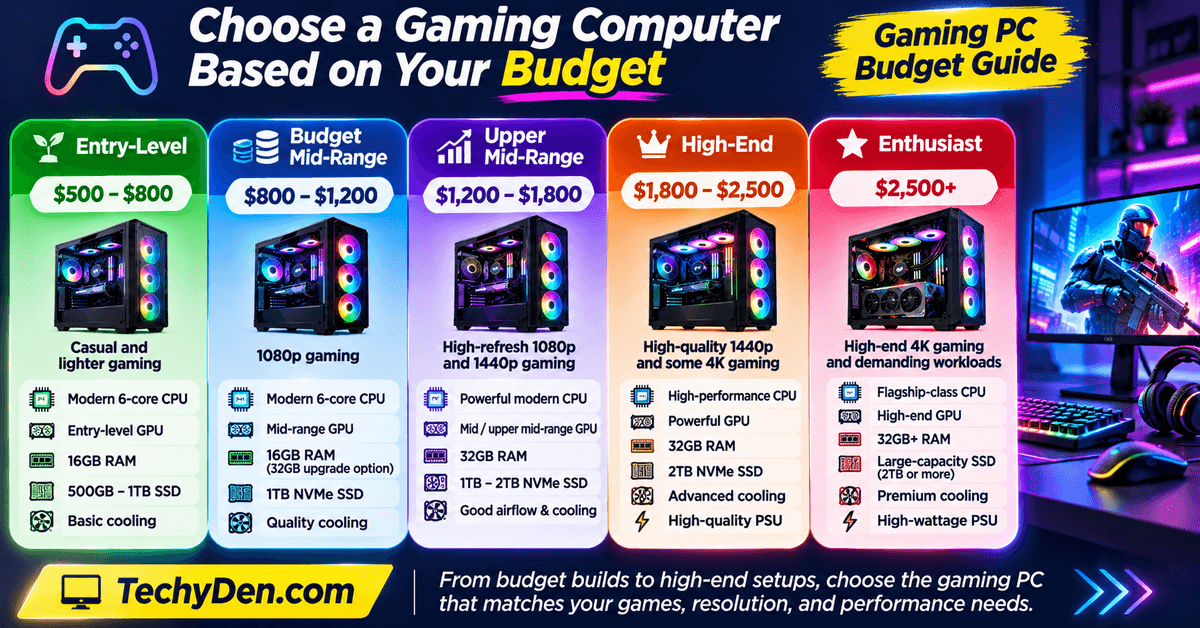
Here is an illustrative gaming desktop budget breakdown.
| Gaming PC category | Indicative budget (USD) | Gaming requirements |
|---|---|---|
| Entry-level | $500–$800 | Casual and lighter gaming |
| Budget mid-range | $800–$1,200 | 1080p gaming |
| Upper mid-range | $1,200–$1,800 | High-refresh 1080p and 1440p |
| High-end | $1,800–$2,500 | High-quality 1440p and some 4K |
| Enthusiast | $2,500+ | High-end 4K and demanding workloads |
These are approximate planning ranges, not fixed market prices. Actual costs vary by country, hardware availability, and component generation. Monitor and peripherals may also require a separate budget.
Entry-Level Gaming Computer ($500–$800)
An entry-level gaming PC is suitable for beginners who want to play casual games, esports titles, and less demanding games.
Prioritize:
- A modern six-core CPU.
- An entry-level dedicated GPU.
- 16GB RAM.
- 500GB or 1TB SSD.
- A reliable power supply.
- Basic but effective cooling.
Budget Mid-Range Gaming Computer ($800–$1,200)
This category is suitable for gamers who want a better 1080p gaming experience.
Recommended priorities include:
- A capable modern six-core CPU.
- A mid-range dedicated GPU.
- 16GB RAM, with a 32GB upgrade option.
- 1TB NVMe SSD.
- A quality motherboard.
- An adequate PSU.
Upper Mid-Range Gaming Computer ($1,200–$1,800)
This category is suitable for gamers who want high-refresh 1080p or 1440p gaming.
Look for:
- A powerful modern CPU.
- A capable mid-range or upper mid-range GPU.
- 32GB RAM.
- 1TB or 2TB NVMe SSD.
- Good airflow and cooling.
- A suitable high-refresh gaming monitor.
High-End Gaming Computer ($1,800–$2,500)
High-end gaming computers are designed for demanding games, higher resolutions, and intensive workloads.
Consider:
- A high-performance CPU.
- A powerful dedicated GPU.
- 32GB RAM.
- 2TB NVMe SSD.
- High-quality PSU.
- Advanced cooling.
- A 1440p or 4K gaming monitor.
Enthusiast Gaming Computer ($2,500 and Above)
Enthusiast systems target gamers who want premium hardware and excellent performance in demanding games.
These systems may include high-end processors, flagship-class graphics cards, larger SSD capacities, premium cooling, and advanced displays.
Only choose this category if your games and performance expectations justify the additional spending.
Gaming PC Specifications Comparison
If you are confused about which specifications to select, the following table provides a quick reference for different gaming requirements.
| Component | Entry-level | Mid-range | High-end |
|---|---|---|---|
| CPU | Modern 6-core | Modern 6–8-core | High-performance 8-core or above |
| GPU | Entry-level dedicated | Mid-range dedicated | High-end dedicated |
| RAM | 16GB | 16–32GB | 32GB |
| Storage | 500GB SSD | 1TB NVMe SSD | 1–2TB NVMe SSD |
| Gaming resolution | 1080p | 1080p/1440p | 1440p/4K |
| Cooling | Quality air cooling | Improved air cooling | Advanced air or liquid cooling |
These configurations are general recommendations. Always compare individual component models and real-world gaming benchmarks before purchasing.
Prebuilt Gaming PC vs Custom-Built Gaming PC
When buying a gaming computer, you generally have two options: purchase a prebuilt gaming PC or build a custom computer using individually selected components.
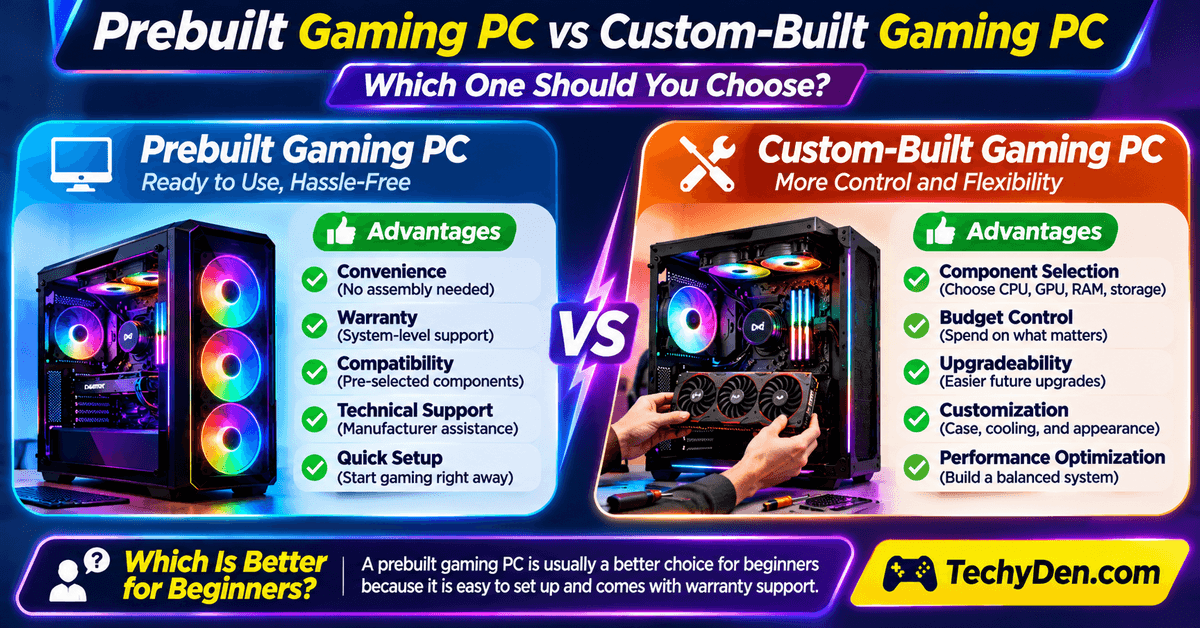
Both options have advantages and disadvantages.
Advantages of a Prebuilt Gaming PC
A prebuilt gaming computer comes assembled and ready to use.
Its main advantages include:
- Convenience: No need to assemble individual components.
- Warranty: The manufacturer generally provides system-level warranty support.
- Compatibility: Components are selected and assembled by the manufacturer.
- Technical support: Beginners can contact the manufacturer for assistance.
- Quick setup: You can start gaming after completing the initial setup.
However, some prebuilt computers use proprietary components, limited upgrade options, or lower-quality power supplies. Always inspect the complete specifications.
Advantages of a Custom-Built Gaming PC
A custom-built gaming computer allows you to select individual components according to your requirements.
Its advantages include:
- Component selection: Choose your preferred CPU, GPU, RAM, and storage.
- Budget control: Allocate more money to the components that matter.
- Upgradeability: Select compatible components with future upgrades in mind.
- Customization: Choose the cabinet, cooling system, and appearance.
- Performance optimization: Build a balanced system for your preferred games.
However, custom PC building requires hardware knowledge, component compatibility checks, and assembly skills.
Which Is Better for Beginners?
If you are purchasing your first gaming computer and do not have experience with PC hardware, a prebuilt gaming PC is often a convenient choice.
However, if you understand computer components and want complete control over your configuration, a custom-built gaming PC can offer greater flexibility.
Compare the component specifications, warranty coverage, service availability, and total cost before making your decision.
Gaming Desktop vs Gaming Laptop: Which Should You Choose?
Another important decision is whether to purchase a gaming desktop or gaming laptop.
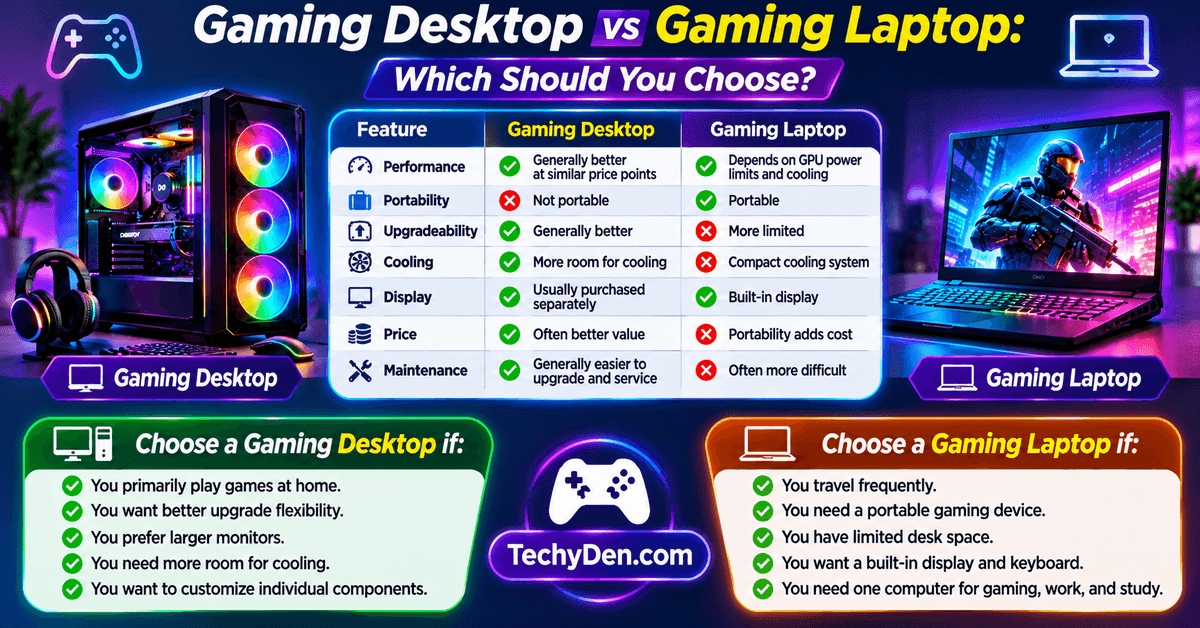
Both devices can run modern games, but they offer different advantages.
| Feature | Gaming desktop | Gaming laptop |
|---|---|---|
| Performance | Generally better performance at comparable price points | Depends on GPU power limits and cooling |
| Portability | Not portable | Portable |
| Upgradeability | Generally better | More limited |
| Cooling | More room for cooling | Compact cooling system |
| Display | Usually purchased separately | Built-in display |
| Price | Often better value | Portability adds cost |
| Maintenance | Generally easier to upgrade and service | Often more difficult |
Choose a gaming desktop if:
- You primarily play games at home.
- You want better upgrade flexibility.
- You prefer larger monitors.
- You need more room for cooling.
- You want to customize individual components.
Choose a gaming laptop if:
- You travel frequently.
- You need a portable gaming device.
- You have limited desk space.
- You want a built-in display and keyboard.
- You need one computer for gaming, work, and study.
If you are considering a gaming laptop instead of a desktop, read our complete laptop buying guide to understand the important features and specifications to check before purchasing.
If you need a computer for gaming, education, and everyday productivity, explore our list of the best laptops for students to compare different options.
Important Things to Check Before Buying a Gaming Computer
Before purchasing a gaming PC, review the following checklist to avoid unnecessary expenses and hardware compatibility problems.
- Processor: Check the exact CPU model and its gaming performance.
- Graphics card: Verify the GPU model, VRAM, and benchmark results.
- RAM: Confirm the memory capacity, generation, and upgrade options.
- Storage: Check SSD capacity and available expansion slots.
- Motherboard: Verify compatibility with the CPU and RAM.
- Power supply: Check wattage, quality, and required connectors.
- Cooling: Inspect the CPU cooler, case fans, and airflow.
- Monitor: Match resolution and refresh rate with GPU performance.
- Connectivity: Check USB ports, Wi-Fi, Bluetooth, and Ethernet.
- Warranty: Review manufacturer warranty and service availability.
- Upgradeability: Check whether you can add memory, storage, or a new graphics card.
- Price: Compare similar configurations from multiple sellers.
If you are purchasing a used gaming computer, inspect its physical condition, check the hardware specifications, and test its performance before paying.
When purchasing a used gaming computer, check its identification details and learn how to find your computer’s serial number before completing the purchase.
Common Mistakes to Avoid When Buying a Gaming PC
Many first-time buyers focus on appearance or individual specifications instead of evaluating the complete system.
Avoid these common mistakes when choosing a gaming computer.
- Spending Too Much on the Processor: An expensive CPU does not guarantee better gaming performance if the graphics card is underpowered. Choose a balanced processor and GPU combination.
- Buying Insufficient RAM: A computer with only 8GB RAM may struggle with many modern games and multitasking. Consider 16GB as a starting point and 32GB for additional flexibility.
- Choosing a Small SSD: Modern games can require substantial storage space. A 500GB drive may fill up quickly if you install several large games.
- Ignoring Power Supply Quality: A cheap or unreliable PSU can create system stability problems. Always consider the PSU’s quality, wattage, and compatibility.
- Overlooking Cooling Performance: Poor airflow can increase hardware temperatures and cause thermal throttling. Check the case ventilation and cooling configuration.
- Buying Based Only on RGB Lighting: RGB lighting makes a gaming computer look attractive, but it does not improve gaming performance. Prioritize hardware specifications and cooling.
- Ignoring Monitor Specifications: A high-performance graphics card paired with a low-refresh-rate monitor may not provide the gaming experience you expect. Match your monitor to your GPU.
- Purchasing Incompatible Components: For custom-built systems, verify CPU socket, RAM generation, motherboard support, GPU dimensions, and PSU connectors before purchasing.
- Ignoring Warranty and Upgrade Options: A gaming computer should provide reliable after-sales support and practical upgrade options. Review the warranty terms before making your final decision.
Best Gaming Computer Brands to Consider
Several manufacturers offer gaming desktops and prebuilt gaming systems for different budgets.
Here are some popular gaming computer brands worth considering.
| Brand | Popular gaming series |
|---|---|
| Alienware | Aurora |
| ASUS | ROG |
| Lenovo | Legion |
| HP | OMEN |
| Acer | Predator |
| MSI | Gaming desktops |
| Corsair | Vengeance |
| CyberPowerPC | Gaming PCs |
| iBUYPOWER | Gaming desktops |
Each manufacturer offers different hardware configurations and price ranges.
When comparing gaming computer brands, do not choose a product simply because it has a popular brand name. Check its processor, graphics card, RAM, storage, cooling system, power supply, warranty, and upgrade options.
Also consider local service availability and replacement-part support before purchasing.
After purchasing a gaming laptop, follow proper maintenance practices to protect your computer from damage and maintain its performance over time.
Frequently Asked Questions About Choosing a Gaming Computer
What is the most important component in a gaming computer?
The graphics card (GPU) is usually the most important component for gaming performance, particularly at higher resolutions and graphics settings. However, the processor, RAM, and storage also matter. The best configuration depends on the games you play, your preferred resolution, and your target frame rate.
How much RAM do I need for a gaming PC?
For most modern gaming computers, 16GB RAM is a reasonable starting point. However, 32GB provides additional flexibility for demanding games, multitasking, and streaming. Choose compatible DDR4 or DDR5 memory depending on your processor and motherboard specifications.
Is a gaming PC better than a gaming laptop?
A gaming desktop generally offers better performance, cooling, and upgradeability for a similar budget. A gaming laptop is more suitable if you need portability or frequently travel. Your choice should depend on where you play games, your budget, and whether you need a portable computer.
How much should I spend on a gaming computer?
Your gaming PC budget depends on the games and resolution you want to play. An entry-level gaming desktop may cost around $500–$800, while mid-range and high-end systems can cost considerably more. Compare complete hardware configurations instead of focusing only on the processor or graphics card.
Is 16GB RAM enough for gaming?
Yes, 16GB RAM is sufficient for many modern games and everyday multitasking. However, 32GB is a better choice if you frequently play demanding games, stream gameplay, or run several applications simultaneously. Always check the memory requirements of your preferred games.
Which is better for gaming, Intel or AMD?
Both Intel and AMD offer capable gaming processors. Their performance depends on the specific processor model, game, graphics card, and system configuration. Compare independent gaming benchmarks, processor prices, and motherboard compatibility instead of choosing a manufacturer based only on its brand name.
Do I need an SSD for a gaming computer?
Yes. An SSD is strongly recommended for a gaming computer because it improves system responsiveness and generally reduces game loading times. An NVMe SSD is an excellent option for a new gaming PC if your motherboard supports it. Choose at least 1TB if your budget allows.
What graphics card do I need for 4K gaming?
4K gaming generally requires a powerful modern graphics card with sufficient VRAM. The exact GPU depends on the games you play, graphics settings, and desired frame rate. Consider ray tracing performance and supported upscaling technologies such as NVIDIA DLSS or AMD FSR when comparing graphics cards.
Is a prebuilt gaming PC worth buying?
Yes. A prebuilt gaming PC is a convenient choice for beginners who want a ready-to-use system with manufacturer support. However, compare its component specifications, power supply quality, cooling, warranty, upgrade options, and total price with similar custom-built configurations before purchasing.
Can I upgrade my gaming computer later?
Yes. Most desktop gaming computers allow upgrades to components such as RAM, storage, and graphics cards. However, motherboard compatibility, power supply capacity, case dimensions, and cooling limitations can affect future upgrades. Check these specifications before buying if you plan to upgrade your gaming PC.
Conclusion
Choosing the best gaming computer requires more than comparing processor speeds or graphics card models. You should evaluate the entire system, including the CPU, GPU, RAM, storage, motherboard, power supply, cooling, and monitor.
If you are a beginner, start with a balanced gaming computer featuring a modern processor, a dedicated graphics card, at least 16GB RAM, and SSD storage. If you want better performance for demanding games and multitasking, consider a system with 32GB RAM and a more powerful GPU.
Most importantly, determine your budget and gaming requirements before purchasing. Compare hardware specifications, check independent gaming benchmarks, and consider future upgrade options.
By following these tips, you can choose a gaming computer that delivers excellent value, reliable performance, and an enjoyable gaming experience.