Windows 11 September 2026 Update: KB5124008, New Features, and Known Issues
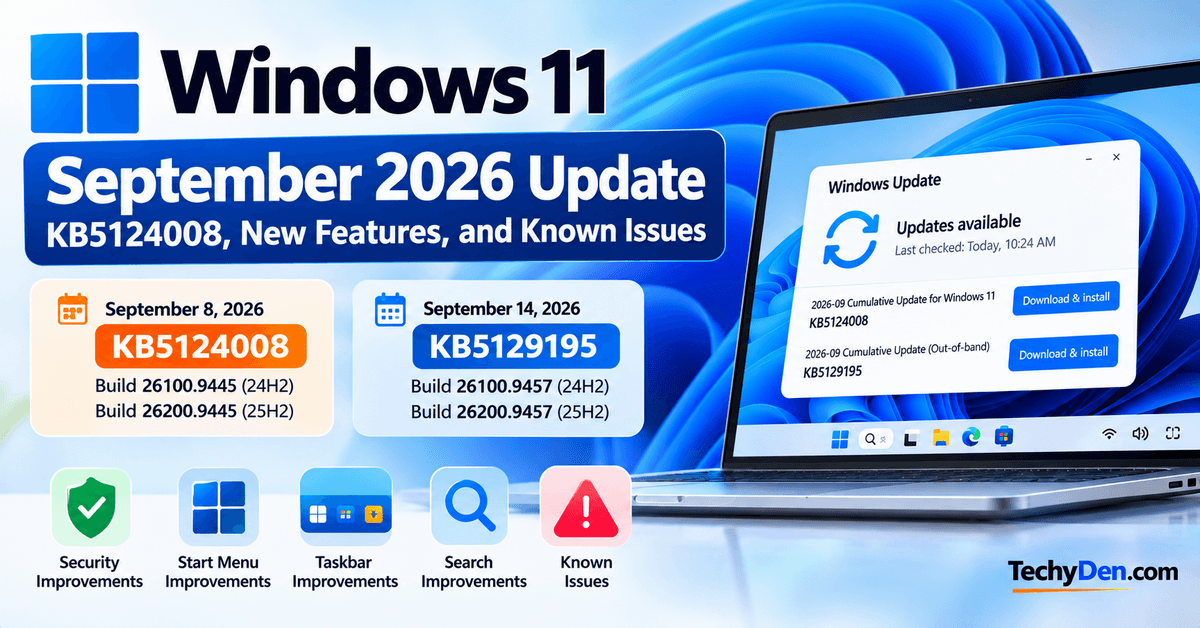
Microsoft’s Windows 11 September 2026 Update has become a more significant release than a typical monthly security update. The September 8 Patch Tuesday release, KB5124008, introduced security improvements and several quality fixes for Windows 11 24H2 and 25H2.
Microsoft subsequently released an out-of-band update, KB5129195, on September 14, 2026, to address several problems reported after the September security update, including Remote Desktop Services failures, Hyper-V Plan9 folder-sharing problems, and some USB audio issues.
There are also important Windows 11 feature changes arriving through gradual rollouts, including Start menu customization and taskbar improvements. These features should not automatically be treated as part of the KB5124008 security package because Microsoft frequently rolls new Windows features out in phases.
In this guide, we’ll cover everything you need to know about the Windows 11 September 2026 Update, including KB numbers, build numbers, new features, security improvements, known problems, installation instructions, and what you should do if your PC is affected.
Windows 11 September 2026 Update at a Glance
| Detail | Information |
|---|---|
| September Patch Tuesday update | KB5124008 |
| KB5124008 release date | September 8, 2026 |
| Windows 11 24H2 build | 26100.9445 |
| Windows 11 25H2 build | 26200.9445 |
| September out-of-band update | KB5129195 |
| KB5129195 release date | September 14, 2026 |
| Latest 24H2 build after OOB update | 26100.9457 |
| Latest 25H2 build after OOB update | 26200.9457 |
| Main update type | Security and cumulative update |
| OOB update type | Cumulative out-of-band update |
| Primary installation method | Windows Update |
| Manual installation | Microsoft Update Catalog |
Microsoft’s Windows release information confirms KB5124008 as the September 8 B release and KB5129195 as the September 14 out-of-band release for Windows 11 24H2 and 25H2.
What Is the Windows 11 September 2026 Update?
The Windows 11 September 2026 Update refers primarily to Microsoft’s September 8, 2026 cumulative security update, KB5124008.
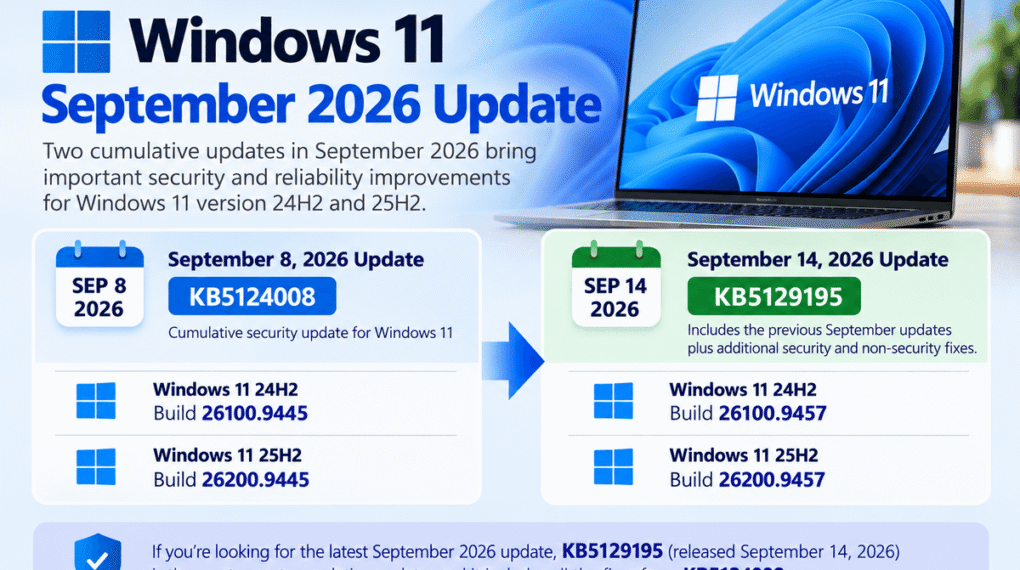
It applies to Windows 11 version 24H2 and version 25H2. Microsoft lists build 26100.9445 for Windows 11 24H2 and 26200.9445 for Windows 11 25H2.
However, because Microsoft released another cumulative update on September 14, users searching for the “latest September 2026 update” should also know about KB5129195.
KB5129195 raises the builds to:
- Windows 11 24H2: 26100.9457
- Windows 11 25H2: 26200.9457
It includes the previous September updates plus additional security and non-security fixes.
Windows 11 September 2026 KB Numbers and Build Numbers
KB5124008
KB5124008 is the regular September 8, 2026 cumulative security update.
| Windows 11 version | Architecture | Build |
|---|---|---|
| 24H2 | x64 | 26100.9445 |
| 24H2 | ARM64 | 26100.9445 |
| 25H2 | x64 | 26200.9445 |
| 25H2 | ARM64 | 26200.9445 |
Microsoft’s Update Catalog lists the applicable x64 and ARM64 packages for Windows 11 24H2 and 25H2.
KB5129195
KB5129195 is the September 14 out-of-band update.
| Windows 11 version | Build after KB5129195 |
|---|---|
| Windows 11 24H2 | 26100.9457 |
| Windows 11 25H2 | 26200.9457 |
Microsoft describes KB5129195 as a cumulative update containing the previous releases plus additional security and non-security improvements.
What’s New in the Windows 11 September 2026 Update?
The September release includes a mixture of security fixes, reliability improvements, and changes that are being rolled out separately through Microsoft’s normal feature-delivery process.
1. Security Improvements
- The September 8 update provides security improvements for Windows 11.
- Microsoft also included additional protection in the September 14 out-of-band update for CVE-2026-62721, a Windows User-Mode Power Service elevation-of-privilege vulnerability.
- For users, the main takeaway is that the September update is not simply a cosmetic Windows update. It includes security protections that are important for supported Windows 11 installations.
2. Fix for Microsoft Teams and Outlook on ARM PCs
- Microsoft resolved an issue affecting some ARM-based Windows 11 PCs where Microsoft Teams and the new Outlook for Windows could fail to launch or close unexpectedly after an earlier August security update.
- The issue is listed as resolved through KB5124008.
- If you’re using a Snapdragon-based or other ARM Windows 11 computer, installing the applicable current cumulative update is particularly relevant.
3. Fix for Desktop Background Problems
- Some Windows 11 systems affected by the August 27 update could lose their desktop background settings and display a solid black background.
- Microsoft lists this issue as resolved by KB5124008.
4. Fix for Mouse Customization Problems
- Microsoft also resolved an issue where custom cursors and cursor animations could intermittently revert on some non-English Windows installations.
- KB5124008 resolved this problem.
Windows 11 Start Menu Improvements
One of the more interesting Windows 11 developments around the September 2026 update cycle is the continued rollout of Start menu customization.
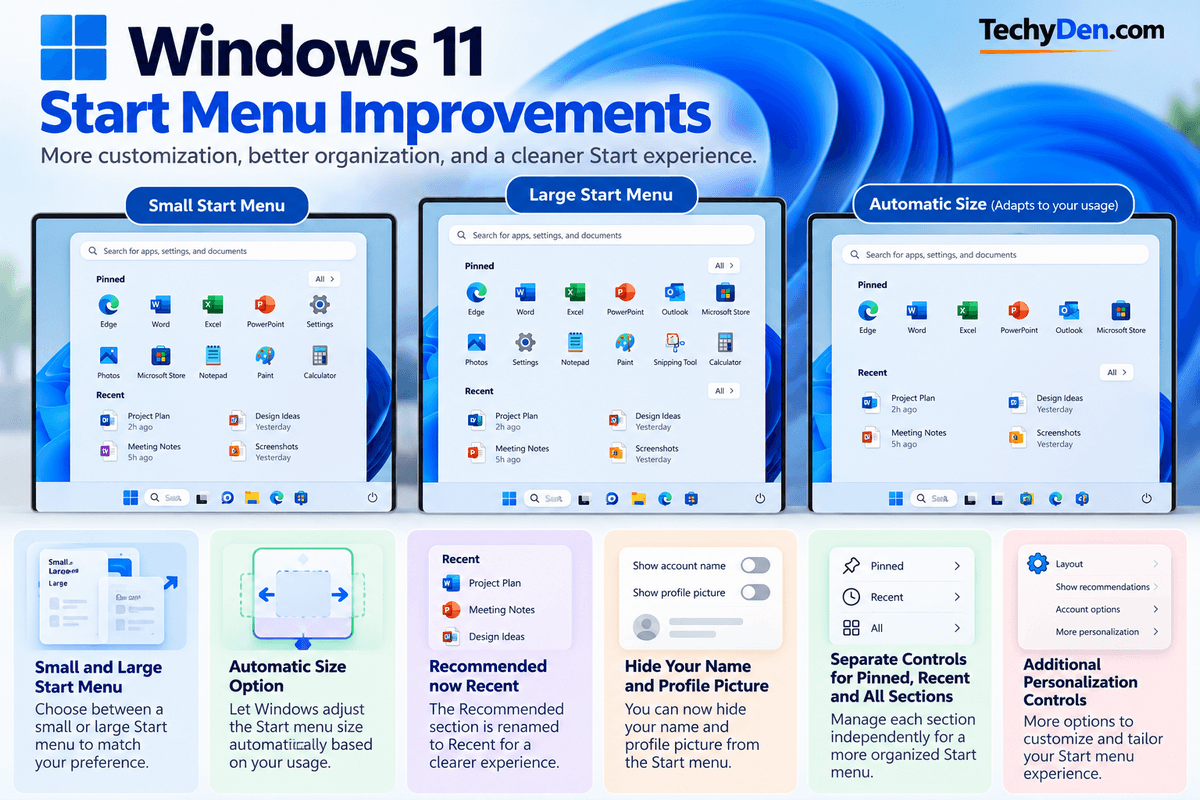
Microsoft’s Windows Insider documentation describes several Start menu improvements, including
- A choice between a small and large Start menu.
- An automatic size option.
- Renaming the Recommended section to Recent.
- The ability to hide your name and profile picture.
- Separate controls for Pinned, Recent, and All sections.
- Additional Start menu personalization controls.
Microsoft introduced these features through preview builds and gradual rollouts, meaning availability can vary between devices.
Therefore, users should not assume that every Windows 11 PC receiving KB5124008 will immediately show all of these options.
Windows 11 Taskbar Improvements
Microsoft is also continuing to expand taskbar customization.
Recent Windows 11 preview documentation describes additional taskbar customization and improved discoverability of taskbar settings. Microsoft says gradual rollouts can cause features to appear on devices at different times.
Some reports have also highlighted additional taskbar positioning and sizing changes. However, feature availability depends on the specific Windows build and rollout status.
If you’re writing about a particular taskbar feature, verify it against Microsoft’s release notes for the exact Windows 11 build rather than assuming that it is included in KB5124008.
Windows Search Improvements
Windows Search is also receiving usability improvements through Microsoft’s ongoing Windows development process.
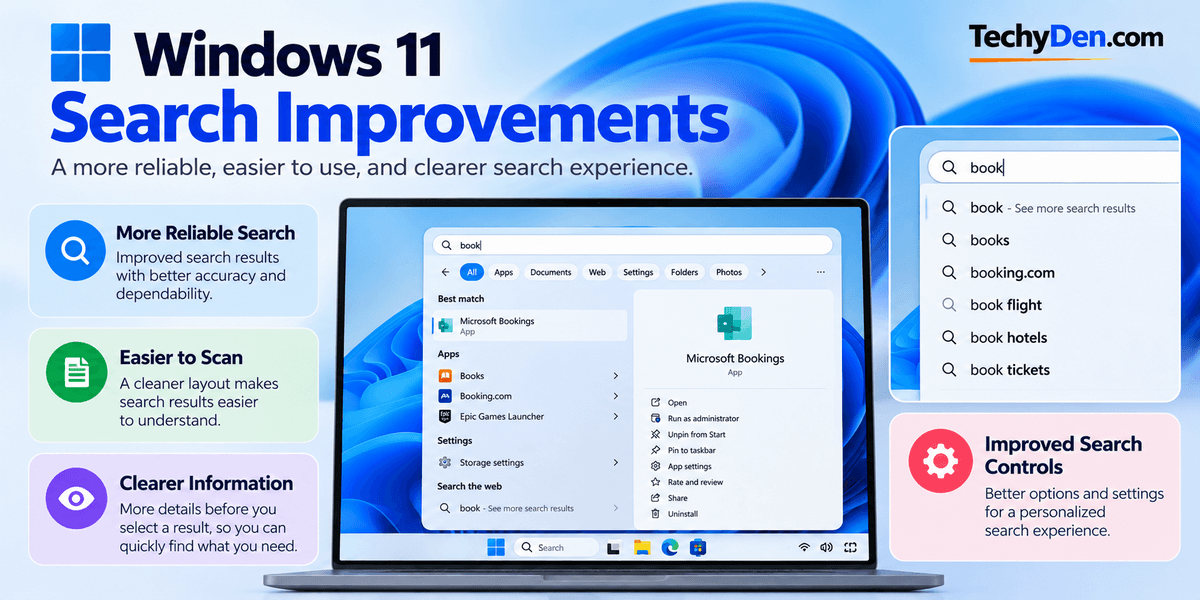
Microsoft has described improvements intended to make Search more dependable, easier to scan, and clearer before a user selects a result.
Some search-related changes are part of gradual feature rollouts rather than the core security update itself.
Windows 11 September 2026 Update Known Issues
This is one of the most important sections for anyone installing the September update.
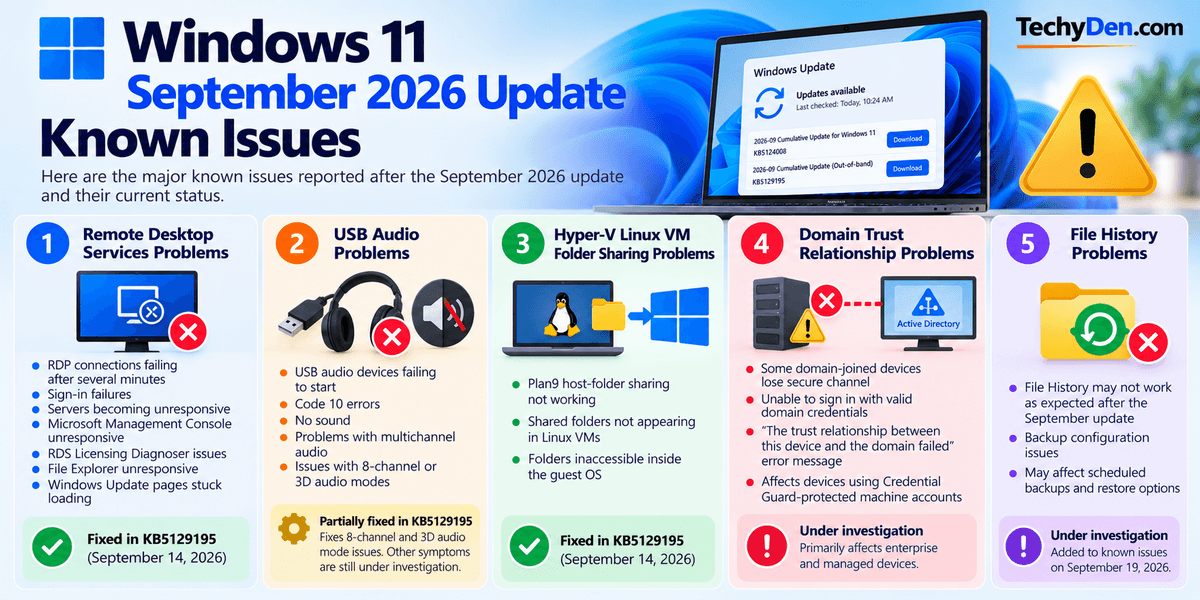
Microsoft has documented several issues associated with the September 8 update. Some have already been resolved by KB5129195, while others are still being investigated or mitigated.
1. Remote Desktop Services Problems
After installing KB5124008, some organizations experienced problems with Remote Desktop Services.
Symptoms could include:
- RDP connections failing after several minutes.
- Sign-in failures.
- Servers becoming unresponsive during Remote Desktop configuration.
- Microsoft Management Console becoming unresponsive.
- RDS Licensing Diagnoser problems.
- File Explorer becoming unresponsive.
- Windows Update pages becoming stuck loading.
Microsoft released KB5129195 on September 14 to address this issue.
If your PC or organization relies heavily on Remote Desktop, make sure the latest applicable cumulative update is installed.
2. USB Audio Problems
Another significant issue affected some USB Audio Class 1.0 devices.
Symptoms could include:
- USB audio devices failing to start.
- Code 10 errors.
- No sound.
- Problems when using multichannel audio.
- Problems with 8-channel or 3D audio modes.
Microsoft says KB5129195 partially resolves this issue. Specifically, the OOB update fixes the symptoms affecting 8-channel and 3D audio modes, while Microsoft continues working on other symptoms.
If you use a USB audio interface, DAC, headset, or other USB Audio Class 1.0 hardware, check Microsoft’s latest release health information before troubleshooting further.
3. Hyper-V Linux VM Folder Sharing Problems
KB5124008 could cause problems with Plan9 host-folder sharing in Hyper-V-based Linux virtual machines.
Affected virtual machines could start normally, but folders shared from the Windows host might not appear or might be inaccessible inside the Linux guest.
Microsoft identified applications and environments that rely on this functionality as potentially affected. The problem was resolved through KB5129195.
4. Domain Trust Relationship Problems
Microsoft also documented an issue involving some domain-joined devices using Credential Guard-protected machine accounts.
After KB5124008, some affected devices could lose their secure channel with an on-premises Active Directory domain. Users might then be unable to sign in interactively with valid domain credentials and could see a message indicating that the trust relationship between the device and the domain failed.
This is primarily an enterprise and managed-device concern rather than a typical home-user issue.
5. File History Problems
Microsoft’s September release notes were updated on September 19 to add a known issue involving File History.
If you rely on File History for backups, check the current Windows release health documentation before assuming that your backup configuration is working normally after installing the September update.
September 2026 Out-of-Band Update KB5129195
What Is KB5129195?
KB5129195 is an emergency, or out-of-band, cumulative update released by Microsoft on September 14, 2026.
It applies to Windows 11 24H2 and 25H2 and updates the operating system to builds 26100.9457 and 26200.9457, respectively.
Microsoft says KB5129195 includes:
- Security protection for CVE-2026-62721.
- A fix for Remote Desktop Services problems.
- A fix for Hyper-V Plan9 host-folder sharing problems.
- A partial fix for USB audio issues.
- Previous cumulative updates.
Should You Install KB5129195?
If you’re running Windows 11 24H2 or 25H2 and Windows Update offers KB5129195, it is the current September out-of-band cumulative update and includes important fixes.
Users who experienced RDP, Hyper-V folder-sharing, or certain USB audio problems should pay particular attention to this update.
Windows 11 24H2 End of Support Is Coming
There is another important reason for Windows 11 24H2 users to pay attention to their Windows version.
Microsoft states that Windows 11 version 24H2 Home and Pro editions reach the end of updates on October 13, 2026.
After that date, those editions will no longer receive monthly security and preview updates, fixes for known issues, time zone updates, or technical support.
Enterprise and Education editions of Windows 11 24H2 remain supported until October 12, 2027.
If you’re using Windows 11 24H2 Home or Pro, check Windows Update for an available newer Windows 11 version before the October deadline.
Windows Secure Boot Certificate Updates
Microsoft is also continuing its Secure Boot certificate transition.
Microsoft says Secure Boot certificates used by many Windows devices began expiring in June 2026. Microsoft has been deploying newer certificates to PCs and unmanaged business devices through Windows Update. Devices that have not yet received the new certificates will continue to start, and normal Windows updates will continue to install.
Microsoft says certificate deployment will continue through Windows Updates in the coming months.
For most users, there is no need to manually change Secure Boot settings simply because of this notice. Keep Windows updated and follow Microsoft’s guidance if your device receives a specific Secure Boot certificate notification.
How to Install the Windows 11 September 2026 Update
The easiest way to install the latest September update is through Windows Update.
Install Windows 11 Updates Through Settings
- Press Windows + I to open Settings.
- Select Windows Update.
- Click Check for updates.
- Allow Windows to search for available updates.
- Download and install the available cumulative update.
- Restart your computer when prompted.
- Return to Windows Update and check again if necessary.
Microsoft says KB5124008 and KB5129195 are available through Windows Update, Windows Update for Business, and the Microsoft Update Catalog.
How to Download the Windows 11 September 2026 Update Manually
If Windows Update does not offer the update, you can use the Microsoft Update Catalog.
Download KB5129195 Manually
- Open the Microsoft Update Catalog.
- Search for KB5129195.
- Identify your Windows 11 version.
- Select the correct x64 or ARM64 package.
- Download the
.msupackage. - Open the downloaded file.
- Follow the installation instructions.
- Restart Windows.
Microsoft notes that the Microsoft Update Catalog may list required checkpoint cumulative updates alongside the target package, particularly for manual servicing scenarios.
Which Version Should You Download?
| Windows 11 version | Architecture | September OOB build |
|---|---|---|
| Windows 11 24H2 | x64 | 26100.9457 |
| Windows 11 24H2 | ARM64 | 26100.9457 |
| Windows 11 25H2 | x64 | 26200.9457 |
| Windows 11 25H2 | ARM64 | 26200.9457 |
Check your system architecture before downloading an MSU package manually.
How to Check Your Windows 11 Version
The easiest method is the winver command.
- Press Windows + R.
- Type
winver. - Press Enter.
- Check the Windows version and OS build.
You can also open:
Settings > System > About
Look for the Windows specifications section.
How to Check Whether KB5124008 or KB5129195 Is Installed
- Open Settings.
- Select Windows Update.
- Select Update history.
- Look under the quality or cumulative updates section.
- Search for KB5124008 or KB5129195.
You can also use it winver to check the resulting build.
For the latest September 2026 OOB update:
- 26100.9457 indicates Windows 11 24H2.
- 26200.9457 indicates Windows 11 25H2.
Microsoft’s Windows release information lists these builds for KB5129195.
What to Do Before Installing the Update
Although Windows updates are designed to install without affecting your personal files, it is good practice to prepare your PC before a significant update.
- Back Up Important Files: Keep copies of important documents, photos, videos, and work files on another drive or cloud storage.
- Create a Restore Point: A restore point can provide another recovery option if a software problem occurs.
- Check Available Storage: Make sure your Windows drive has enough free space for the update and temporary installation files. You can find the details on how to free up disk space on Windows 11.
- Update Important Drivers: If you use specialized hardware, check for updated graphics, chipset, audio, network, or peripheral drivers.
- Check Microsoft’s Release Health Page: Before troubleshooting an update problem, check Microsoft’s current Windows release health documentation.
Windows 11 Release Health—Microsoft Learn
This is especially important for business PCs, workstations, virtual machines, and computers connected to enterprise networks.
How to Fix Windows 11 September Update Problems
If your computer behaves differently after installing the September update, start with basic troubleshooting.
- Restart Your Computer: A restart can complete pending update operations and resolve temporary system problems.
- Check for Another Update: Microsoft may release additional fixes after a monthly update, as demonstrated by KB5129195. Open: Settings > Windows Update. Then select Check for updates.
- Update Your Drivers: If the problem involves audio, graphics, networking, USB devices, or other hardware, check for updated drivers.
- Run Windows Update Troubleshooter: Windows includes troubleshooting tools designed to identify common Windows 11 update problems.
- Use Windows Recovery Options: If a serious problem remains, Windows provides recovery options such as System Restore and uninstalling recent updates.
However, removing a security update should not be the first troubleshooting step unless there is a specific reason. Installing the latest cumulative fix is generally preferable when Microsoft has already addressed the problem.
Should You Install the Windows 11 September 2026 Update?
For most supported Windows 11 users, keeping the operating system updated is important because the September releases include security protections and fixes for known problems.
However, September 2026 also demonstrates why users should distinguish between the initial Patch Tuesday release and later fixes.
KB5124008 introduced important security improvements but was followed by documented problems involving RDP, USB audio, Hyper-V Plan9 folder sharing, and domain trust relationships.
Microsoft subsequently released KB5129195 to address several of those issues.
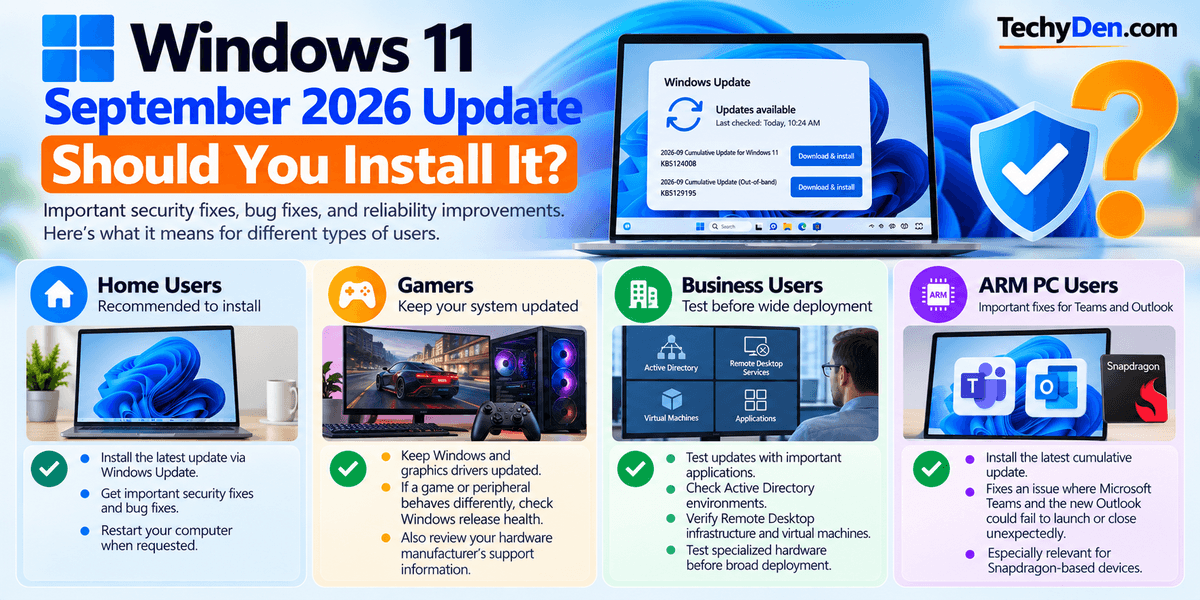
- Home Users: For typical home users, install the current cumulative update offered by Windows Update and restart the computer when requested.
- Gamers: Gamers should keep Windows and graphics drivers updated. If a game or peripheral behaves differently after an update, check Windows release health and the hardware manufacturer’s support information.
- Business Users: Organizations should test cumulative updates against important applications, Active Directory environments, Remote Desktop infrastructure, virtual machines, and specialized hardware before broad deployment.
- ARM PC Users: ARM users should pay particular attention to the fixes for Microsoft Teams and the new Outlook for Windows.
Pros and Cons of the September 2026 Windows 11 Update
| Benefits | Considerations |
|---|---|
| Important security improvements | Some post-update issues were reported |
| Fixes several earlier Windows problems | Some features are gradually rolled out |
| Fixes RDP problems through KB5129195 | USB audio issue is only partially resolved |
| Fixes Hyper-V Plan9 sharing problems | Enterprise users should test updates |
| Includes additional vulnerability protection | Windows 11 24H2 Home/Pro support is ending soon |
Windows 11 September 2026 Update FAQs
What is the Windows 11 September 2026 Update?
The Windows 11 September 2026 Update is Microsoft’s monthly security and cumulative update cycle for Windows 11. KB5124008 was released on September 8 for versions 24H2 and 25H2. Microsoft later released KB5129195 on September 14 as an out-of-band cumulative update containing additional security and reliability fixes.
What is the KB number for the Windows 11 September 2026 Update?
The main September Patch Tuesday update is KB5124008. Microsoft released it on September 8, 2026, for Windows 11 24H2 and 25H2. The subsequent September 14 out-of-band update is KB5129195. If you’re checking for the latest September fixes, you should know about both KB numbers.
What is the latest Windows 11 September 2026 build?
After Microsoft’s September 14 out-of-band update KB5129195, Windows 11 24H2 reaches build 26100.9457, while Windows 11 25H2 reaches build 26200.9457. The earlier September 8 KB5124008 builds were 26100.9445 and 26200.9445.
Is the Windows 11 September 2026 Update safe to install?
Microsoft recommends keeping supported Windows devices updated with the latest available cumulative updates. However, the September release had several documented issues, some of which were addressed by KB5129195. Before installing or troubleshooting, check Microsoft’s current release health information, particularly if you use RDP, USB audio hardware, Hyper-V, or enterprise domain services.
Does KB5129195 fix the Remote Desktop problem?
Yes. Microsoft released KB5129195 to address Remote Desktop Services problems that could occur after the September 8 security update. Affected environments could experience failed RDP connections, sign-in problems, or unresponsive servers during Remote Desktop configuration. Microsoft lists the problem as addressed by the September 14 out-of-band update.
Does the September update fix USB audio problems?
KB5129195 partially resolves the USB Audio Class 1.0 problem introduced by KB5124008. The OOB update fixes symptoms associated with 8-channel and 3D audio modes. Microsoft says other USB audio symptoms remain under investigation, so users experiencing continuing problems should check the latest release health information.
Does KB5124008 fix the black wallpaper problem?
Yes. Microsoft lists the desktop background problem as resolved by KB5124008. Some affected Windows 11 installations could lose their configured background and display a solid black background instead. Microsoft also lists the related mouse customization problem on some non-English installations as resolved by the same update.
Why can’t I see the September 2026 Windows 11 update?
Windows Update availability can depend on your Windows version, device configuration, servicing policies, and rollout status. First check Settings > Windows Update and select Check for updates. You can also verify your Windows version with winver. If the update is appropriate but does not appear, check Microsoft’s release health information before attempting manual installation.
Can I manually download KB5129195?
Yes. Microsoft provides KB5129195 through the Microsoft Update Catalog. Search for the KB number and choose the package matching your Windows version and system architecture. Microsoft notes that manual installation can involve checkpoint cumulative updates, particularly for some servicing scenarios, so follow the installation instructions provided with the package.
Is Windows 11 24H2 still supported?
Windows 11 24H2 Home and Pro editions are scheduled to reach the end of updates on October 13, 2026. After that date, those editions will no longer receive the normal monthly security and preview updates. Enterprise and Education editions remain supported until October 12, 2027.
Can I move the Windows 11 taskbar to the top?
Taskbar customization is being expanded through Windows 11 feature rollouts and preview builds, but availability depends on the specific Windows build and rollout stage. Microsoft documents gradual feature rollouts, meaning two otherwise similar PCs can receive a feature at different times. Check the Taskbar settings on your current Windows build rather than assuming it is included with KB5124008.
Can I make the Windows 11 Start menu smaller?
Microsoft has introduced a small Start menu option in Windows 11 preview and gradual-rollout builds. The feature lets users choose between small, large, and automatic start menu sizing. Availability depends on the Windows build and rollout status, so the option may not appear on every PC immediately.
How do I check whether KB5129195 is installed?
Open Settings > Windows Update > Update history and look for KB5129195. You can also press Windows + R, type winver, and press Enter. Windows 11 24H2 should show build 26100.9457, and Windows 11 25H2 should show build 26200.9457 after the September 14 out-of-band update.
Final Thoughts
The Windows 11 September 2026 Update is more than a single KB package.
The September 8 KB5124008 update brought the month’s main security and quality improvements for Windows 11 24H2 and 25H2. Microsoft then released KB5129195 on September 14 to address several problems that appeared after the September security update.
For most users, the important step is to make sure Windows is running the latest applicable cumulative update rather than stopping at the original September 8 build.
If you’re running Windows 11 24H2 Home or Pro, there’s another deadline to keep in mind: Microsoft says those editions reach end of updates on October 13, 2026.
Windows 11 users should therefore check their current version and build, install available updates, and review Microsoft’s release health information if they encounter problems.
For TechyDen readers, the most useful approach is to keep this article updated as Microsoft publishes additional September 2026 fixes or changes to the known-issues list.
Windows 11 September 2026 Update: Quick Summary
- KB5124008: September 8, 2026, cumulative security update.
- 24H2 build: 26100.9445 after KB5124008.
- 25H2 build: 26200.9445 after KB5124008.
- KB5129195: September 14, 2026, out-of-band cumulative update.
- Latest 24H2 build: 26100.9457.
- Latest 25H2 build: 26200.9457.
- KB5129195 fixes: RDP problems, Hyper-V Plan9 sharing problems, and some USB audio problems.
- USB audio: partially resolved; Microsoft continues to investigate remaining symptoms.
- 24H2 Home/Pro end of updates: October 13, 2026.
- Start and taskbar changes: some are being delivered through gradual feature rollouts rather than being universally available with one cumulative update.
Have you installed the Windows 11 September 2026 update? Share your experience in the comments and let us know whether KB5129195 fixed any problems you experienced after KB5124008.