Google Assistant: Your Virtual Personal Assistant

Technology has become integral to our lives, simplifying tasks and enhancing convenience. One such remarkable technological advancement is Google Assistant. The Google Assistant was developed by Google. It is an intelligent virtual personal assistant. It is designed to help users perform a wide range of tasks efficiently.
Google Assistant is a powerful tool. It can answer queries and provide recommendations. It controls smart devices and manages schedules, making our lives easier.
In this article, we will explore the features of Google Assistant. We will also discuss its benefits and applications. This exploration highlights how it can revolutionize our interaction with technology.
You know that with a single word, ‘OK Google,’ you can search for anything on your phone. If you are using an Android phone, you know that you can search for anything in your Android app. This capability is at your fingertips. Just say one word, ‘OK Google.’ However, the Google Assistant is designed to give you more than that.

What is Google Assistant?
Google Assistant is an artificial intelligence-powered virtual assistant developed by Google. It is an advanced voice-controlled system that allows users to interact with their devices through natural language conversations.
It is available on various platforms, including smartphones, smart speakers, smart displays, and other compatible devices.
Google Assistant leverages the power of machine learning and natural language processing to understand user queries and provide accurate responses.
First of all, let us know when Google’s Assistant was introduced. They launched Google’s Assistant in May 2016. It is not the only Artificial Intelligence technology in use right now. Google’s assistant had to face potent competitors at that time.
Google’s assistant faced challenges from Apple’s Siri Amazon’s Alexa virtual assistant app. Let us discuss this. It supports all the latest updates and new smart home devices.
a) Apple’s Siri
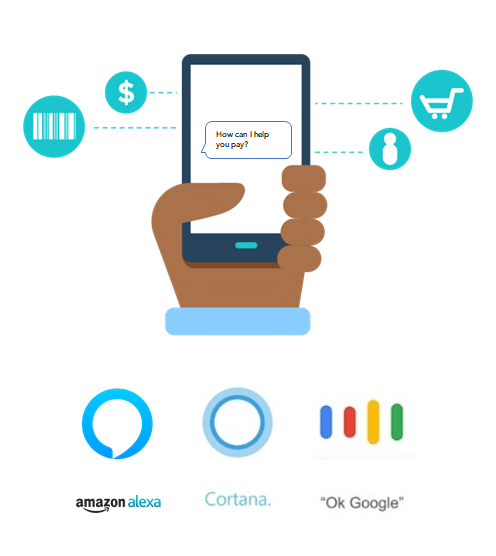
Apple’s Siri. It launched with the Apple Siri in October 2011. Apple’s Siri is a virtual assistant app from Apple. It is available for its iOS, macOS, SmartWatch OS, and Smart Home TV operating systems. Apple’s Siri assistant uses a natural-language user interface and voice queries to respond and answer questions. Apple’s Siri was the best search engine partner for Apple.
b) Amazon’s Alexa
After that, Amazon’s Alexa has led the path. Amazon Alexa is an Amazon-developed virtual assistant. It was first used in the Amazon Echo Dot and the Amazon Echo intelligent speakers. Amazon Alexa can do voice interaction and make to-do lists. It can play music and stream podcasts. It sets alarms and plays audiobooks. It also provides weather, sports, traffic, and other real-time information.
After one year, Cortana for Windows 10 has been greatly appreciated as an artificial intelligence search partner. This entire search engine partnership was a great competitor to Google’s Assistant. Even though Google’s virtual assistant started late, it has surpassed every other virtual assistant technology.
In the beginning, Google Assistant was dedicated only to Android pixel mobiles. Later on, Android was launched for every other mobile having an Android version of 5.0 or above. For playing music, this feature is fascinating.
How does Google Assistant work?
Google Assistant analyzes user voice commands and translates them into actionable tasks. It uses advanced algorithms to process speech and identify the intent behind the queries.
The Assistant retrieves relevant information from the internet or accesses pre-existing data to deliver precise answers or perform requested actions.
Its ability to interpret context and understand follow-up questions makes it highly intuitive and user-friendly.
How to Install Google Assistant on Android?
On most Android devices, Google’s Assistant is pre-installed. To access this feature, long-press the home button. A white screen with four dots will appear on your Android. You can also say ‘OK, Google’ to open the Google Assistant.
Once it has opened, you can give it any command, and it will obey. If it is not pre-installed on your Android device, you can download it from the Google Play app store. Remember that your Android version should be above 5.0 to use Google’s Assistant, and at least 1.4 GB of memory is required.
The good thing about Google Assistant is that it is also available for Apple users. You can download the Google Assistant app from the Google Play Store if you have an iOS version of 9.1 or above.
How to use Google Assistant?
Android users can directly access the feature by long-pressing the home button or saying, ‘OK, Google.’ Still, Apple users must open Google’s Assistant App manually. They can also tap the microphone icon on the home screen. You can use your voice to search for something. You can also ask something using your voice. Alternatively, directly type in the question in the writing box below.
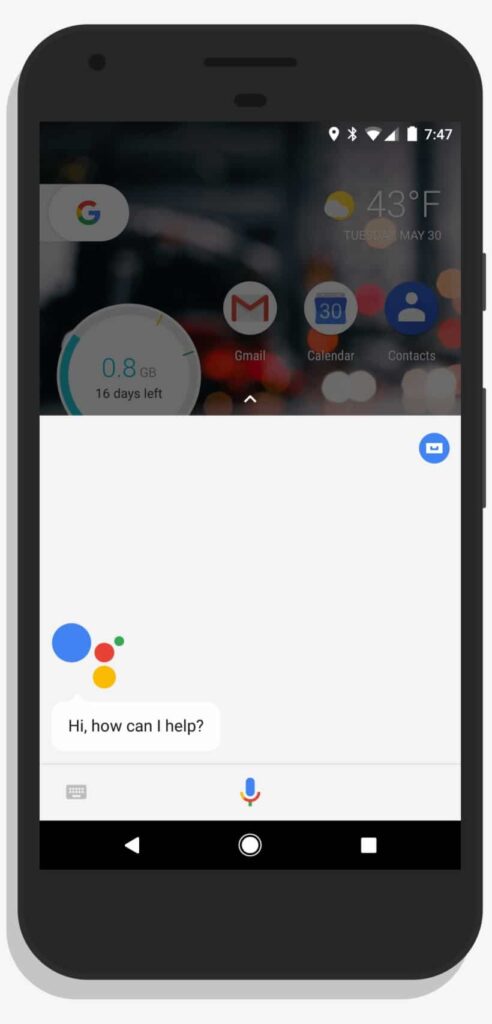
To read the news using this assistance feature, open the content site in a browser first. Then, you can say, “Hey Google, read it” or “Hi Google, read this page.” The app’s narration feature will narrate the page content. It will start reading by highlighting the text as the pages auto-scroll. The tool can translate English to other languages as per your choice.
Using the Google Home app on Android boxes, you will get the same feature as your smart home.
Key Features of Google Assistant
a. Voice Recognition and Natural Language Processing
Google Assistant’s voice recognition capabilities are exceptional, allowing it to understand various accents and speech patterns accurately. Moreover, its natural language processing enables users to interact with it conversationally, making the experience more human-like and engaging.
b. Personalized Assistance
Google Assistant learns from user interactions and adapts to individual preferences over time. It can provide personalized recommendations. For example, it can suggest restaurants based on previous dining preferences. It can also offer tailored news updates based on user interests. This personalized assistance enhances user satisfaction and makes the Assistant more efficient in fulfilling specific needs.
c. Task Automation and Integration
Google Assistant can integrate with various services and applications, allowing users to automate tasks seamlessly. For example, it can schedule appointments. It can also set reminders, send messages, make phone calls, and order food from supported delivery services. This integration simplifies daily routines and streamlines productivity.
d. Third-Party App Support
Developers can extend Google Assistant’s functionality by creating actions similar to apps specifically designed for voice interaction. These actions enable users to perform specific tasks or access services from third-party applications. The ecosystem of actions is growing. Google Assistant continues to expand its capabilities. It offers users a broader range of services.
Awesome Things You Can Learn From the Google Assistant
After touching and holding the home button of your Android phone, you may say, “OK, Google.” The tool feature gets itself ready to serve you humbly. Then,
- You can manage your tasks. It helps you manage your studies or work. You can set reminders and check emails.
- Send texts and save battery life by activating the battery saver option.
- Get Answers.
- You can search for new items.
- You can check the news
- Make Memories
- Plan your daily activities.
- You can organize the content.
- Control your devices and your smart home.
- Access information from your calendars and other personal information.
- Find information online, from restaurant bookings to directions, weather, and news.
- Control your music
- Play content on your Chromecast or other compatible devices.
- Run timers and reminders.
- Make appointments and send messages.
- Open apps on your phone.
- Read your notifications to you
- Real-time spoken translations
- And you can enjoy yourselves with this by asking to go to various websites that offer entertainment and enjoyment.
You may find more details about this fantastic feature on the official android site.
Benefits of Using Google Assistant
a. Time-saving Convenience
Google Assistant saves time by quickly providing information or performing tasks that would otherwise require manual input. Whether checking the weather, setting timers, or finding directions, the Assistant’s swift responses enhance efficiency. They eliminate the need for manual searching or interaction with multiple applications.
b. Hands-free Operation
The voice-activated nature of Google Assistant allows for hands-free operation. This feature is particularly valuable in situations where physical interaction with devices is inconvenient. It is also important when such interaction is unsafe. Users can make calls, send messages, play music, and control various functions without touching their devices. This promotes a safer and more seamless user experience.
c. Smart Home Control
Google Assistant can seamlessly integrate with smart home devices. It enables users to control lights, thermostats, and security systems using voice commands. Other compatible appliances can also be controlled in this way. This feature enhances home automation. It brings greater convenience to users. They can create personalized routines and control their environment effortlessly.
d. Enhanced Productivity
Google Assistant enhances productivity by automating routine tasks and providing quick access to information. Users can delegate administrative tasks to the Assistant, such as setting reminders, creating calendar events, and managing to-do lists. It frees up valuable time and mental energy, enabling individuals to focus on more important or enjoyable activities.
e. Multilingual Support
Google Assistant supports multiple languages, making it accessible to a global audience. Users can interact with the Assistant in their preferred language, facilitating communication and information retrieval for non-native English speakers. This inclusive approach reflects Google’s commitment to creating a diverse, user-friendly experience.
Is it Safe and Secure?
Google Assistant is secure, safe, and under our control. With this feature, we can choose what to share. There is a chance of quickly deleting or managing our earlier conversations with the assistant. We may permit Google Assistant when setting up on your device.
Google Assistant asks for permission regarding your account data. This includes web and app activity, voice and audio activity, and device information. If you give Google Assistant access to your Google Account, it will save your activity. This happens when your web and app activity is turned on. Your activity is then saved with your Google Assistant to your “My Activity Page.”
- Best Windows 10 Apps: It Makes Your Life much Better
- How to Lock Your Windows PC? Best Methods To Keep The Data Safe
- What is Windows? Features and Categories of Microsoft Windows
- How to create a user account in windows 10 without Email?
- How to update Windows 10 with the WSUS Offline Update tool (Offline)?
Here is a simple hack to enable voice activation for AI-based assistance. This allows Siri shortcut phrases to open the Google Assistant app by using “Hey Siri” and “Hey Google.” Of course, my car’s music system is also working with this fantastic Google Assistant feature.
The Common Commends or terms to use
Primarily, Google’s Assistant will understand anything you say to it and then reply to you with the exact answer. In some cases, you can use a set of commands to perform certain operations on your phone directly.
For example, if you need to call someone, you can directly use the command ‘make a phone call.’ Then, Google’s Assistant will ask you the name of the person you want to call. Or, if you need to send a message, you can directly use the command ‘send a message.’ Google’s assistant will understand and bring up the messaging screen.
Here is the set of commands you can directly use for the Google Assistant. It supports maximum commands from your regular words.
- How is the weather?
- Find a restaurant near me.
- Make a phone call.
- Write a message.
- Navigate home.
- Open an app.
You can use the above commands. Google’s Assistant will prompt you to say the name of the particular app you need to open. It will also prompt you to say the person you need to message or call.
You can directly use Google Assistant commands included with the person’s name or app name, as shown below.
- Call Sam.
- Message gym.
- Text Jim, ‘I’ll be home right now.’
- Open Instagram.
- Define ‘federation’
Additional Features of Google Assistant
- You can manually change the settings in Google Assistant.
- Change the type of voice that the Google Assistant should recognize.
- Restrict certain apps that Google Assistant should not open.
- You can even add some shortcut commands to Google’s assistant.
- You can also turn off the Google Assistant by disabling it from the settings.
- If you don’t want Google Assistant to recognize the ‘OK Google’ command, you can disconnect the access. Use the ‘OK Google setting’ in settings to do this.
- You can also make Google Assistant unlock your phone using voice recognition. If your mobile is locked, and you say “OK Google,” your phone will open automatically if the voice matches. To do that, you need to add your voice model beforehand.
How to Delete Your Google Assistant Activity
Google Assistant saves your earlier activities by remembering your interests and giving you more personalized information. You can see the earlier activity at any point. You can also delete a specific action. Additionally, you have the option to delete all moves at once.
How to Delete a Specific Activity from Your Mobile Phone on Google Assistant
- Touch and hold the Home button of your mobile phone.
- Say ‘OK Google’
- Find an item in your conversation with Google’s Assistant that you want to delete.
- Touch and hold the particular conversation.
- It will highlight that specific conversation.
- Then delete the group.
How to Delete All Activities at Once on Google Assistant
- Go to the Assistant Activity page on your Google Account.
- Tap’ More’ on Google Assistant’s banner, located at the top right.
- Go to Delete Activity by –
- Choose ‘All Time’ under ‘Delete By Date.’
- Tap “OK” under ‘Delete.’
- Delete after confirmation
- Sometimes, it can take a day or more to get your conversation deleted from your other devices.
Applications of Google Assistant
a. Voice Search and Information Retrieval
Google Assistant’s primary function is to provide accurate and relevant information in response to user queries. By leveraging Google’s vast knowledge graph, it can answer questions, provide definitions, and retrieve information on various topics. This feature makes it a powerful tool for quick information retrieval and educational purposes.
b. Smart Home Automation
With its ability to integrate with smart home devices, Google Assistant plays a crucial role in home automation. Users can control lights, adjust temperatures, lock doors, and perform other tasks using voice commands. This level of control and convenience enhances the smart home experience and promotes a more connected and comfortable living environment.
c. Travel Planning and Assistance
Google Assistant can assist with travel planning by providing flight information. It can suggest attractions and recommend restaurants. It even assists with hotel bookings. It can also provide real-time traffic updates and directions, ensuring smooth navigation during trips. Whether for business or leisure, Google Assistant is a valuable companion for travellers.
d. Entertainment and Media Control
Controlling entertainment systems and media playback is effortless with Google Assistant. Users can play music, stream videos, adjust volume levels, and access content from supported platforms using voice commands. This feature enhances the entertainment experience and adds convenience to leisure activities.
f. Task Management and Reminders
Google Assistant excels at task management and reminders. Users can create to-do lists, set alarms, schedule appointments, and receive timely notifications. The Assistant ensures that important tasks and commitments are not overlooked, contributing to better time management and organizational skills.
The Future of Google Assistant
As technology continues to evolve, so does the potential of Google Assistant. The Assistant will become even more intelligent and intuitive with advancements in machine learning, natural language processing, and voice recognition.
It will likely expand its integration with various devices and services. This will further enhance its capabilities. It will transform how we interact with technology.
Frequently Asked Questions on Google Assistant
Is Google Assistant available on all devices?
Yes, Google Assistant is available on various devices, including smartphones, tablets, smart speakers, smart displays, and smartwatches.
Can I change the voice of Google Assistant?
Yes, Google Assistant offers multiple voice options, allowing users to choose the voice that suits their preferences.
Is Google Assistant capable of recognizing multiple users?
Yes, Google Assistant can recognize and provide personalized responses for multiple users. It can distinguish between voices and tailor its interactions accordingly.
Can Google Assistant perform translations?
Yes, Google Assistant can translate phrases and sentences into different languages. Ask for a translation, and it will provide the desired information.
Can Google Assistant make phone calls?
Yes, Google Assistant can call contacts in your address book or dial phone numbers based on your voice commands.
Conclusion
Google Assistant has revolutionized how we interact with technology by providing a powerful and intuitive virtual personal assistant. It can understand natural language. It automates tasks. It delivers personalized assistance. These features have made it an indispensable tool for millions of users worldwide.
Google Assistant has become invaluable in our daily lives. It manages schedules and controls smart homes. It also retrieves information and provides entertainment.
So, you have learned everything that you need to know about Google’s Assistant. The Google assistant has improved significantly in recent years. It is attempting in many ways to enhance its performance.
- 6 Best Free Android Apps To Find Your Friends via GPS
- 10 Best Writing Apps for Android users
- Google Assistant – Undoubtedly Makes Your Life Better
- 9 Best Multiplayer Games for Android Users
- The Best File Managers for Android device Users
Say ‘OK, Google’ and make your phone turn hands-free. If you need more assistance from the developers, you can ask questions in their forum. If you are already using Google Assistant, share your experiences in the comment box below.